In the world of business process modeling, clarity is king. BPMN 2.0 (Business Process Modeling Notation) provides a universal language for designing workflows that are easily understood by both technical developers and business stakeholders. At the heart of every BPMN diagram lies the concept of the Activity.
An activity represents “work” performed within a process. Whether it is a simple human action or a complex automated sequence, understanding how to categorize and structure these activities is the first step to building robust, scalable process models. This tutorial breaks down the hierarchy of activities, the specific types of tasks, and how to manage complexity using sub-processes.
1. The Hierarchy of Activities: From General to Specific
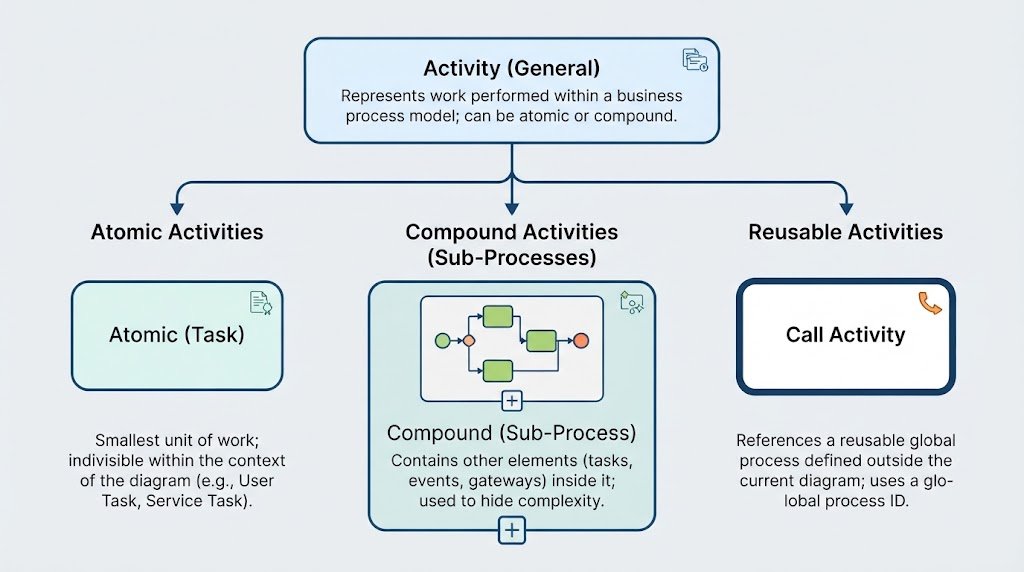
Before diving into specific icons, it is crucial to understand the structural relationship between different activity types. Think of an activity as a container for work. Depending on the level of detail required, an activity can be broken down or called from elsewhere.
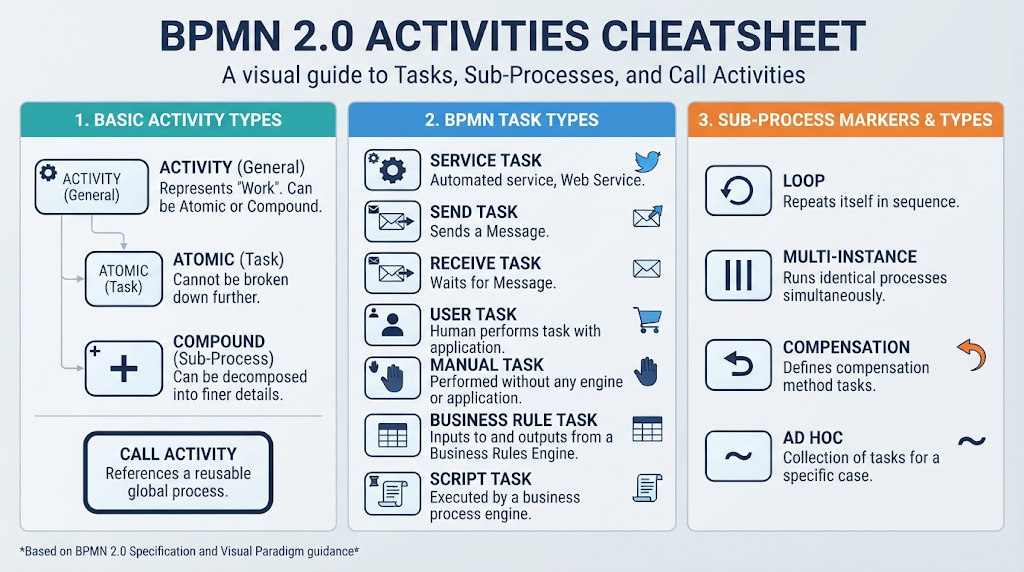
- Activity (General): This is the overarching concept. It represents work that can be either atomic (indivisible) or compound (decomposable).
- Atomic (Task): These are the smallest units of work. They cannot be broken down further into sub-steps within the current model. They are the “leaf nodes” of your process tree.
- Compound (Sub-Process): These are activities that contain other elements inside them. They allow you to hide complexity by grouping a collection of nested tasks and sub-processes into a single, manageable block.
- Call Activity: This is a special type of activity that does not contain its own definition but instead references a reusable process defined elsewhere (globally).
2. Deep Dive: BPMN Task Types
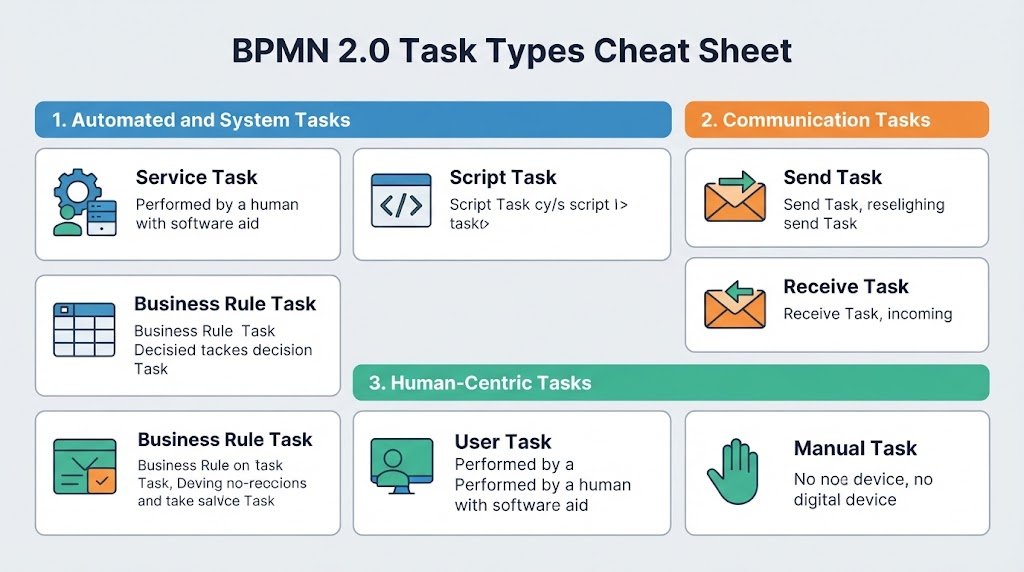
Tasks are the most common atomic activities. While they all represent “work,” the specific type of task defines who or what performs it. Choosing the correct task type is essential for the process execution engine to know how to handle the step.
Automated and System Tasks
- Service Task: Used when the work is performed by an application or a web service, not a human.
- Example: An automated system publishing an answer to a question via the Twitter API.
- Script Task: Executed automatically by the process engine running a pre-written script (like Python, Java, or SQL).
- Example: A loan application system running a script to check a user’s credit status.
- Business Rule Task: Interfaces with a dedicated Business Rules Engine (BRE) to provide input and obtain calculated output.
- Example: Analyzing survey results against a set of complex scoring criteria.
Communication and Messaging Tasks
BPMN distinguishes clearly between sending and receiving messages, as the process flow behaves differently in each case.
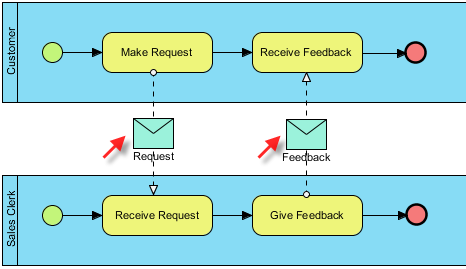
- Send Task: The process sends a message to another participant (another pool) and the task completes immediately after the message is sent. The process does not wait for a reply.
- Example: Delivering a rejection message to an author.
- Receive Task: The process pauses here and waits for an incoming message to arrive before it can continue.
- Example: Waiting for a courier pickup request to arrive before dispatching a driver.
Human-Centric Tasks
These tasks represent work performed by people, distinguishing between those who need software and those who do not.
- User Task: A task performed by a human user who interacts with a software application. This is the most common task type in enterprise modeling.
- Example: A buyer reviewing and approving an order within a shopping system interface.
- Manual Task: A task performed entirely without the aid of a process execution engine or software systems.
- Example: A physical inspection of a cart where a worker signs off on a paper checklist.
3. Managing Complexity: Sub-Process Markers
When a process becomes too complex to visualize in a single flat view, you use a Sub-Process. These are compound activities that allow you to “zoom in” on a specific section of the workflow. To provide advanced functionality, sub-processes can be decorated with specific markers:
- Loop Marker: Indicates that the sub-process repeats itself sequentially. For example, checking a list of items until the list is empty.
- Multi-Instance Marker: Indicates that multiple instances of the sub-process can run simultaneously. This is often used for parallel processing, such as processing 100 loan applications at the same time.
- Compensation Marker: Represents a sub-process dedicated to a compensation method. If the main process fails or is aborted, this marker indicates that specific tasks should be executed to undo the work or refund costs.
- Ad-Hoc Marker: Represents a collection of tasks that exist solely to handle a specific case where the order of execution is not strictly defined. It offers flexibility for handling exceptions or unique scenarios.
4. The Power of Reusability: Call Activities
One of the most powerful features of BPMN 2.0 is the Call Activity. Instead of recreating the same process logic in multiple diagrams, you can define a global process once and reference it wherever needed.
Definition: A Call Activity references an activity defined in an external or global process.
Purpose: It enables the creation of reusable process definitions. For instance, a global “Register User” process can be called from a “New Order” workflow, a “Subscription” workflow, and a “Support Ticket” workflow, ensuring consistency across the entire enterprise.
Conclusion
By mastering these basic activity types, task variations, and sub-process markers, you can create BPMN diagrams that are not only visually clear but also technically precise. Whether you are modeling a simple manual workflow or a complex, automated enterprise system, selecting the right activity is the foundation of successful process architecture.