


In the modern landscape of enterprise architecture and software engineering, the gap between abstract design and implementation is often bridged by a chaotic mix of static images, disconnected documents, and manual file transfers. The Visual Paradigm (VP) ecosystem represents a paradigm shift, evolving from a traditional desktop modeling tool into a dynamic, AI-driven lifecycle management platform. At the heart of this transformation is The Pipeline, a seamless automation engine that connects conceptualization, documentation, and code engineering.
This tutorial guides you through the architecture of this ecosystem, breaking down how the four pillars interact to create “Living Models” rather than static drawings.
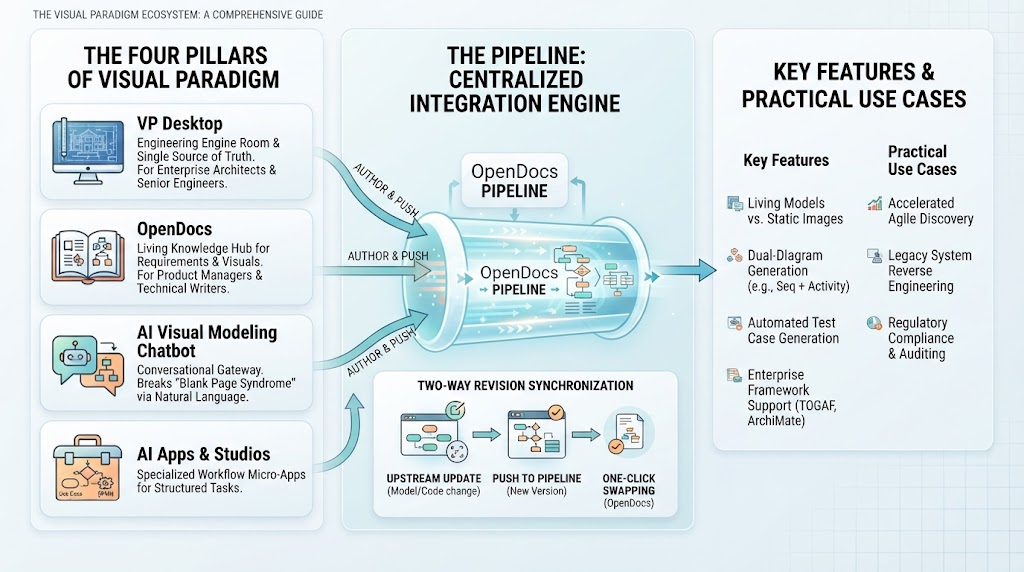
The Four Pillars of the Visual Paradigm Ecosystem
The ecosystem is anchored by four distinct but interconnected tools, each designed for a specific phase of the development lifecycle. Understanding the role of each pillar is the first step to mastering the workflow.
1. VP Desktop: The Engineering Engine Room
VP Desktop acts as the single source of truth. It is the heavy-duty environment used by Enterprise Architects and Senior Software Engineers. Here, the rigorous work of formal modeling takes place. Unlike lighter-weight tools, VP Desktop handles complex data schemas, deep enterprise architecture frameworks, and high-level compliance requirements.
2. OpenDocs: The Living Knowledge Hub
While Desktop handles the heavy modeling, OpenDocs serves as the repository for knowledge. It bridges the gap between text requirements and visual diagrams. This tool is ideal for Product Managers, Business Analysts, and Technical Writers who need to maintain a narrative that is intrinsically linked to the visual architecture.
3. AI Visual Modeling Chatbot: The Conversational Gateway
One of the biggest hurdles in modeling is “blank page syndrome.” The AI Visual Modeling Chatbot acts as a conversational gateway to break this paralysis. It allows Agile Teams and Solution Explorers to draft workflows using natural language, instantly generating structured diagram objects rather than un-editable images.
4. AI Apps & Studios: Specialized Workflow Micro-Apps
For structured, repetitive tasks, the ecosystem offers specialized micro-apps (Studios). These are designed for Developers and QA Engineers to perform specific tasks like Use Case Modeling or Domain Modeling, ensuring consistency across the engineering team.
The Pipeline: The Central Integration Engine
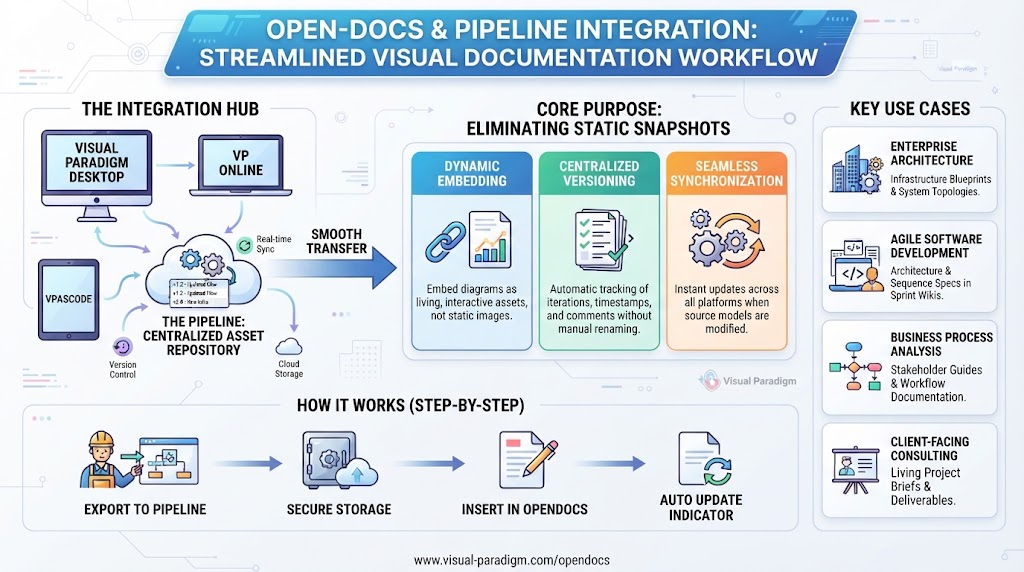
Connecting these four pillars is The Pipeline (specifically the OpenDocs Pipeline). Historically, the workflow of moving a diagram from a modeling tool to a documentation tool involved exporting a JPEG, saving it locally, and manually pasting it into a document. The Pipeline eliminates this friction entirely.
Instead of treating a diagram as a flat image, the Pipeline treats diagrams, data charts, and code (such as VPasCode, PlantUML, or Mermaid.js) as first-class, version-controlled artifacts.
How the Pipeline Flows
- Author & Push: Whether you are modeling in VP Desktop, designing in VP Online, or writing code in VPasCode, you select the option to “Send to OpenDocs Pipeline.” You can attach an optional changelog comment or version tag.
- Centralized Repository: The asset is routed to a secure cloud pipeline pane. Here, it maintains a clean history of metadata, timestamps, and authorship.
- Embed & Publish: Inside OpenDocs, you access the Pipeline sidebar and drop the interactive diagram directly into your knowledge page. The diagram is no longer a static image; it is a live, versioned component.
Two-Way Revision Synchronization
A common failure point in software documentation is “stale specs”—diagrams that drift out of sync with the actual architecture because they were manually updated. The Pipeline solves this with a robust revision management system.
The process works as a continuous loop:
- Upstream Updates: When the system architecture changes (e.g., a new service is added to the backend), the modeler updates the source model or code.
- Push to Pipeline: This change is pushed to the pipeline, creating a new revision layer.
- One-Click Swapping: OpenDocs flags the updated assets. When a document is opened, the user sees a notification that the diagram has changed. With a single click, the old graphic is swapped for the latest version. There are no broken links, and no manual layout fixes are required.
Key Features and Practical Use Cases
The power of this architecture lies in its capabilities, which move beyond simple drawing into intelligent engineering.
Living Models vs. Static Images
Unlike generic generative AI tools that output un-editable bitmaps, VP AI yields fully structured diagram objects. This means the diagrams retain underlying semantic properties and data schemas, making them editable and analyzable.
Dual-Diagram Generation
The system supports intelligent coordination. Feeding text flows or use-case descriptions into the tool can automatically generate dual outputs, such as a Sequence Diagram alongside an Activity Diagram, ensuring that logic is consistent across different views.
Automated Test Case Generation
Studios can transform functional use case scenarios directly into structured test cases. This includes generating Test IDs, pre-conditions, discrete steps, and expected results, streamlining the QA process.
Enterprise Framework Support
For large-scale organizations, the ecosystem includes deep compliance alignments. This includes TOGAF ADM Guide-Through workflows and certified ArchiMate 3 modeling support, ensuring that the architecture meets industry standards.
Summary
By leveraging the Visual Paradigm ecosystem, organizations can achieve:
- Accelerated Agile Discovery: Bypassing “blank page paralysis” with AI-assisted drafting.
- Legacy System Reverse Engineering: Scanning existing source code to auto-generate structural class or database ER diagrams.
- Regulatory Compliance & Auditing: Maintaining exact traceability maps from high-level business goals down to microservices implementation through rigorous version control.
The Visual Paradigm ecosystem is not just a set of tools; it is a cohesive workflow that ensures your documentation is always up-to-date, your models are always accurate, and your team is always aligned.
Related posts:
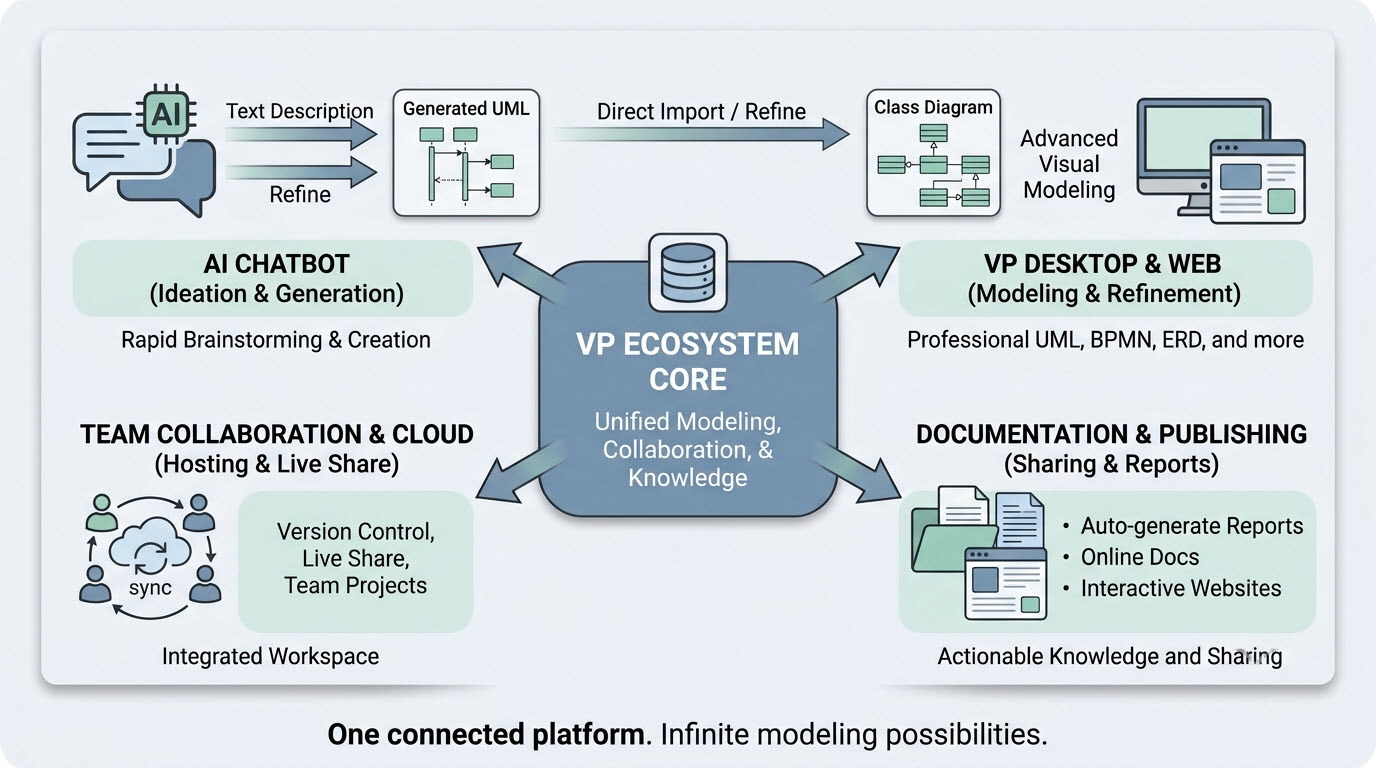 VP Ecosystem Core Platform System Architecture Diagram
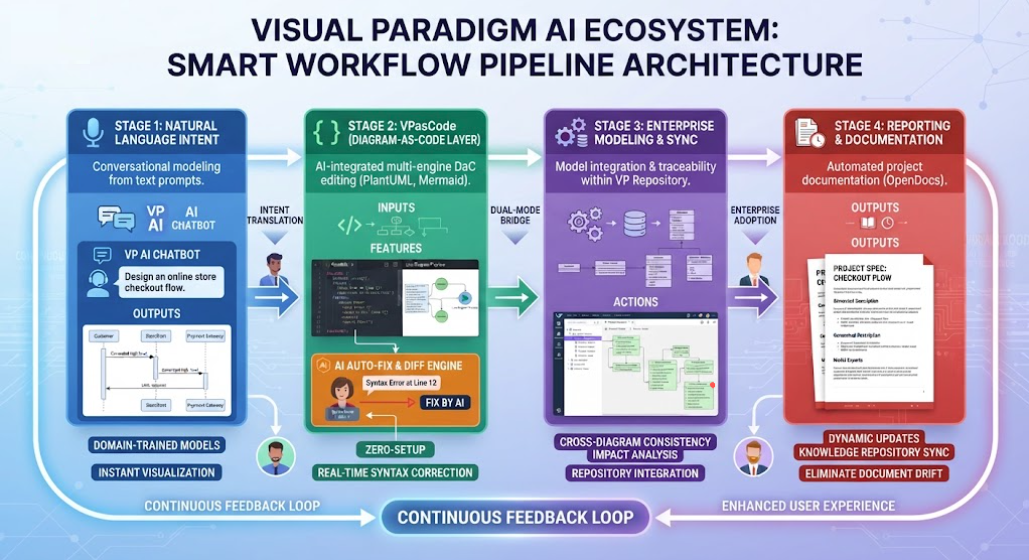 Mastering the Visual Paradigm AI Ecosystem: A Guide to the Smart Workflow Pipeline
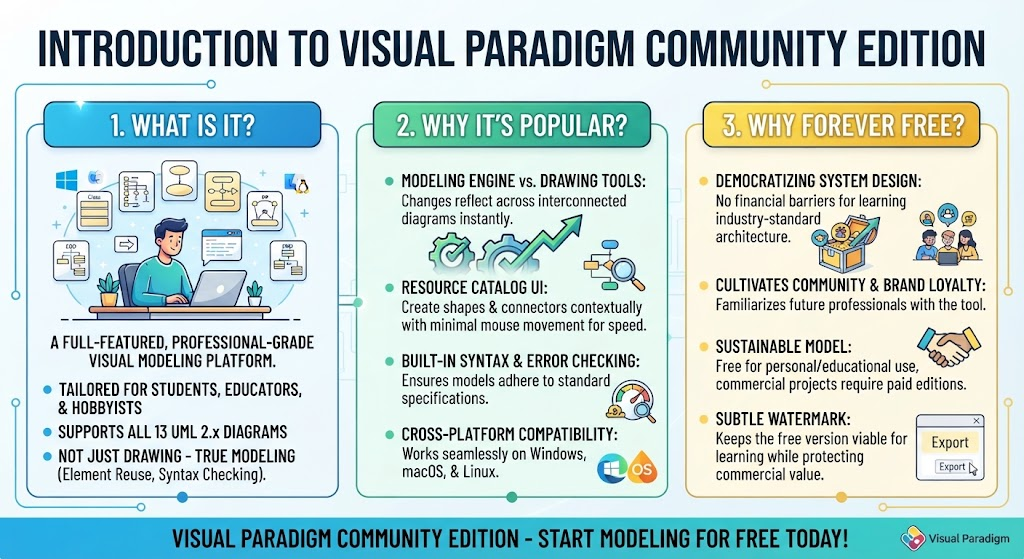 Mastering System Design: A Deep Dive into Visual Paradigm Community Edition
 Mastering Dynamic Documentation: A Deep Dive into Visual Paradigm’s OpenDocs & Pipeline Integration