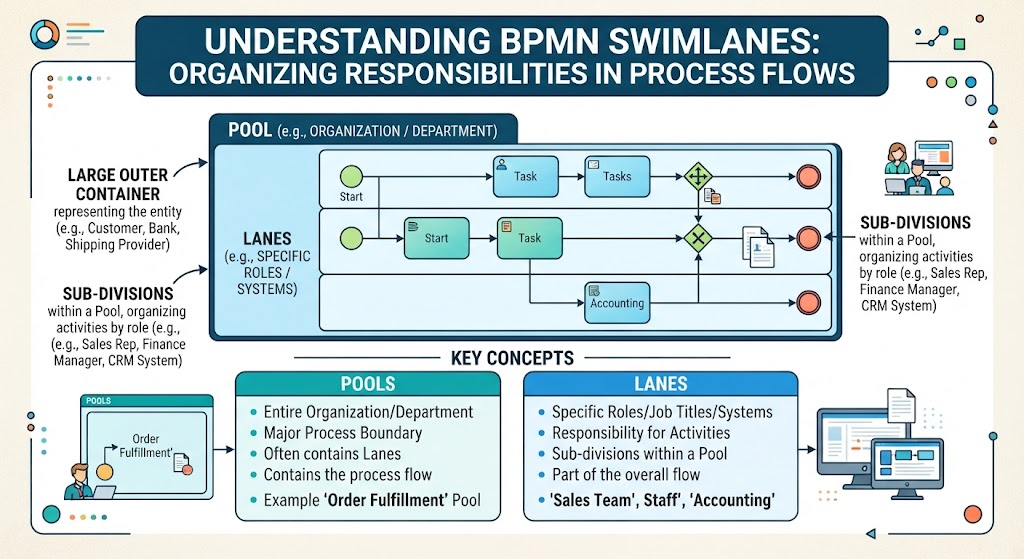
In the world of business process modeling, clarity is king. Before you can analyze what is happening in a workflow, you must first understand who is doing the work. This is the fundamental purpose of Swimlanes in BPMN (Business Process Model and Notation). This tutorial will walk you through the architecture of swimlanes, helping you interpret complex diagrams and organize responsibilities effectively.
The Anatomy of a BPMN Diagram: Pools and Lanes
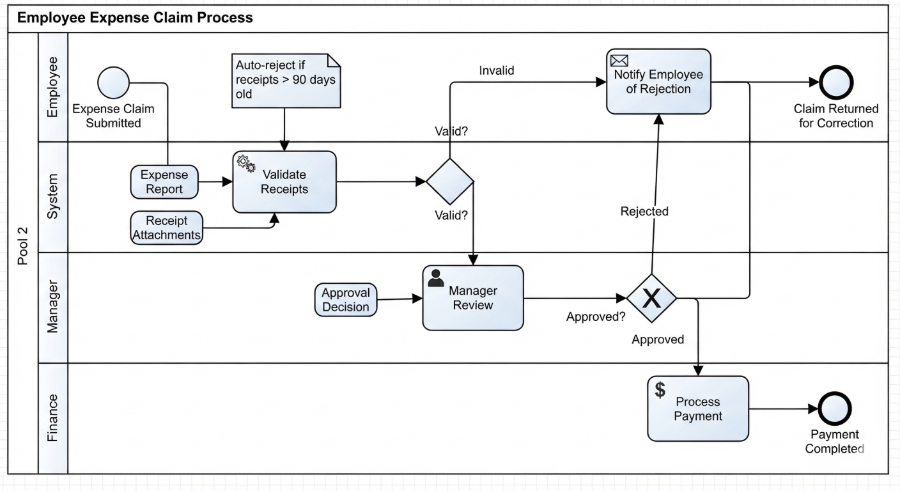
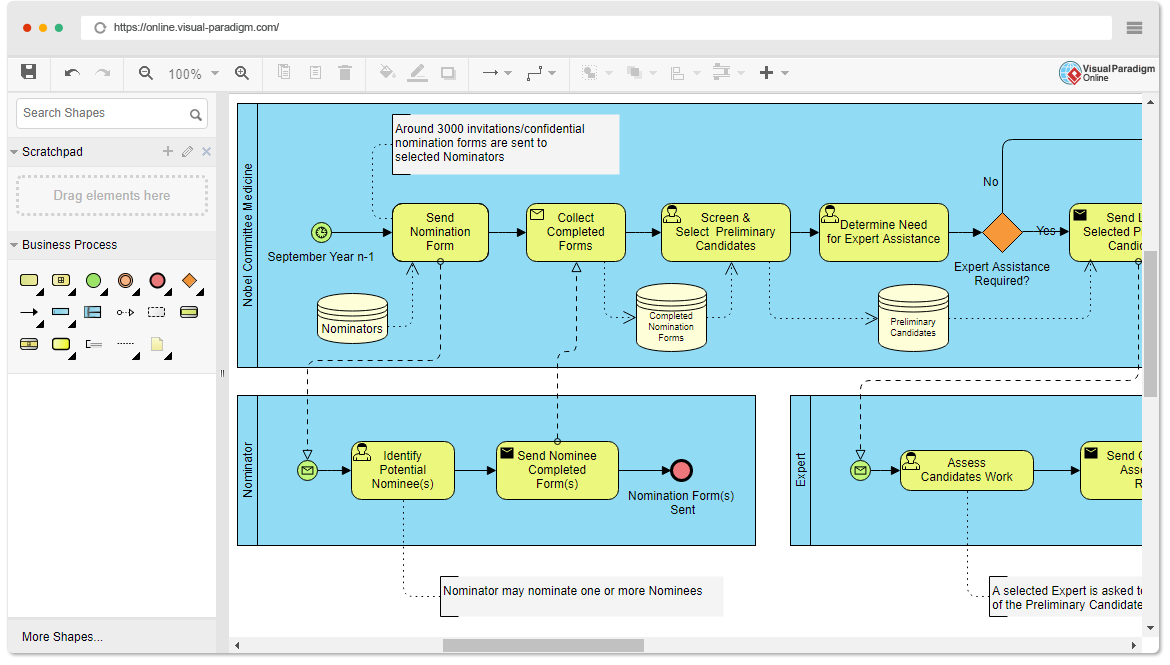
At the highest level of abstraction, a BPMN diagram is not just a list of steps; it is a structured map of accountability. The visual structure relies on two primary container concepts: Pools and Lanes.
Pools: The Large Outer Container
Imagine a pool as the “stage” upon which the process takes place. In the visual diagram, this is represented by the large, outer box. Pools typically represent:
- Entire Organizations: For example, a “Bank” or a “Shipping Provider.”
- Departments: A specific internal unit like “Sales” or “Logistics.”
- External Entities: The customer or a third-party vendor.
Key Takeaway: A Pool defines the major process boundary. It tells you the scope of the interaction. If you see multiple pools side-by-side, it usually implies a cross-organization process (e.g., a Customer interacting with a Supplier).
Lanes: Sub-Divisions of Responsibility
Inside the Pool, we find Lanes. These are horizontal (usually) or vertical subdivisions that slice the pool into specific areas of ownership. Lanes represent:
- Specific Roles or Job Titles: Such as “Sales Rep,” “Finance Manager,” or “Warehouse Clerk.”
- Systems or Software: Automated entities like “CRM System,” “Inventory Database,” or “Accounting Software.”
Key Takeaway: A Lane acts as a bucket for activities. If a task sits inside the “Finance Manager” lane, it means the Finance Manager is responsible for that specific action.
How to Read the Flow: The “Handoff” Concept
Once you understand the containers, you need to understand the movement. BPMN diagrams are read top-to-bottom or left-to-right. The most critical moment in reading a swimlane diagram is when a flow line (arrow) crosses from one lane to another.
This crossing is known as a Handoff. It signifies a transfer of responsibility. When the arrow moves from the “Customer” lane to the “Warehouse” lane, it indicates that the Customer has completed their part of the process (placing the order) and the ball is now in the Warehouse’s court to act.
Visualizing the Steps
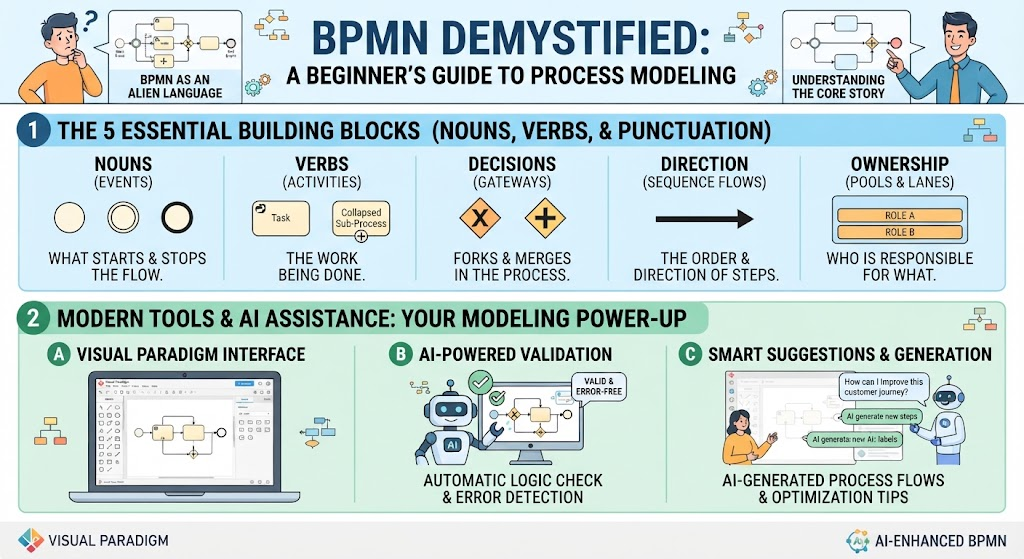
Let’s look at the specific shapes you will encounter within these lanes:
- Start Event (Green Circle): The trigger. The process begins here. Notice in our diagram that a pool can have multiple start events if different lanes trigger the process independently.
- Task (Blue Rectangle): The actual work. This is an action performed by the entity in that lane (e.g., “Place Order,” “Check Inventory”).
- Gateway (Diamond): The decision point. This is where the process branches based on a condition (e.g., “Is payment approved?”).
- End Event (Red Circle): The conclusion of a specific path.
Practical Example: The “Order Fulfillment” Process
Let’s apply this to the “Order Fulfillment” pool example found in the bottom-left of our reference image. Imagine a customer wants to buy a product. Here is how the swimlanes organize that chaos:
- The Customer Lane: The process might start here with the customer initiating an order.
- The Sales Team Lane: The order is received. The Sales Rep validates the customer details.
- The Accounting Lane: The process flows down to Accounting. They must verify payment. This is a handoff from Sales to Finance.
- The Warehouse Lane: Once payment is cleared (indicated by the arrow moving into this lane), the Warehouse team picks the item.
Without swimlanes, these steps might just be a long, confusing list of tasks. With swimlanes, the diagram instantly tells you who is responsible for what and where the process bottlenecks might occur.
Summary of Key Concepts
To wrap up, remember the hierarchy of BPMN Swimlanes:
Pools
- Function: Entire Organization or Department.
- Scope: Major Process Boundary.
- Content: Contains the overall process flow and its internal Lanes.
- Example: ‘Order Fulfillment’ Pool.
Lanes
- Function: Specific Roles, Job Titles, or Systems.
- Scope: Responsibility for specific Activities.
- Content: Sub-divisions within a Pool; Part of the overall flow.
- Example: ‘Sales Team’, ‘Staff’, ‘Accounting’.