In the complex world of Business Process Model and Notation (BPMN), clarity is king. However, business processes are often shrouded in the details of internal operations. This is where the concept of a Public Process becomes an essential architectural tool. Unlike a standard process diagram that shows every single step, a Public Process acts as a strategic abstraction, designed specifically to communicate how a system interacts with the outside world.
This tutorial will guide you through the architecture of a Public Process, using a medical appointment scenario as our primary case study. We will explore why these diagrams exist, how they differ from private workflows, and how to construct them effectively.
1. The Core Concept: The “API” of Business
Think of a Public Process as the Application Programming Interface (API) of your business. When you use a software library, you don’t need to know the complex lines of code inside the library’s black box; you only need to know what inputs to give it and what outputs to expect. Similarly, a Public Process hides the internal complexities of a Private Process.
- The Internal View (Private Process): Contains the “how.” It includes internal tasks, gateways, data manipulation, and complex logic required to execute a goal.
- The External View (Public Process): Contains the “what.” It shows only the interactions (message flows) with external participants.
By separating these views, organizations can protect proprietary information while still clearly defining their contract with partners, customers, or regulators.
2. Visualizing the Architecture: The Patient Example
To understand this architecture, let us analyze a specific scenario: A Medical Appointment System. Imagine you are a Doctor (the service provider). You have a complex internal workflow to manage your clinic, but your patient only cares about the interaction.
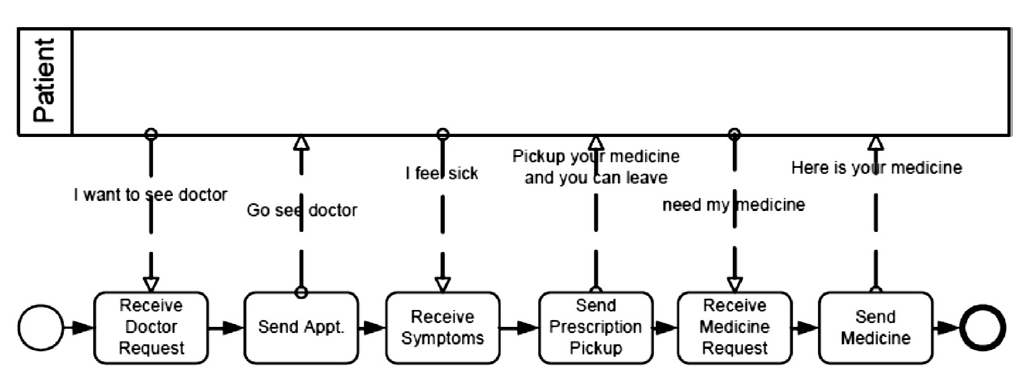
The diagram below represents the Public Process from the perspective of the Doctor’s system, but the labels are directed toward the Patient.
(See the visual representation of the flow described below)
In this model, the top swimlane represents the Patient, while the bottom flow represents the Doctor’s System. Notice that the internal steps of the doctor (like consulting a textbook or updating a private database) are invisible. Only the Message Flows crossing the boundary are shown.
Step-by-Step Breakdown of the Flow
- Initiation (The Request):
The process begins when the patient initiates contact. The message
"I want to see doctor"flows from the Patient to the Doctor. The system receives this as a Receive Doctor Request. - Response (The Appointment):
The system processes the request internally (hidden) and sends a response back. The message
"Go see doctor"is sent to the Patient, represented as Send Appt. This confirms the appointment. - Interaction (The Symptoms):
Once the patient arrives or begins the consultation, they communicate their status. The message
"I feel sick"flows up to the Patient. The system captures this via Receive Symptoms. - Resolution (The Prescription):
The doctor formulates a plan. The system sends a message instructing the patient:
"Pickup your medicine and you can leave". This is the Send Prescription Pickup step. - Completion (The Medication):
Finally, the transaction concludes. The patient indicates they need the medication, and the system delivers it via the message
"Here is your medicine"(labeled as Send Medicine).
3. Key Architectural Rules
When modeling a Public Process, you must adhere to strict rules to maintain the integrity of the abstraction.
Rule 1: Message Flows Only
A Public Process is defined by its interaction. You will only see arrows that cross participant boundaries. Internal tasks (like “Check Insurance” or “Log Visit”) are stripped away. If a task does not result in a message sent to or received from an external party, it is not represented in this view.
Rule 2: No Internal Logic
You will not see decision gateways (diamonds) or complex loops within the public view. For example, the doctor might internally decide to reject a request if the patient is already booked. In the Public Process, the system might simply send a “Busy” message. The logic of why is hidden; only the result is shown.
Rule 3: Orchestrated by the Private Process
It is crucial to understand that the Public Process is a projection. It is derived from the Private Process. If the Private Process changes (e.g., adding a new step for “Phone Verification”), the Public Process must be updated to reflect any new interactions that the customer must participate in. However, internal optimizations that do not affect the customer (e.g., changing the database backend) do not require a change to the Public Process.
4. When to Use a Public Process
Why go through the effort of creating this separate view? Here are the primary use cases:
- Partner Integration: When two companies need to agree on how their systems talk to each other, the Public Process defines the contract.
- Customer Communication: It serves as a clear guide for the user, showing them exactly what steps they need to take to get a result.
- Regulatory Compliance: You can show auditors that you follow a specific protocol without revealing your internal intellectual property or security measures.
Conclusion
The Public Process is a powerful tool for managing complexity. By abstracting the internal machinery of your business and focusing solely on the interactions, you create a transparent, secure, and user-friendly interface. As you saw in the Patient/Doctor example, the goal is not to document every internal thought of the doctor, but to clearly map the journey of the patient from “I want to see a doctor” to “Here is your medicine.”