In the realm of Business Process Model and Notation (BPMN), understanding how data flows through a system is just as critical as understanding the tasks themselves. While tasks represent what is being done, data objects represent what information is being consumed or produced.
This tutorial focuses on a specific yet fundamental pattern often seen in order management systems: the transition from a process task to a data artifact. Specifically, we will analyze the relationship between a Prepare Invoice task and the resulting Invoice data object. By understanding this pattern, you can design systems that accurately reflect the lifecycle of business documents.
1. The Task: ‘Prepare Invoice’
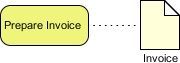
At the center of our diagram is a rounded rectangle labeled Prepare Invoice. In BPMN terminology, this is a Task.
- Definition: A task is the smallest unit of work within a process. It represents an atomic activity that has a specific start and end point.
- Context: In a typical Order-to-Cash workflow, this task occurs after the order has been verified and shipped. The “Prepare” aspect implies a calculation or generation activity—summing up totals, applying tax, and formatting the document.
- Visuals: Notice the yellow background. While BPMN core does not mandate specific colors, many modeling tools (like Enterprise Architect, Bizagi, or Lucidchart) use yellow for standard tasks to distinguish them from Sub-Processes or Events.
2. The Data Object: ‘Invoice’
To the right of the task sits a document-shaped icon labeled Invoice. This is a Data Object.
- Definition: A data object represents the information required or produced by a process. It is not an action; it is a state of data.
- Visual Metaphor: The icon is a white page with a folded top-right corner. This is the universal symbol for a document or file. It signifies that this is a tangible output—a file that can be saved, printed, or emailed.
- Role in Process: In this specific context, the Invoice serves as a Data Output. It is the result of the preparation task.
3. The Connection: The Association Link
The most critical part of this diagram is the line connecting the Task and the Data Object. It is a dashed line.
Understanding the Association (Dashed Line)
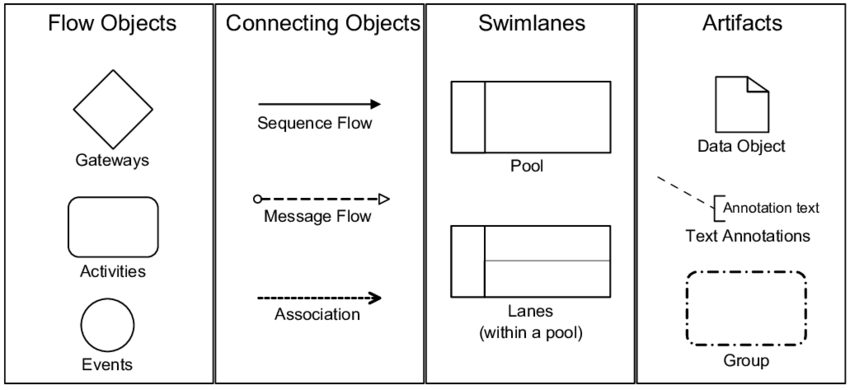
In BPMN, a dashed line is known as an Association. It connects a graphical element (like a task) to a data object.
- Meaning: This line indicates a relationship of dependency or data flow. It tells the reader that the “Prepare Invoice” task interacts with the “Invoice” data.
- Directionality: While the line is not an arrow in this specific snippet, the placement and standard convention imply an Output relationship. The task creates the data.
- Contrast with Flow: It is important not to confuse this with a Sequence Flow (solid arrow). A Sequence Flow shows the order of execution (Task A -> Task B). An Association shows data usage (Task A -> Document B).
4. Technical Implementation & Lifecycle
When implementing this in a real-world system or a BPM engine, the relationship between the Task and the Data Object follows a specific lifecycle:
- Instantiation: Before the task can begin, the system must have the necessary inputs (e.g., Customer ID, Order ID, Line Items). These inputs would be connected to the task via another dashed association line, typically on the left side.
- Execution: The user or automated service executes the “Prepare Invoice” logic.
- Completion: Once the task finishes, the data object transitions to a Completed state. In a database, this might mean a row is inserted into the Invoices table with a status of “Generated.”
- Storage: The data object can then be moved to a Data Store (often represented by a cylinder) for long-term archival.
Summary
This simple diagram encapsulates a vital concept in enterprise architecture: the transformation of activity into information. By modeling the Prepare Invoice task and linking it to the Invoice data object, you create a blueprint that is clear to both business stakeholders and technical developers. It ensures that everyone agrees on the fact that the process does not end until the document is successfully produced.