In the dynamic world of software development, Agile methodologies have become the standard for delivering value quickly and adapting to change. However, as projects grow in complexity and teams scale, the informal nature of Agile can sometimes lead to ambiguity. This is where Business Process Model and Notation (BPMN) 2.0 steps in as a powerful ally.
Integrating BPMN into Agile workflows isn’t about heavy, upfront documentation; it’s about bringing clarity to complexity. This tutorial explores how Agile teams can leverage BPMN within their sprint cycles to clarify user stories, identify dependencies, and simulate workflow efficiency before a single line of code is written.
The Agile-BPMN Cycle
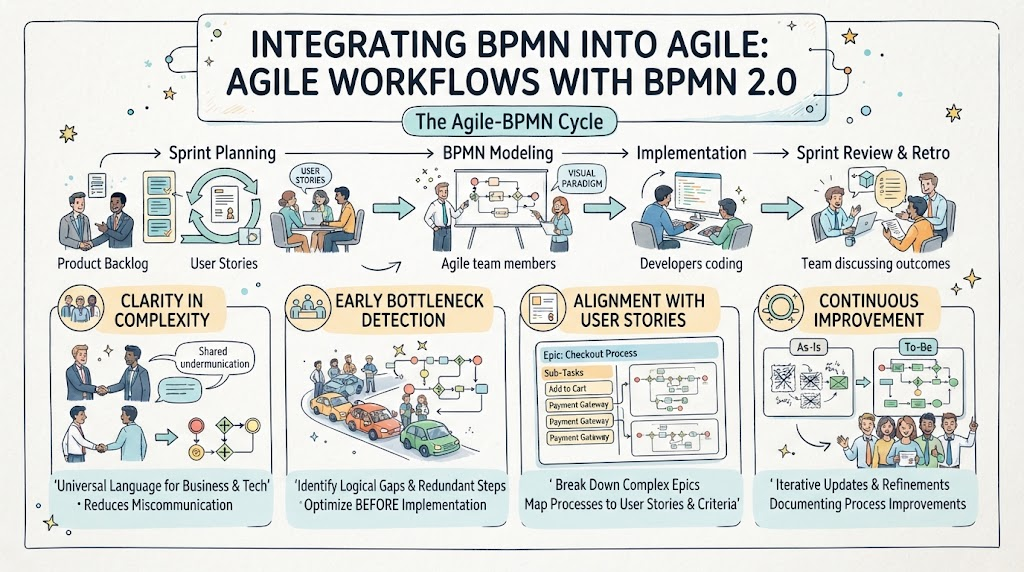
The image illustrates a continuous loop where process modeling and development are tightly coupled. The cycle consists of four distinct phases:
- Sprint Planning: The starting point where the Product Backlog is refined into specific User Stories.
- BPMN Modeling: Agile team members collaborate to visualize these stories using BPMN.
- Implementation: Developers code based on the validated visual models.
- Sprint Review & Retro: The team discusses outcomes and identifies areas for continuous improvement.
Phase 1: From Backlog to User Stories
Every cycle begins with the Sprint Planning phase. Here, the team selects items from the Product Backlog and breaks them down into actionable User Stories. The challenge lies in ensuring that everyone—stakeholders, business analysts, and developers—shares a common understanding of what is being built. Visual Paradigm is often used here to bridge the gap between the abstract “what” and the concrete “how.”
Phase 2: BPMN Modeling & Visualization
Once user stories are defined, the team moves to BPMN Modeling. Instead of writing long text specifications, the team creates lightweight, iterative process models. This phase is critical for “Clarity in Complexity.”
- Shared Understanding: BPMN acts as a “Universal Language for Business & Tech.” By visualizing the flow, teams can reduce miscommunication.
- Identifying Gaps: As shown in the “Early Bottleneck Detection” section of the diagram, modeling allows teams to identify logical gaps and redundant steps before implementation begins. It is far cheaper to fix a process flow on a whiteboard (or in software like Visual Paradigm) than to refactor code later.
Phase 3: Implementation & Alignment
With the process modeled, the team moves to Implementation. Developers code the solution, but they do so with a clear map of the system architecture. The “Alignment with User Stories” box highlights how complex Epics (large bodies of work) are broken down into sub-tasks and mapped directly to specific process flows.
For example, a “Checkout Process” epic might be decomposed into sub-tasks like “Add to Cart” or “Payment Gateway” integration, each represented by its own mini-diagram. This ensures that the code being written aligns perfectly with the business criteria.
Phase 4: Review, Retro, and Continuous Improvement
The final phase is Sprint Review & Retro. The team discusses the outcomes of the implementation. The diagram emphasizes “Continuous Improvement” through a “To-Be” vs. “As-Is” analysis.
- Iterative Updates: The “To-Be” model represents the new process. If the implementation revealed inefficiencies, the process model is updated immediately.
- Documentation: These updates serve as documentation for process improvements, ensuring that the next sprint starts with a more optimized view of the system.
Key Benefits of This Integration
By integrating BPMN 2.0 into Agile, teams gain three distinct advantages:
- Clarity in Complexity: Visual diagrams make complex logic easier to digest than dense text.
- Optimization Before Implementation: Teams can simulate workflow efficiency and identify bottlenecks early.
- Breaking Down Epics: Complex requirements are mapped precisely to user stories, ensuring nothing is lost in translation.
In conclusion, tools like Visual Paradigm provide the ecosystem necessary to streamline this integration. By treating process models as living documents that evolve alongside the code, Agile teams can deliver higher quality software with fewer surprises.