


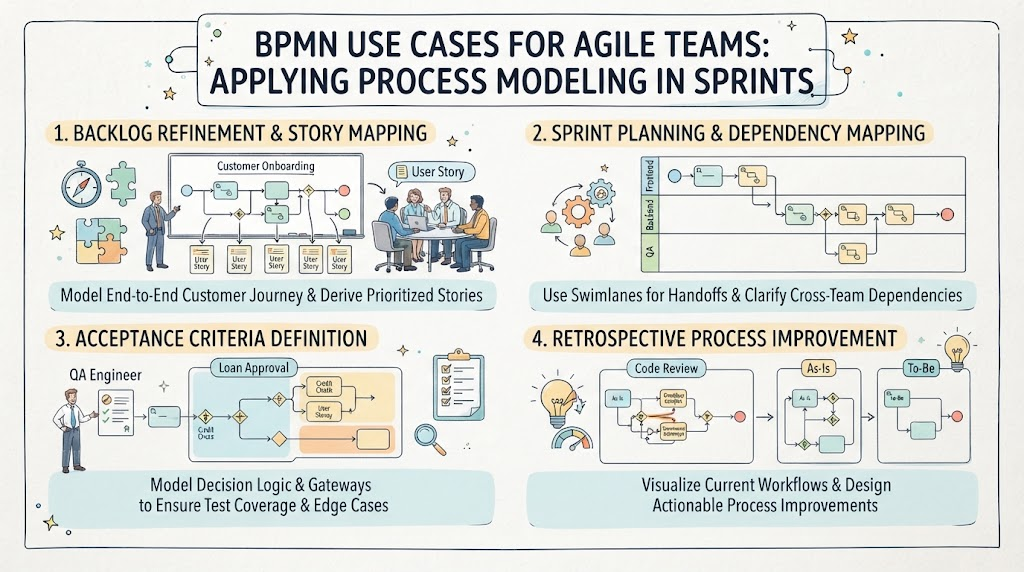
In the fast-paced world of Agile software development, the primary goal is to deliver value quickly while maintaining high quality. However, rapid iteration can sometimes lead to “process drift”—where teams lose sight of the bigger picture, miss dependencies, or fail to cover complex edge cases. This is where Business Process Model and Notation (BPMN) becomes a critical tool. Far from being a rigid methodology reserved for enterprise architecture, BPMN is a flexible visual language that bridges the gap between business requirements and technical implementation.
This tutorial explores four practical use cases where Agile teams can integrate BPMN into their standard Scrum or Kanban workflow to enhance clarity, reduce friction, and optimize delivery.
1. Backlog Refinement & Story Mapping
Backlog refinement is the process of breaking down large epics into manageable user stories. A common pitfall is breaking an epic into tasks without understanding the flow of the user’s experience. If you only list tasks, you might miss the critical path or the interactions between different system components.
The Application: Visualizing the End-to-End Journey
Instead of a simple bulleted list, teams should create a high-level BPMN diagram representing the “Customer Onboarding” epic. Think of the BPMN diagram as the “map” and the User Stories as the “destinations.”
- The Model: Draw a sequence flow that represents the entire lifecycle of the user. Use Tasks for specific actions (e.g., “Enter Email,” “Upload ID”) and Gateways for decision points (e.g., “Is ID Valid?”).
- The Derivation: Iterate through the diagram. Each task or gateway becomes a candidate for a user story. For example, the “Upload ID” task becomes the story: “As a user, I want to upload my ID so that I can be verified.”
The Benefit
This approach ensures completeness. By visualizing the entire journey, the team can identify missing steps (like “Account Creation” or “Welcome Email”) that a list might have overlooked. Furthermore, it helps in prioritizing stories based on process criticality—ensuring the MVP covers the essential “Happy Path” first.
2. Sprint Planning & Dependency Mapping
When a sprint involves multiple teams (e.g., Frontend, Backend, QA), communication overhead often increases. Dependencies become “black boxes,” leading to the dreaded “waiting on the backend” scenario.
The Application: Swimlanes for Cross-Team Coordination
BPMN’s Swimlanes feature is perfect for this scenario. Swimlanes visually separate the responsibilities of different actors or teams.
- Assign Swimlanes: Create vertical lanes for “Frontend,” “Backend,” and “QA.”
- Map Handoffs: Draw the process flow across these lanes. When a task in the “Backend” lane connects to a task in the “Frontend” lane, use a Sequence Flow to represent the handoff (e.g., an API response).
- Identify Dependencies: Look for long arrows crossing multiple lanes. These represent the dependencies that must be resolved before a sprint can be completed.
The Benefit
This creates a shared mental model for the sprint. During planning, the team can see exactly where the “ball” is passed from one team to another. It clarifies who does what and when, significantly reducing cross-team friction and preventing the “it was supposed to be done yesterday” syndrome.
3. Acceptance Criteria Definition
Writing acceptance criteria for complex features like “Loan Approval” often results in long, text-heavy documents that are hard to read. Logic involving multiple conditions can get lost in prose.
The Application: Modeling Decision Logic with Gateways
BPMN allows you to visualize logic using Gateways. This is particularly useful for defining the “Definition of Done” for a feature.
- Exclusive Gateways (XOR): Use these for “If/Else” scenarios. For example, if the “Loan Amount > $10,000” decision point is true, the flow goes to “Manager Approval.” If false, it goes to “Auto-Approve.”
- Parallel Gateways (AND): Use these for tasks that must happen simultaneously, such as sending an email and updating the database.
- QA Checklist: The resulting diagram serves as a visual checklist. QA engineers can trace every path through the gateways to ensure every scenario (including edge cases) is tested.
The Benefit
It transforms abstract logic into a visual contract. Developers know exactly what code paths to write, and testers know exactly what scenarios to verify. It eliminates ambiguity and ensures that edge cases are not forgotten in the rush to ship.
4. Retrospective Process Improvement
Agile teams often identify process bottlenecks during retrospectives, but the solutions can remain vague (“We need to improve code review”). To make these improvements actionable, we need data and visualization.
The Application: As-Is vs. To-Be Modeling
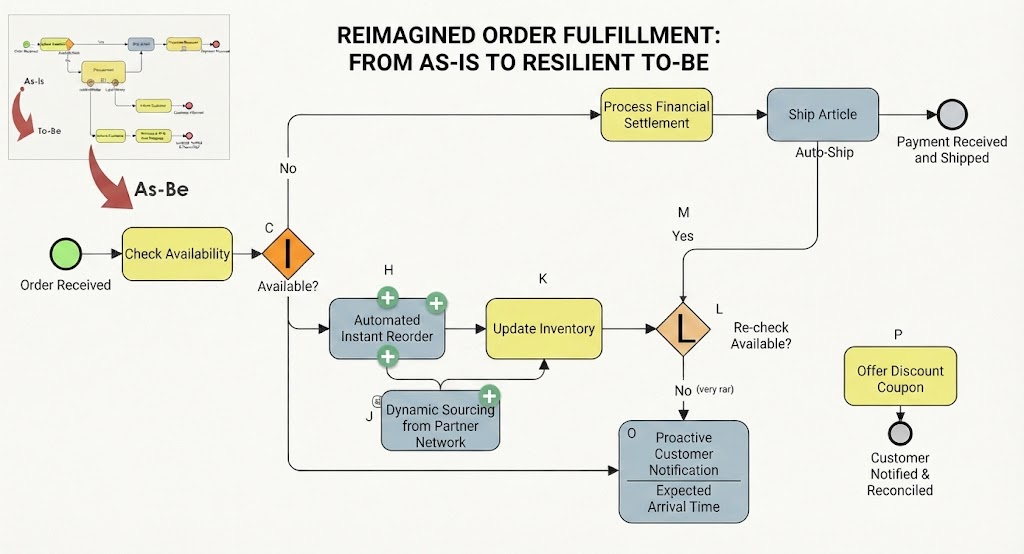
Use BPMN to document the “As-Is” state of a problematic process and design the “To-Be” state.
- Model the As-Is: Map the current “Code Review” process. Highlight bottlenecks—perhaps a single senior developer is the only one who can approve, creating a queue.
- Identify the Problem: The diagram makes the bottleneck obvious visually. It might show a “Queue” symbol or a very long time gap between the “Submit Review” and “Approve” tasks.
- Design the To-Be: Create a new diagram where the solution is applied. For example, introduce a “Parallel Gateway” to allow multiple developers to review a ticket simultaneously, or add a swimlane for “Junior Reviewers.”
The Benefit
This creates a clear, actionable roadmap for optimization. Instead of just discussing feelings about delays, the team has a visual blueprint of the future state. It validates the proposed improvements before they are implemented in the next sprint.
Conclusion
BPMN is not just a diagramming tool; it is a thinking tool. By applying these four use cases—Backlog Refinement, Sprint Planning, Acceptance Criteria, and Retrospective Improvement—Agile teams can maintain the speed of their sprints while gaining the architectural clarity usually reserved for larger projects. The result is a more predictable, efficient, and high-quality delivery pipeline.
Related posts:
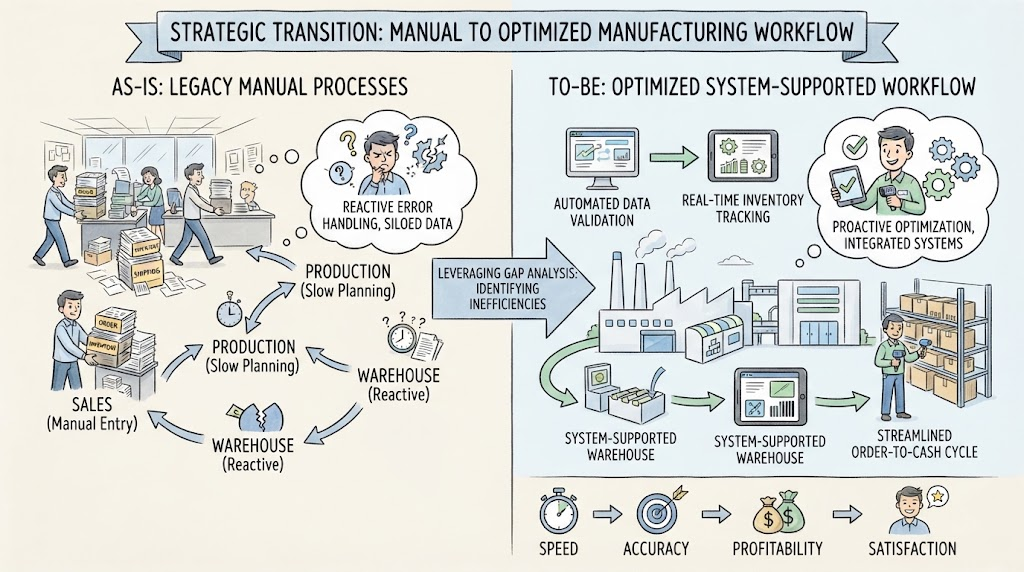 Navigating the Strategic Transition: From Manual Chaos to Optimized Efficiency
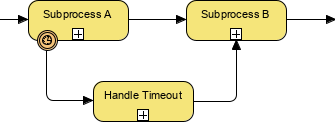 BPMN Diagram Subprocess Timeout Handling
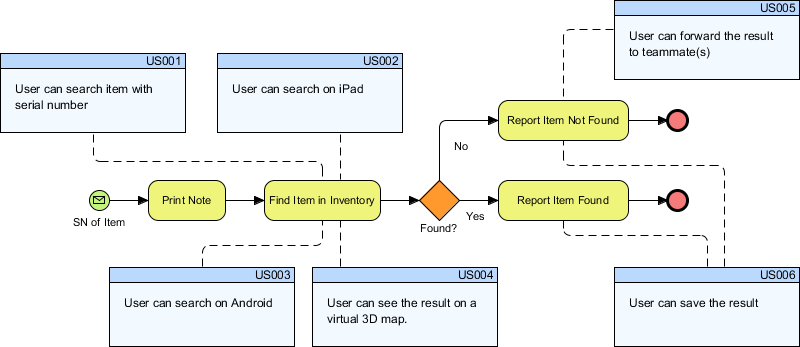 Bridging the Gap: Integrating BPMN Process Flows with Agile User Stories in Visual Paradigm
 Reimagining Business Resilience: A Visual Guide to the As-Is vs. To-Be Order Fulfillment Architecture