In the world of Agile software development and business process modeling, reliability is paramount. When designing systems that handle critical operations like financial transactions, you cannot rely solely on the “happy path”—the scenario where everything goes perfectly. Real-world systems must be designed to gracefully handle failures.
This tutorial breaks down a sophisticated BPMN (Business Process Model and Notation) diagram focused on Payment Processing with Exception Handling. We will analyze how to model a system that automatically retries failed payments while notifying support, ensuring your business logic remains robust and testable.
Understanding the Process Flow
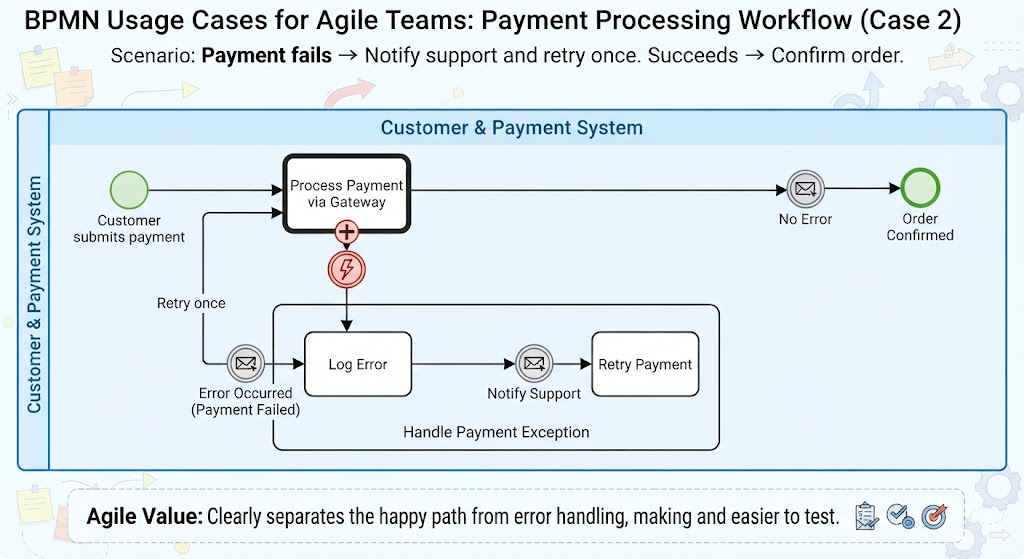
The diagram illustrates a “Customer & Payment System” workflow. Let’s walk through the lifecycle of a payment transaction as depicted in the model.
1. The Initiation Phase
The process begins with a Start Event (represented by the green circle on the left), triggered when a Customer submits payment. This event acts as the gateway, initiating the sequence of activities within the system.
2. The Core Activity
The workflow immediately moves to a central task: “Process Payment via Gateway”. This is a pivotal activity where the system attempts to communicate with an external payment processor to authorize the transaction.
Implementing Boundary Error Events
The most critical architectural decision in this diagram is the use of the Boundary Error Event. Instead of cluttering the main process with if-else logic blocks, we attach an interrupting error event directly to the “Process Payment” activity.
- The Happy Path (No Error): If the payment succeeds, the flow continues along the top path. A Message Throw Event (the envelope icon labeled “No Error”) is triggered, likely sending a confirmation signal, leading to the End Event where the Order Confirmed.
- The Exception Path (Error Occurs): If the payment gateway returns an error (e.g., “Payment Failed”), the Boundary Error Event (the red lightning bolt) immediately interrupts the “Process Payment” activity. This prevents the task from hanging indefinitely and diverts the flow to the error handling logic.
Designing the Exception Handling Logic
The diagram features a sub-process labeled “Handle Payment Exception”. This encapsulates the logic required to recover from the failure. This separation of concerns is a best practice in system design.
- Log the Error: The flow first enters the “Log Error” task. This ensures that a record of the failure exists for audit trails and debugging purposes.
- Notify Support: A Message Throw Event labeled “Notify Support” is triggered. In a real-world implementation, this would send an email or a Slack notification to the support team, alerting them that a customer requires assistance.
- Retry Mechanism: Finally, the process flows into the “Retry Payment” task. This activity represents a second attempt to process the transaction. The diagram indicates this is a single retry (“Retry once”), preventing an infinite loop of failed transactions.
The Agile Value of Separation
Why structure the diagram this way? The bottom banner of the image highlights the Agile Value:
“Clearly separates the happy path from error handling, making the process resilient and easier to test.”
By isolating the error handling logic into a distinct sub-process with its own boundary events, development teams can:
- Improve Readability: Stakeholders can easily understand the standard flow without getting bogged down by error cases.
- Enhance Resilience: The system is explicitly designed to fail forward, automatically attempting recovery before escalating to human support.
- Facilitate Testing: QA teams can easily write test cases specifically for the “Error Path” without having to mock the entire successful flow.
Conclusion
Effective BPMN modeling goes beyond drawing boxes and arrows; it requires a deep understanding of system resilience. By utilizing Boundary Error Events and structured Sub-processes, you create a digital blueprint that not only describes how a business works but also how it survives challenges.