Introduction to Automated Status Workflows
Welcome to this tutorial on business process modeling. Today, we are going to break down a specific workflow designed to automate the status reporting for a “working group.” In many professional environments, keeping track of active projects and circulating issue lists can become a tedious manual task. By using a structured process flow, we can ensure that the right information reaches the right people at the right time without constant human intervention.
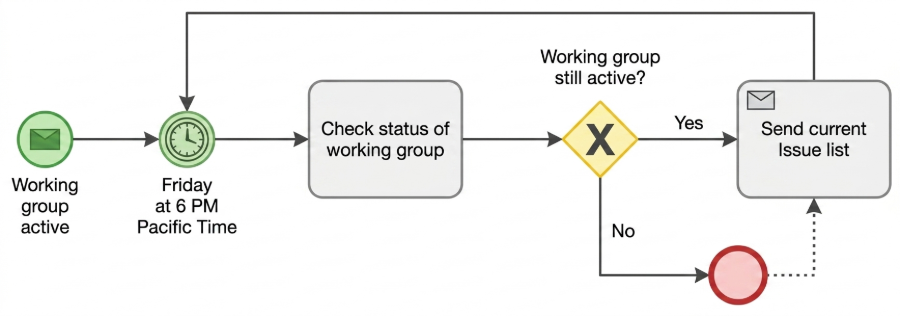
This diagram illustrates a recurring cycle that checks the health of a working group and sends out necessary updates. Let’s walk through each step of this process to understand how the logic flows from initiation to execution.
The Starting Point: Group Activation
The process begins with a specific event: the working group becoming active. In the diagram, this is represented by a green circle with an envelope icon. This symbol indicates that the workflow is triggered by a message or an external signal. Essentially, once a team is formed or a project is officially kicked off, this process is ready to launch. It sets the stage for the automated monitoring that follows.
The Schedule: A Weekly Check-in
Once the group is active, the process moves to a timer event. You will see a green circle with a clock face labeled “Friday at 6 PM Pacific Time.” This is a crucial component of the automation. It dictates that the system will not check the status continuously, but rather at a specific, recurring interval. This ensures that team members aren’t bombarded with notifications but receive a consolidated report every week, specifically on Friday afternoons in the Pacific timezone.
The Decision Logic: Is the Group Still Active?
After the timer triggers the workflow, the next step is a task labeled “Check status of working group.” This is followed by a yellow diamond with an “X” inside, known as an Exclusive Gateway in process modeling. This is the brain of the operation. It presents a binary question: “Working group still active?”
This decision point branches the path of the workflow into two distinct possibilities based on the answer to that question. It acts as a filter, ensuring that the workflow behaves differently depending on the current state of the project.
The “Yes” Path: The Recurring Cycle
If the answer to the status check is Yes—meaning the working group is still active—the process flows to the right. The system executes a task labeled “Send current Issue list.” This is likely an automated email containing the latest list of outstanding tasks or bugs. Once this email is sent, the arrow loops back to the top, pointing to the timer event. This creates a continuous loop: check status, send report, wait for next Friday, repeat. This is the standard operating procedure for an active team.
The “No” Path: Handling Inactive Groups
What happens if the group is no longer active? If the answer to the gateway is No, the flow takes a different route. It leads to a red circle, which typically signifies the end of a process instance. However, there is a dotted line connecting this end point back to the “Send current Issue list” task. This suggests a specific business rule: even if the group is deemed inactive, the system may still trigger a final notification or archive the current issue list before terminating the workflow. This ensures that no data is lost and stakeholders are informed of the final state of the project before the process concludes.
Conclusion
This workflow demonstrates a clean, logical approach to managing recurring administrative tasks. By separating the schedule (the timer), the logic (the gateway), and the action (the email task), we create a robust system that adapts to the life cycle of the working group. Whether the group is thriving or winding down, the process ensures that the necessary communications are handled automatically.