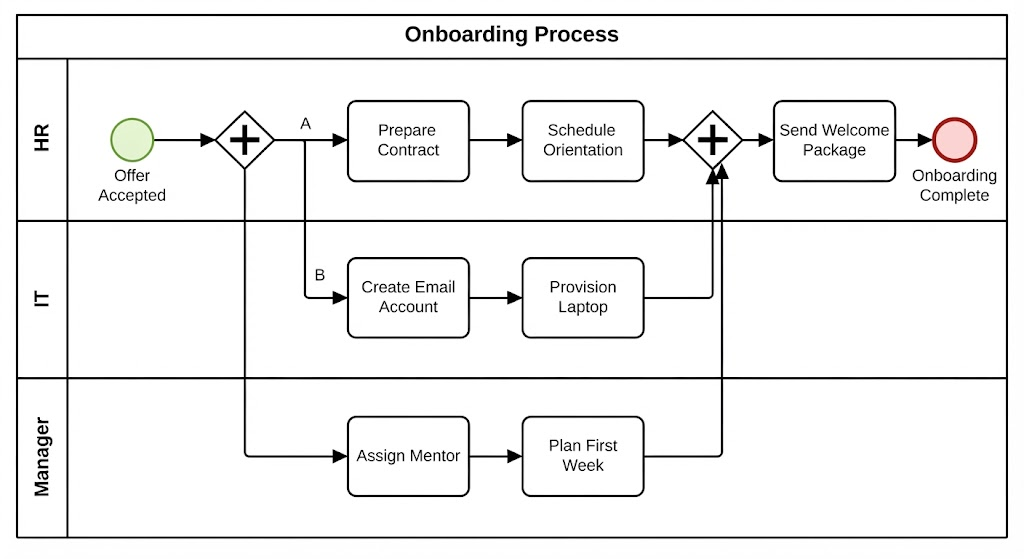
In the world of business process modeling, efficiency is everything. When a new employee joins a company, the “Onboarding” phase is critical. It sets the tone for their entire tenure. However, a common pitfall in process design is treating all tasks as a linear sequence—waiting for HR to finish before IT starts, and so on. This tutorial explores a superior architectural approach using Business Process Model and Notation (BPMN) to visualize how Parallel Gateways can drastically reduce total process time by enabling simultaneous work streams.
We will deconstruct the Onboarding Process diagram, breaking down the swimlanes, the flow logic, and the specific symbols that drive this high-performance workflow.
1. The Architecture of Efficiency: Swimlanes
Before diving into the flow, we must understand the structure. The diagram utilizes a Pool containing three distinct Lanes:
- HR Lane: Responsible for legal documentation and cultural integration.
- IT Lane: Handles technical infrastructure and security access.
- Manager Lane: Focuses on team integration and strategic planning.
By segregating tasks into these lanes, the diagram clarifies responsibility. It ensures that the “Manager” does not accidentally attempt to “Provision a Laptop,” and IT does not need to draft the “Employment Contract.”
2. The Catalyst: The Start Event
Every process requires a trigger. In this diagram, the process begins at the Start Event (the green circle), labeled “Offer Accepted”.
This event represents the moment the candidate signs the contract. It is the spark that ignites the automated workflow. As soon as this event occurs, the process engine signals that the prerequisites for onboarding are met, allowing the flow to move forward.
3. The Power Move: The Parallel Gateway (AND)
This is the most critical concept in the tutorial. Observe the diamond shape containing a plus sign (+) immediately following the start event. This is a Parallel Gateway (often called an AND-gateway).
What does it do?
Unlike a Standard Gateway (which might ask “Is the offer accepted? Yes/No”), a Parallel Gateway says, “Do everything at once.”
When the flow hits this gateway, it splits the process into three distinct paths simultaneously:
- Path A (HR): The flow moves to “Prepare Contract” and “Schedule Orientation.”
- Path B (IT): The flow moves to “Create Email Account” and “Provision Laptop.”
- Path C (Manager): The flow moves to “Assign Mentor” and “Plan First Week.”
Key Insight: In a real-world scenario, IT can provision a laptop while HR is drafting the contract. By modeling this as a parallel split, we acknowledge that these tasks are independent and can happen concurrently. This architecture reduces the total “Onboarding Cycle Time” significantly compared to a linear approach.
4. The Convergence: The Joining Gateways
Parallelism requires order. The process cannot move forward until all independent work is complete. This is managed by the second Parallel Gateway (the diamond with the plus sign) located in the HR lane.
This is known as a Parallel Join. It acts as a checkpoint:
- It waits for the arrow coming from HR (Schedule Orientation).
- It waits for the arrow coming from IT (Provision Laptop).
- It waits for the arrow coming from Manager (Plan First Week).
Only when all three of these paths have completed their tasks does the gateway open, allowing the single flow to resume. This ensures that the “Welcome Package” is only sent after the employee has a contract, a laptop, and a mentor assigned.
5. The Final Steps and End Event
Once the parallel streams converge, the process returns to a linear flow. The final task is performed by HR: “Send Welcome Package”. This task likely contains the laptop, the contract, and the schedule, ready for the new hire.
Finally, the flow terminates at the End Event (the red circle), labeled “Onboarding Complete”. This signifies that the system state has transitioned from “Hiring” to “Employee Day 1 Ready.”
Conclusion: Why This Architecture Matters
By utilizing Parallel Gateways in the Onboarding Process, organizations achieve two major goals:
- Speed: Tasks that do not depend on each other are executed in parallel, reducing wait times.
- Clarity: The visual diagram clearly communicates that HR, IT, and Managers have distinct but synchronized roles.
Whether you are designing this in a tool like Camunda, Bizagi, or drawing it by hand, understanding the difference between a Gateway and a Parallel Gateway is the key to building efficient, modern business systems.