In the world of Business Process Model and Notation (BPMN), precision is paramount. A process diagram is not just a drawing; it is a blueprint for operational logic. Among the various elements used to construct these diagrams, Intermediate Events are often the unsung heroes that define the tempo and resilience of a business workflow. They represent the “happenings” within a process—the signals that tell the system to proceed, pause, or react.
This tutorial delves into the two distinct architectures of Intermediate Events: those embedded within the normal flow of activities and those attached to the boundaries of tasks to handle exceptions. By understanding these concepts, you will learn how to model robust systems using tools like Visual Paradigm that can handle both routine operations and unexpected scenarios.
The Architecture of Intermediate Events
Intermediate events are distinct from Start and End events because they occur during the execution of a process. They are essentially “checkpoints” that allow a process to either wait for an external trigger or react to an internal condition.
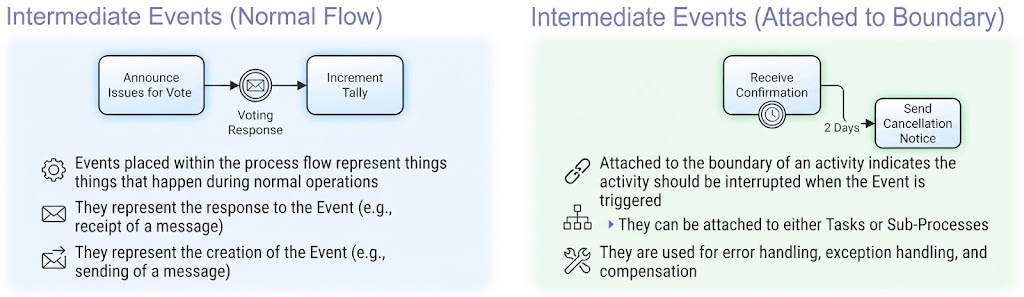
As illustrated in standard BPMN modeling, these events are categorized based on their location and their impact on the surrounding activity. We will explore these two primary categories: Intermediate Events (Normal Flow) and Intermediate Events (Attached to Boundary).
1. Intermediate Events (Normal Flow)
The first category represents the heartbeat of a standard business operation. These events are placed directly on the process path, indicating that the process flow cannot continue until the event occurs.
- Definition: These events represent things that happen during normal operations. They are “caught” or “thrown” by the flow itself.
- The Message Mechanism: In the context of the diagram, these often represent the receipt or creation of a message. For example, a process might need to “Announce Issues for Vote” before it can proceed.
- Visual Logic: Look at the sequence “Announce Issues for Vote” $\rightarrow$ Intermediate Event $\rightarrow$ “Increment Tally”. The process flows linearly. The Voting Response event acts as a gatekeeper. The system cannot “Increment Tally” until the response is received.
Key Takeaway: When you place an intermediate event in the normal flow, you are defining a synchronization point. The process is waiting for a specific condition (like a message arrival) to be met before advancing to the next step.
2. Intermediate Events (Attached to Boundary)
The second category introduces complexity and error handling. These events are visually distinct because they are attached to the edge (boundary) of a Task or Sub-Process, rather than sitting on the connecting line.
- Definition: An event attached to the boundary indicates that the activity should be interrupted when the Event is triggered.
- Exception Handling: These are the “Plan B” mechanisms of BPMN. They are used for error handling, exception handling, and compensation. If the main task fails or a time limit is exceeded, the boundary event takes control.
- Visual Logic: Consider the diagram where “Receive Confirmation” has a boundary event attached. If the confirmation is not received within 2 Days, the process does not crash. Instead, it triggers the “Send Cancellation Notice” flow.
- Flexibility: These can be attached to either Tasks or Sub-Processes, allowing for granular control over how specific blocks of logic react to external stimuli.
Key Takeaway: Boundary events allow for “preemptive” logic. They monitor a running activity and, upon the occurrence of a specific trigger (like a timer or an error), they divert the flow away from the original task.
Applying Concepts in Visual Paradigm
To model these concepts effectively, you can utilize Visual Paradigm, a leading BPMN design tool. The tool provides specific icons and drag-and-drop capabilities to represent these architectural decisions clearly.
- Modeling Normal Flow: When building a standard process, simply drag an Intermediate Event onto the sequence flow between two tasks. This ensures that your diagram accurately reflects dependencies, such as waiting for a “Voting Response.”
- Modeling Boundary Events: To implement exception handling, drag an Intermediate Event onto the perimeter of a Task. Visual Paradigm will visually attach the event, indicating that this task is now “interruptible.” You can then define the specific condition (e.g., a Timer Event for the “2 Days” delay) and connect it to the alternative flow (e.g., “Send Cancellation Notice”).
Conclusion
By distinguishing between intermediate events in the normal flow and those attached to boundaries, you gain the ability to build diagrams that reflect real-world operational logic. Whether you are managing the steady rhythm of message exchanges or designing robust safety nets for exceptions, mastering these BPMN concepts is essential for any technical architect or process analyst.