In the world of Business Process Model and Notation (BPMN), precision is key to modeling real-world workflows accurately. One of the most critical elements for managing the flow of a process is the Intermediate Event. Unlike the start and end events that frame a process, intermediate events represent the dynamic occurrences that happen while the process is in motion.
This tutorial breaks down the architecture of intermediate events, specifically focusing on the two fundamental orientations: Catching (Receiving) and Throwing (Sending). By understanding these concepts, you can create models that accurately reflect waiting periods, decision points, and active communication.
What Are Intermediate Events?
Intermediate events are circular symbols placed between the start and end of a process. They are visually distinguished by a double thin border around the circle, which sets them apart from the single-bordered start and end events.
These events represent occurrences that take place during the execution of a process. They act as the “middle management” of your workflow, handling the pauses, triggers, and data exchanges that occur between tasks.
The Core Logic: Catching vs. Throwing
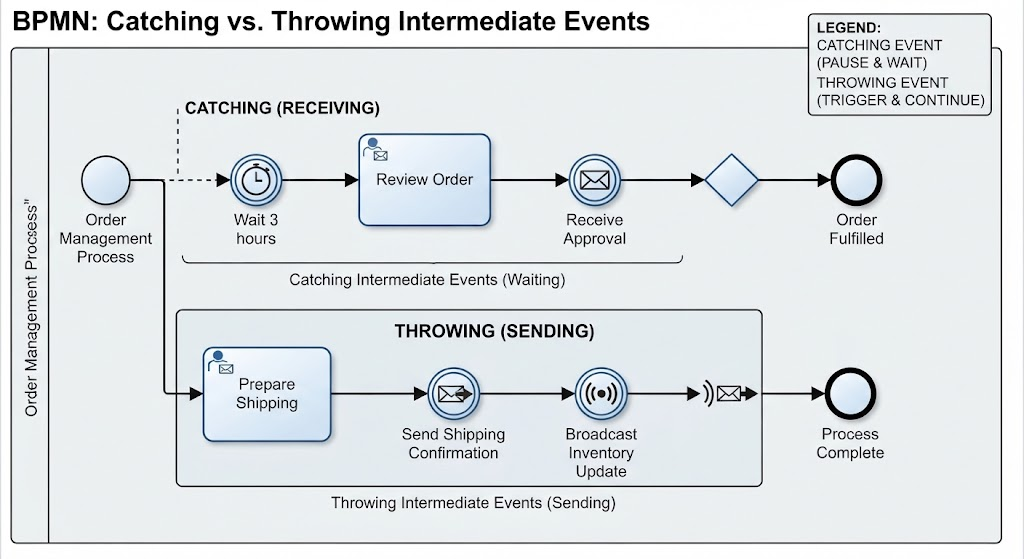
The behavior of an intermediate event is defined by its orientation. The diagram below illustrates how these events control the flow of an “Order Management Process.”
1. Catching (Receiving) Intermediate Events
Catching events are passive in nature. When a process encounters a catching event, it pauses and waits for a specific condition to occur before it can continue.
- Behavior: The process flow stops at the event. Time may pass, or external data may need to arrive. The process remains in a “waiting” state.
- Visual Indicator: In BPMN, the arrow connecting the event to the next activity points inward (towards the event), symbolizing that something is being received.
- Common Examples:
- Timer Events: Waiting for a specific time to elapse (e.g., “Wait 3 hours”).
- Message Events: Waiting for a reply or approval from an external system or user.
- Signal Events: Waiting for a broadcast signal.
2. Throwing (Sending) Intermediate Events
Throwing events are active. When a process reaches a throwing event, it actively generates or triggers something and then immediately continues to the next step.
- Behavior: The process does not stop. Instead, it executes an action (like sending data) and proceeds down the path.
- Visual Indicator: The arrow connecting the event to the next activity points outward (away from the event), symbolizing that something is being sent out.
- Common Examples:
- Message Events: Sending a shipping confirmation email.
- Signal Events: Broadcasting an inventory update.
- Error/Message Escalation: Logging an alert or notifying a supervisor.
Case Study: The Order Management Process
To visualize these concepts, let us analyze the “Order Management Process” shown in the diagram. This workflow demonstrates how a single process can utilize both types of events to manage an order from receipt to fulfillment.
The Catching Sequence
The top section of the diagram illustrates the “Catching” workflow. After the process starts:
- The process executes the task Review Order.
- It encounters a Catching Timer Event labeled “Wait 3 hours.” Here, the process halts. It effectively puts the order on hold for three hours. Once the timer expires, the flow continues.
- Next is a Catching Message Event labeled “Receive Approval.” The system pauses again, waiting for an external approval signal. Only when that signal is received does the process move to the decision diamond.
The Throwing Sequence
The bottom section of the diagram illustrates the “Throwing” workflow, which occurs if the order is approved.
- The process executes the task Prepare Shipping.
- It hits a Throwing Message Event labeled “Send Shipping Confirmation.” The system actively sends a message to the customer and then immediately continues.
- Immediately after, it hits a Throwing Signal Event labeled “Broadcast Inventory Update.” The system actively emits a signal to update inventory levels and then proceeds to the end of the process.
Summary
Understanding the distinction between catching and throwing intermediate events is essential for building accurate BPMN diagrams. Remember the simple rule of thumb based on the visual flow:
- Catching = Pause & Wait (The process waits for an input).
- Throwing = Trigger & Continue (The process sends an output).
By applying these concepts, you ensure your process models reflect the true nature of business operations, balancing waiting times with active communications.