


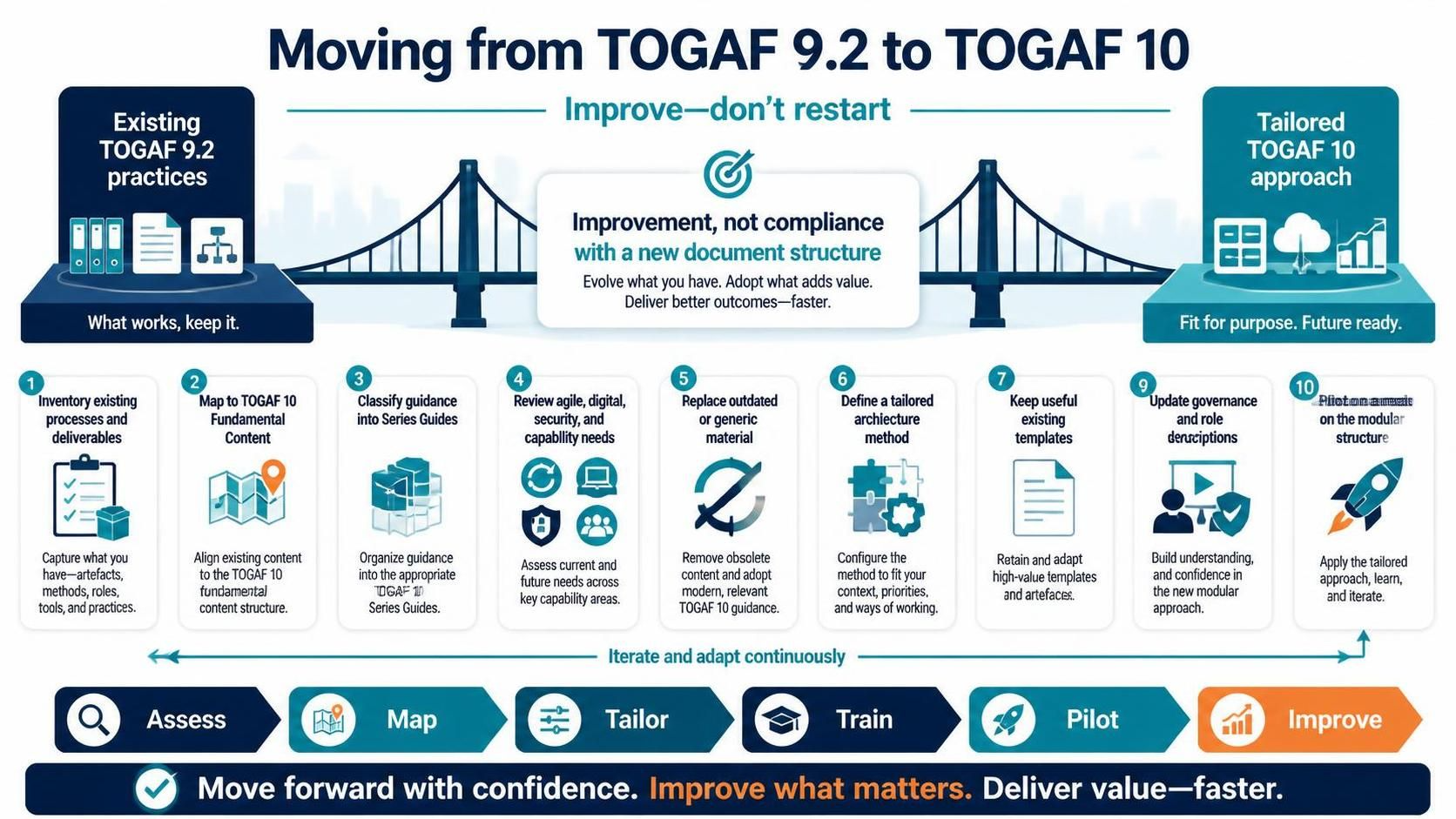
For enterprise architects and IT leaders, the transition from TOGAF 9.2 to TOGAF 10 often triggers anxiety. The prevailing fear is that the modular structure of TOGAF 10 requires a complete overhaul of existing, hard-won processes. However, as illustrated in the strategic framework below, the goal is not a restart, but an evolution. This tutorial explores the architectural strategy of moving from legacy practices to a “Tailored TOGAF 10 approach,” focusing on the principle of “Improve—don’t restart.”
The Philosophy: Improvement Over Compliance
The visual diagram highlights a critical shift in mindset. On the left, we have “Existing TOGAF 9.2 practices”—the assets, artifacts, and methodologies an organization has already invested in. On the right, we have the “Tailored TOGAF 10 approach.” The bridge connecting them is the core philosophy: Improvement, not compliance with a new document structure.
Modern architecture is about delivering value. If an organization blindly adopts every element of TOGAF 10 without regard for its current context, it risks “boiling the ocean.” The diagram suggests a pragmatic path: Evaluate what works, keep it, and evolve the rest.
The 10-Step Migration Framework
The infographic outlines a specific, ten-step workflow to guide this transition. This process is designed to be iterative, ensuring that the organization moves forward with confidence.
Phase 1: Assessment and Discovery
The journey begins with a deep dive into the current state. Before importing new tools or methods, you must understand what is already in place.
- Inventory existing processes and deliverables: You must capture the reality of your current architecture practice. This includes identifying the specific artifacts, methods, tools, and roles that are currently in use.
- Map to TOGAF 10 Fundamental Content: Once inventory is complete, map these existing items to the new TOGAF 10 Fundamental Content. This is a crucial alignment step to see where your current work fits into the new modular structure.
Phase 2: Classification and Review
With a map in hand, the focus shifts to categorization and needs assessment. Not all old methods will survive the transition, and not all new TOGAF 10 modules will be immediately relevant.
- Classify guidance into Series Guides: Organize your guidance into the appropriate “Series Guides” (e.g., Enterprise Architecture, Capability Building). This helps structure the chaos of migration into manageable buckets.
- Review agile, digital, security, and capability needs: Assess current and future needs across key capability areas. TOGAF 10 is more modular, allowing you to focus specifically on these modern requirements.
- Replace outdated or generic material: Remove obsolete content. If a document or process is generic and no longer adds value, replace it with modern, relevant TOGAF 10 guidance.
Phase 3: Tailoring and Definition
This phase is where the architecture becomes fit for purpose. It is about customization.
- Define a tailored architecture method: Configure the method to fit your specific context, priorities, and ways of working. The goal is to build a method that solves actual business problems, not just theoretical ones.
- Keep useful existing templates: Retain and adapt high-value templates. If a specific template has been successful in your organization, do not discard it simply because the structure has changed.
Phase 4: Training and Validation
The final steps ensure human adoption and practical application.
- Update governance and role descriptions: Ensure that the organizational structure supports the new method. Build understanding and confidence in the new modular approach among stakeholders.
- Pilot on a real initiative: Apply the tailored approach, learn, and iterate. Do not wait for perfection. Launch a pilot project to test the new methods in the real world.
Tools for Success: Visual Paradigm
Executing this migration requires more than just a checklist; it requires robust tooling that can handle the complexity of the TOGAF ADM (Architecture Development Method) and the new modular structure. To facilitate this transition, we highly recommend using Visual Paradigm TOGAF ADM Tool.
Visual Paradigm supports the “Tailored TOGAF 10 approach” by allowing architects to:
- Manage Artifacts: Easily handle the inventory of existing deliverables mentioned in Step 1.
- Customize the Method: Adapt the TOGAF 10 cycles to fit specific organizational needs (Step 6).
- Collaborate: Support the agile and digital needs (Step 4) through real-time collaboration features.
Conclusion
The path from TOGAF 9.2 to TOGAF 10 is not a void to be filled, but a bridge to be crossed. By following the “Assess, Map, Tailor, Train, Pilot, Improve” cycle, organizations can deliver better outcomes faster. Remember to utilize recommended tooling like Visual Paradigm TOGAF ADM Tool to ensure your migration is smooth, structured, and ready for the future.
Related posts:
 From Theory to Execution: A Practical Guide to Enterprise Architecture with Visual Paradigm
 Mastering TOGAF 10 Security Architecture: From Principles to Implementation
 Mastering TOGAF Phase D: Technology Architecture and System Modeling
 Mastering TOGAF Phase B: A Comprehensive Guide to Business Architecture Modeling