


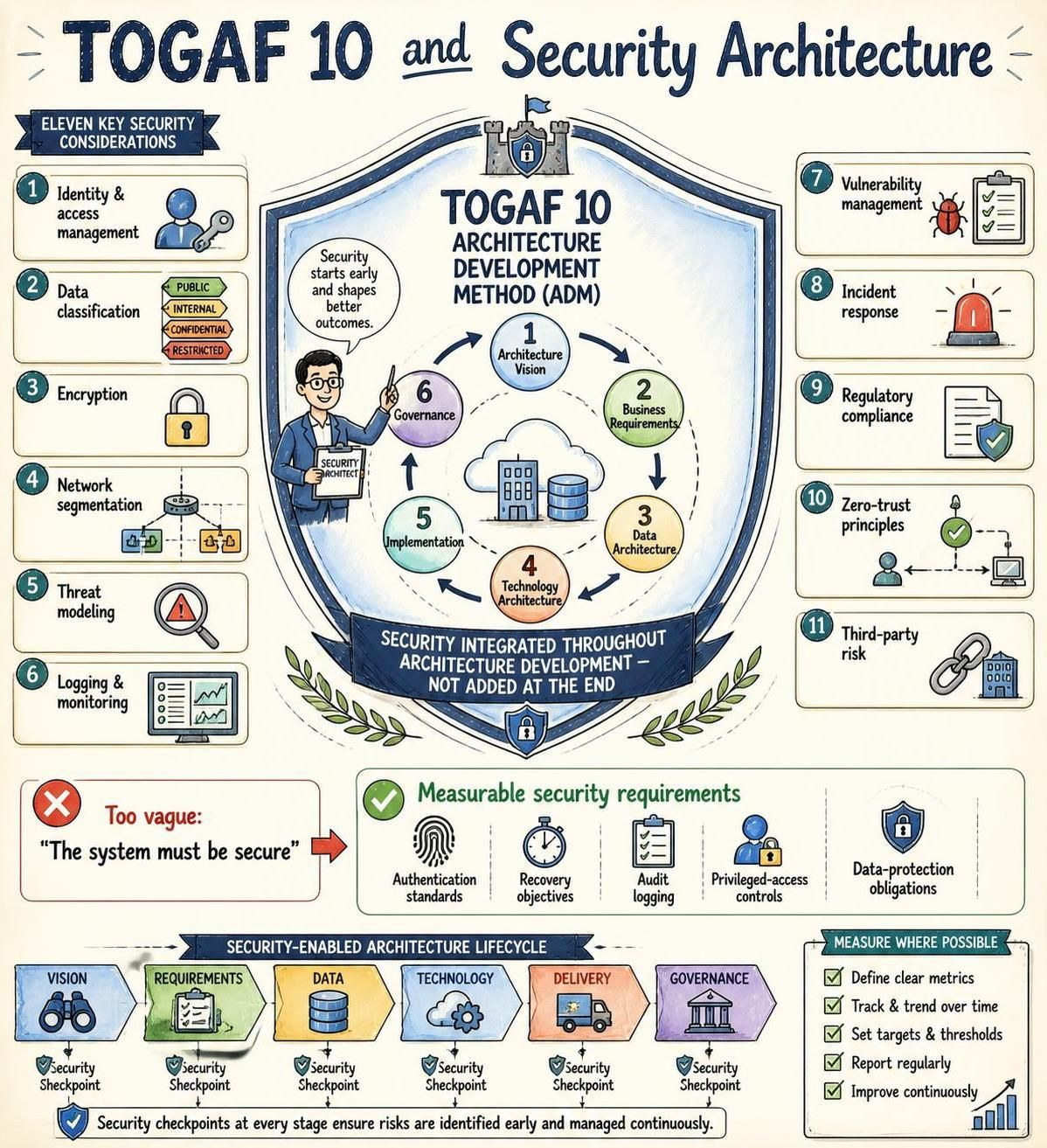
In the rapidly evolving landscape of enterprise architecture, security can no longer be an afterthought. As illustrated by the concepts in the TOGAF 10 framework, security must be a foundational element woven into the very fabric of the Architecture Development Method (ADM). This tutorial explores how to effectively integrate security considerations throughout the architecture lifecycle, ensuring robust protection from the initial vision phase through to governance.
The Paradigm Shift: Security as a Continuous Thread
The most critical concept in modern security architecture is the shift away from “security at the end.” The traditional waterfall approach often resulted in security being bolted onto a finished system, creating gaps and vulnerabilities. The TOGAF 10 approach, as highlighted in the central shield diagram, emphasizes that security should be integrated throughout architecture development rather than added at the end.
By treating security as a continuous thread, architects can identify risks early, reducing the cost and complexity of remediation. This proactive stance is supported by the Security-Enabled Architecture Lifecycle shown at the bottom of the infographic, which maps security checkpoints to specific ADM phases.
Integrating Security into the ADM Phases
To build a secure enterprise, security architects must participate in the early phases. The infographic outlines the specific phases where security integration is vital:
- Phase A: Architecture Vision – This is the inception point. Security requirements must be defined here to align with the business strategy. If security is not part of the vision, it cannot be part of the execution.
- Phase B: Business Architecture – Security requirements must be derived from business needs. What data is critical? What are the regulatory constraints?
- Phase C: Data & Technology Architecture – This is where the technical implementation is designed. Security controls such as encryption, access management, and network segmentation are defined here.
- Phase G: Governance – Continuous monitoring ensures that the architecture remains compliant and secure over time.
Eleven Key Security Considerations
When designing your architecture, you must address a comprehensive list of security domains. The infographic identifies eleven key considerations that serve as a checklist for architects:
- Identity and Access Management (IAM): Ensuring that only authorized users have access to specific resources.
- Data Classification: Categorizing data (Public, Internal, Confidential, Restricted) to apply appropriate protection levels.
- Encryption: Protecting data at rest and in transit using cryptographic standards.
- Network Segmentation: Dividing a computer network into smaller sub-networks to limit the spread of threats.
- Threat Modeling: Systematically identifying potential security threats and vulnerabilities.
- Logging and Monitoring: Maintaining audit trails and real-time visibility into system activities.
- Vulnerability Management: The continuous process of identifying, classifying, and remediating vulnerabilities.
- Incident Response: Having a defined plan to handle security breaches effectively.
- Regulatory Compliance: Adhering to laws and standards (e.g., GDPR, HIPAA) relevant to the organization.
- Zero-Trust Principles: Operating on the assumption that no user or system is trusted by default, even if inside the network perimeter.
- Third-Party Risk: Managing the security risks introduced by vendors and partners.
Defining Measurable Security Requirements
One of the most common pitfalls in architecture is defining vague requirements. The infographic provides a stark contrast between a weak requirement and a strong, measurable one.
Weak Requirement: “The system must be secure.”
This statement is subjective and impossible to test. A secure system for a small blog is vastly different from a secure system for a bank. To be effective, requirements must be quantifiable and specific. The infographic suggests the following measurable criteria:
- Authentication Standards: Specify the protocol (e.g., “All systems must support SAML 2.0”).
- Recovery Objectives: Define RTO (Recovery Time Objective) and RPO (Recovery Point Objective).
- Audit Logging: Mandate that all privileged actions are logged.
- Privileged-Access Controls: Define exactly who can access what.
- Data-Protection Obligations: Specify encryption standards (e.g., “AES-256”).
Tooling for Success: Visual Paradigm TOGAF ADM Tool
Implementing these concepts manually can be a daunting task. To effectively manage the complexity of the TOGAF ADM and ensure security is tracked at every stage, specialized tooling is essential.
We highly recommend the Visual Paradigm TOGAF ADM Tool as a solution for managing this process. Visual Paradigm provides a comprehensive environment where architects can:
- Model the ADM phases visually, ensuring that security checkpoints are not skipped.
- Create data flow diagrams that clearly show how sensitive data moves through the system, aiding in Data Classification and Network Segmentation planning.
- Manage requirements traceability, linking specific security requirements (like Encryption or Zero-Trust) to architectural components.
- Collaborate with stakeholders to ensure the Architecture Vision includes security from the start.
By leveraging tools like Visual Paradigm, organizations can move from theoretical security concepts to a structured, measurable, and implementable security architecture.
Related posts:
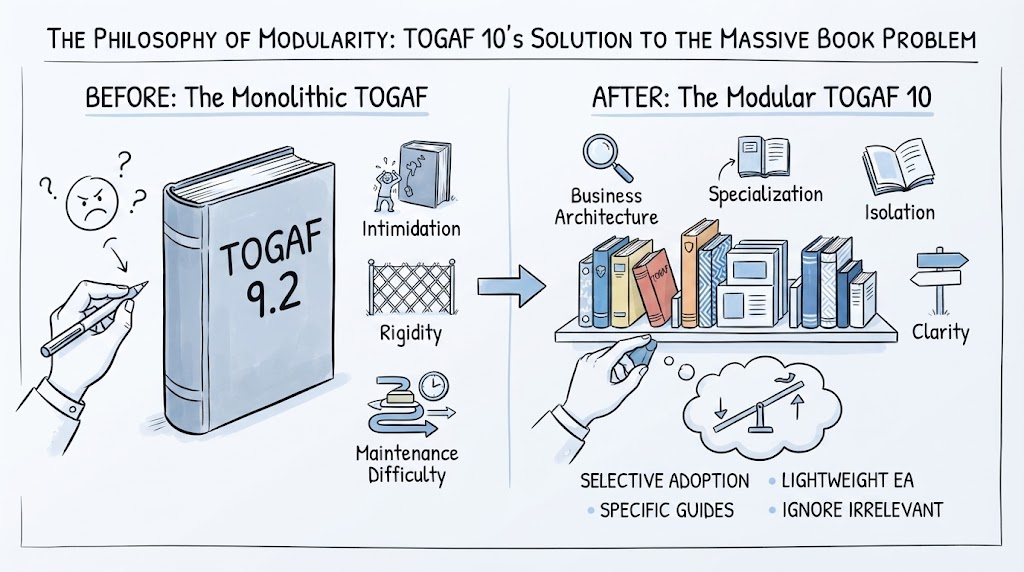 Mastering Modularity: How TOGAF 10 Solves the “Massive Book Problem” with Strategic Flexibility
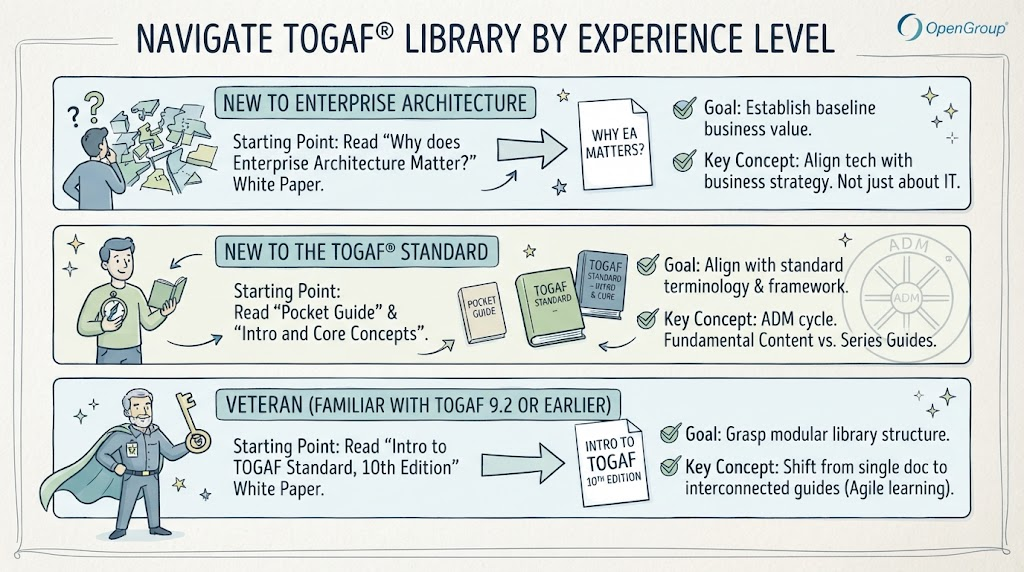 Navigating the TOGAF® Library: A Tiered Approach to Enterprise Architecture Mastery
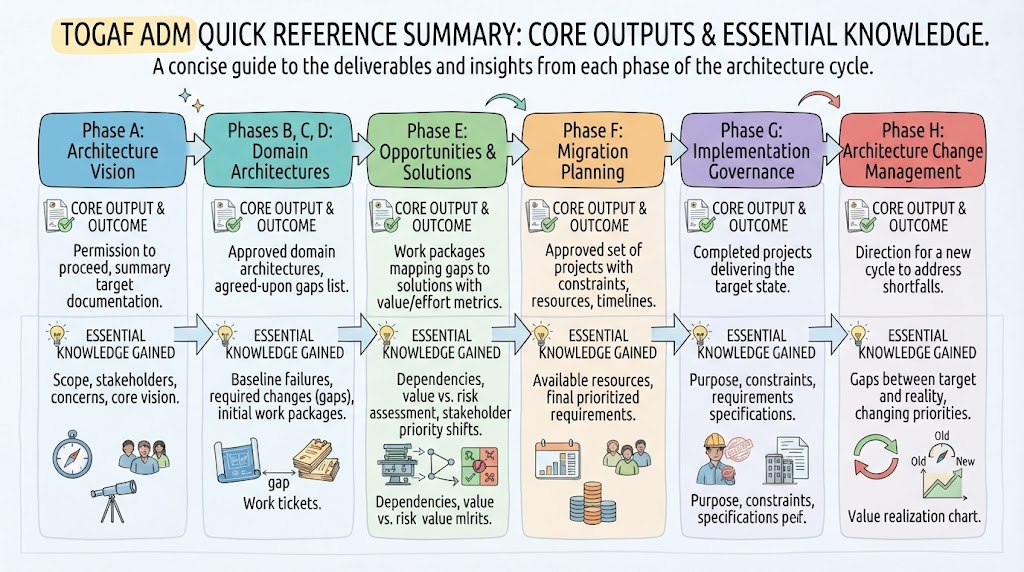 Mastering the TOGAF ADM Cycle: A Visual Guide to Architecture Outputs and Outcomes
 Accelerating Enterprise Architecture: Why Visual Paradigm is the Ideal Companion for TOGAF 10