


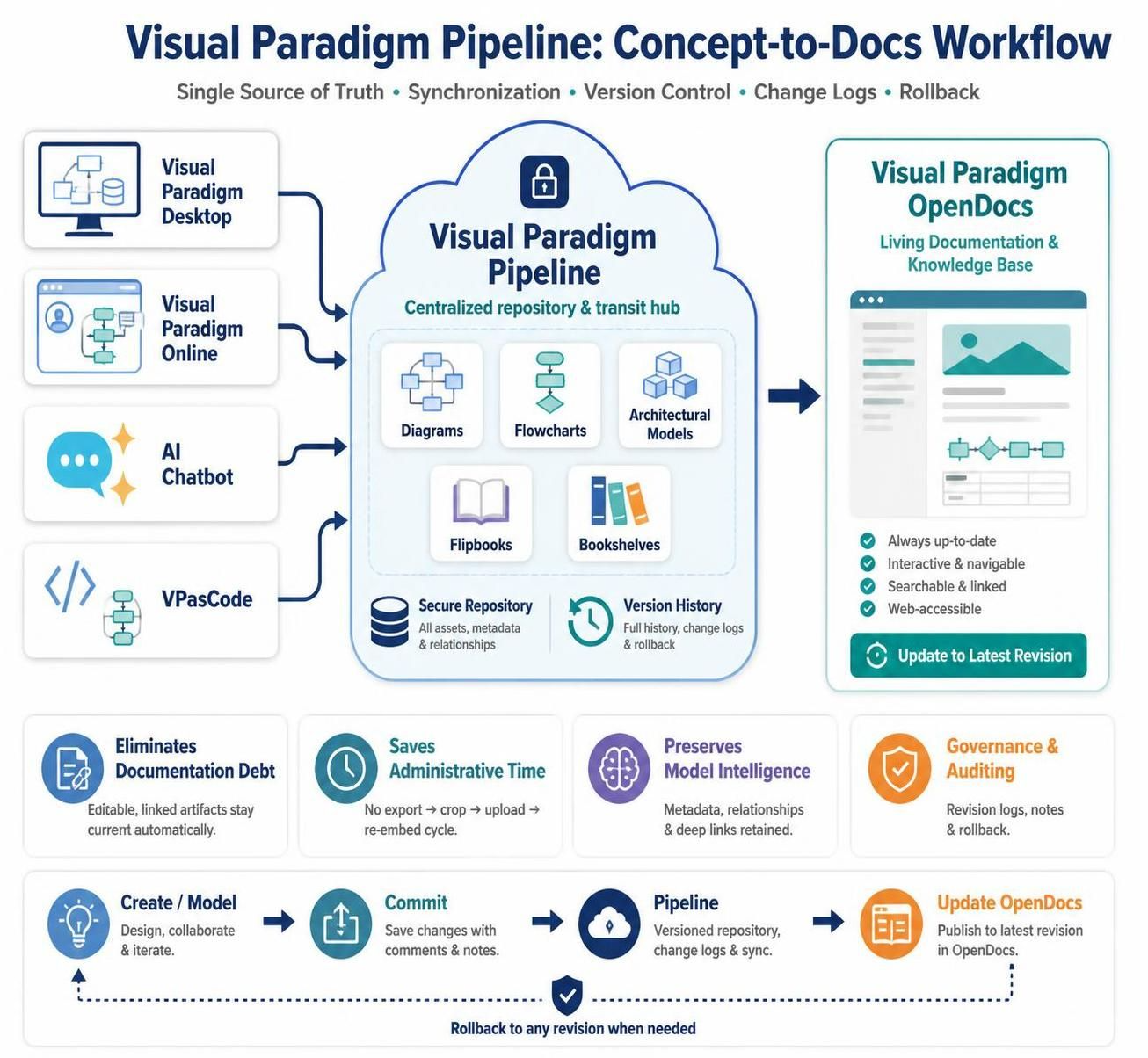
In the modern landscape of software architecture and agile development, the gap between “designing a diagram” and “documenting the system” is often filled with manual, error-prone processes. This tutorial explores the Visual Paradigm Pipeline, a sophisticated architectural pattern that bridges this gap. It transforms static image files into managed, version-controlled artifacts that synchronize automatically with your documentation.
The Problem: The “Static Image” Trap
Before diving into the solution, we must understand the traditional workflow that the Pipeline eliminates. Historically, engineering teams followed a linear, disjointed process:
- Create a UML or BPMN diagram in a tool.
- Export it as a PNG, JPG, or SVG.
- Upload the file to a wiki or documentation platform.
- Modify the source diagram later.
- Export again and manually replace the old image.
This approach creates documentation debt. Over time, diagrams become outdated, source files and images become separated, and metadata is lost. The Visual Paradigm Pipeline replaces this cycle with a centralized connection layer.
Architecture of the Pipeline Ecosystem
The Pipeline functions as a three-layer ecosystem designed to maintain a “Single Source of Truth.” It acts as a transit hub between your modeling tools and your documentation platforms.
1. The Generation Layer
This is where the visual assets originate. The Pipeline supports a diverse range of creation tools, allowing you to choose the best environment for your specific task:
- Visual Paradigm Desktop: The professional standard for advanced enterprise modeling, database design, and complex UML/BPMN tasks.
- Visual Paradigm Online: A browser-based environment ideal for collaborative, real-time diagramming.
- AI Diagramming Chatbot: Accelerates creation by converting natural language descriptions into structured visual models.
- VPasCode: A text-based workflow for developers who prefer defining diagrams through code (e.g., PlantUML, Mermaid, Graphviz).
2. The Pipeline Layer (Centralized Repository)
The core of the system is the Pipeline itself. It serves as a secure, cloud-based repository that performs four critical functions:
- Transit: It connects the Generation Layer to the Documentation Layer.
- Asset Storage: It stores diagrams (UML, BPMN, ERD, ArchiMate) as managed artifacts, not just binary files.
- Revision Management: It records every change, allowing users to review history or roll back to previous versions.
- Relationship Tracking: It maintains the link between the published visual and its source model.
3. The Documentation Layer
The destination for these assets is Visual Paradigm OpenDocs. This layer is responsible for creating technical manuals, system specifications, and knowledge bases. Unlike traditional wikis that require file uploads, OpenDocs accepts Pipeline-managed assets as live elements.
Core Workflow: The “Commit” Cycle
The operational rhythm of the Pipeline follows a specific lifecycle that ensures synchronization:
- Create / Model: Design your diagram in Desktop, Online, or via VPasCode.
- Commit to Pipeline: Push the changes to the cloud repository. This step saves the model and creates a versioned snapshot.
- Embed in OpenDocs: Insert the diagram into your documentation. Crucially, this is a reference, not a copy.
- Review & Update: When the source model changes, OpenDocs detects the newer revision. You can update the documentation to reflect the latest state instantly.
Code Example: Embedding with VPasCode
For teams utilizing the text-based workflow, embedding a diagram in the documentation often involves referencing the specific asset ID managed by the Pipeline. Below is a conceptual representation of how a VPasCode workflow might interact with the system:
graph TD
    A[Start: Write Diagram Code] --> B[Commit to Pipeline]
    B --> C{Pipeline Check}
    C -->|Version Created| D[Reference ID Generated]
    D --> E[Insert into OpenDocs]
    E --> F[Live Rendering]

    subgraph "Pipeline Management"
        G[Track Revisions]
        H[Store Metadata]
    end

    B -.-> G
    G -.-> C
Benefits for Modern Agile Teams
The adoption of the Pipeline architecture offers significant advantages for teams practicing Agile methodologies:
- Eliminates Documentation Debt: Editable, linked artifacts stay current automatically. There is no need for the tedious “export and replace” cycle.
- Saves Administrative Time: Teams can focus on development rather than managing file versions and uploads.
- Governance & Auditing: The system provides full revision logs, notes, and rollback capabilities, ensuring compliance and traceability.
- Web-Accessible: Documentation remains searchable and navigable, with the ability to update to the latest revision with a single click.
Conclusion
The Visual Paradigm Pipeline represents a shift from treating diagrams as static images to treating them as living, managed data assets. By centralizing storage and maintaining the relationship between the source model and the documentation, teams can ensure that their system specifications are always up-to-date, accurate, and authoritative.