


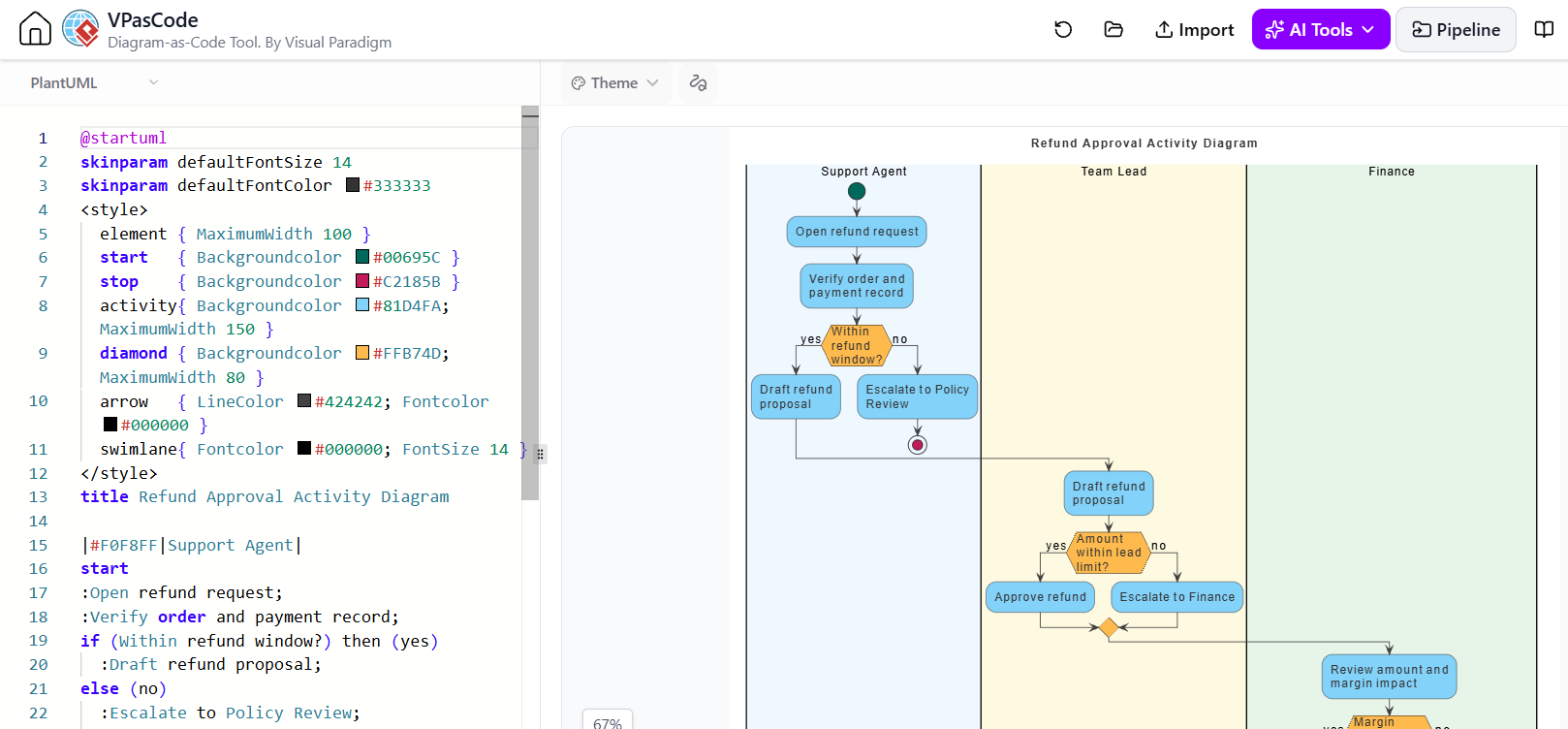
Creating visual representations of complex business processes is a critical skill for system architects and business analysts. In this tutorial, we will explore how to use VPasCode—a tool that leverages the power of text-based modeling—to generate a precise Activity Diagram for a “Refund Approval” workflow. This guide demonstrates how to transition from a text description to a formal system model, emphasizing the importance of swimlanes in clarifying organizational responsibilities.
The Power of Text-Based Modeling
Modern diagramming has evolved beyond drag-and-drop interfaces. Tools like VPasCode allow users to define diagrams using a Domain Specific Language (DSL). This approach, often referred to as “Diagram-as-Code,” offers several advantages: version control compatibility, automated generation from requirements, and a focus on logic over styling.
When building a system model, you must choose the right tool for the job. While Graphviz is excellent for data structures and Mermaid for quick markdown documentation, PlantUML remains the gold standard for formal UML and BPMN modeling. Its strength lies in its ability to handle complex control flows and swimlanes, making it ideal for business process modeling.
Structuring the Refund Approval Process
The core of this diagram is an Activity Diagram, which maps the flow of activities from start to finish. The specific scenario we are modeling is a customer support request: “Show me who can block a refund, so support can tell the customer who to chase.”
To achieve this, we utilize Swimlanes. Swimlanes partition the diagram into horizontal or vertical sections, each representing a specific actor or department. This visual separation is the key to answering the “who to chase” question instantly.
1. Defining the Actors (Swimlanes)
The process is divided into three distinct lanes:
- Support Agent: The entry point for the request. They handle verification and initial drafting.
- Team Lead: Responsible for approving smaller amounts and managing escalation.
- Finance: The final authority for large amounts or policy exceptions.
2. The Syntax: PlantUML
VPasCode uses PlantUML syntax. The diagram begins with the @startuml directive, followed by configuration commands. We use skinparam to set global styling (like font size) and title to name the diagram.
@startuml
skinparam defaultFontSize 14
skinparam defaultFontColor #333333
title Refund Approval Activity Diagram
3. Styling with CSS-like Blocks
One of the most powerful features of PlantUML is the ability to style specific elements using a block of CSS-like rules inside <style> tags. This ensures a consistent professional look without cluttering the logic code.
Implementing Logic and Flow Control
The logic of the diagram follows a linear progression with conditional branching. We represent this using standard PlantUML keywords.
Start and End Points
We define the entry and exit points of the workflow:
start
:Open refund request;
:Verify order and payment record;
stop
Decision Diamonds
The core of the workflow relies on if statements, which render as diamonds in the diagram. The syntax if (condition) then (label) else (label) creates the branching paths.
In the “Support Agent” lane, the logic checks if the request is within the refund window:
if (Within refund window?) then (yes)
    :Draft refund proposal;
else (no)
    :Escalate to Policy Review;
endif
Merging Paths
Notice how the “yes” and “no” paths eventually merge before moving to the next swimlane. In PlantUML, this is handled automatically by the flow engine unless you are using complex orthogonal flows. The logic dictates that once the Support Agent drafts the proposal, the process moves to the Team Lead.
Full Source Code Example
Below is the complete source code generated by the VPasCode tool. You can copy this into a PlantUML editor to visualize the result.
@startuml
skinparam defaultFontSize 14
skinparam defaultFontColor #333333
title Refund Approval Activity Diagram
|#F0F8FF|Support Agent|
start
:Open refund request;
:Verify order and payment record;
if (Within refund window?) then (yes)
:Draft refund proposal;
else (no)
:Escalate to Policy Review;
endif
|#FFF8E1|Team Lead|
:Draft refund proposal;
if (Amount within lead limit?) then (yes)
:Approve refund;
else (no)
:Escalate to Finance;
endif
|#E8F5E9|Finance|
:Review amount and margin impact;
if (Margin impact acceptable?) then (yes)
:Approve refund;
:Release payment;
:Notify customer of credit date;
stop
else (no)
:Decline with written rationale;
:Notify support agent;
stop
endif
@endumlThe “Generate → Validate → Revise” Pattern
Working with DSLs requires a disciplined approach. The workflow in VPasCode follows a strict cycle:
- Generate: The chatbot or developer writes the source code.
- Validate: The tool parses the code. If there is a syntax error, the diagram will not render.
- Revise: If validation fails, the error message is your guide. You must fix the code and re-run, rather than trying to “hand-wave” the visual result.
By adhering to this pattern, you ensure that your system models are not just pretty pictures, but accurate, executable specifications of your business logic.