Mapping the Journey: A Step-by-Step Guide
Welcome to this tutorial session. Today, we are going to explore the logic behind a common business process: the mortgage application journey. We will break down a specific flowchart to understand how businesses handle these workflows efficiently using standard modeling notations.
The Starting Point: Requesting the Application
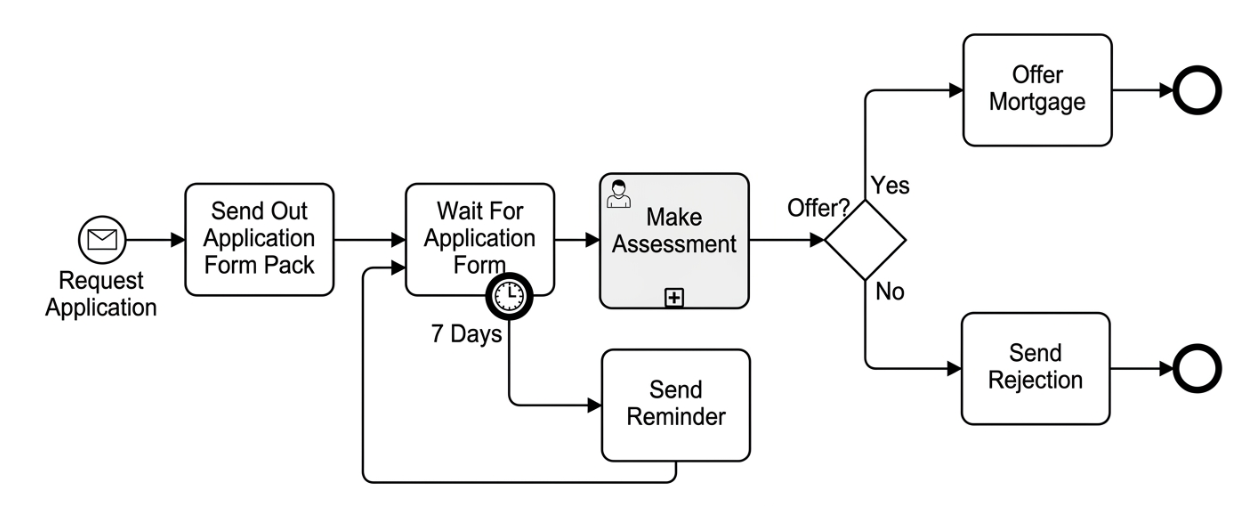
Every process needs a trigger. In our diagram, the journey begins on the far left with an event symbol—a circle containing an envelope icon. This represents the “Request Application” event. It signifies that a customer has initiated contact or requested information, setting the entire workflow in motion.
Initiating the Process
Once the request is received, the first actionable step is a task labeled “Send Out Application Form Pack.” This is a straightforward activity where the institution provides the necessary paperwork for the client to begin their formal application.
Managing Time and Expectations
After sending the forms, the process enters a waiting phase. The next box is labeled “Wait For Application Form.” Crucially, notice the small clock icon attached to this task. In BPMN, this indicates a timer intermediate event. Here, it specifies a duration of “7 Days.” This implies that the system or the process owner waits for a week for the customer to return the documents.
Handling Delays: The Reminder Loop
What happens if the 7 days pass without the form arriving? This is where the loop comes into play. A line branches off from the timer and leads to a task called “Send Reminder.” Once the reminder is sent, the flow loops back to the “Wait For Application Form” task. This creates a cycle that ensures the process continues until the application is submitted, preventing the case from stalling indefinitely.
Evaluating the Application
Once the form is finally received, the workflow moves to the shaded task “Make Assessment.” The shading often denotes a sub-process or a more complex activity involving multiple steps. Here, a human agent reviews the details. Following this assessment, the process reaches a critical decision point.
The Decision Gate: Offer?
We arrive at a diamond shape labeled “Offer?”. In BPMN, diamonds represent gateways or decision points. At this stage, the lender decides whether to approve the mortgage based on their assessment. There are two distinct paths branching out from this diamond:
- The ‘Yes’ Path: If the assessment is positive, the flow moves to the top branch, leading to the task “Offer Mortgage.” This concludes the successful side of the process, ending at a thick-bordered circle known as the End Event.
- The ‘No’ Path: If the applicant does not meet the criteria, the flow goes down to “Send Rejection.” This path also terminates at an End Event, signifying the closure of the case.
Key Takeaways
In this walkthrough, we have visualized how a mortgage application can be structured logically. By using BPMN symbols—such as events for triggers, tasks for actions, gateways for decisions, and timers for time-based constraints—we can create clear maps for complex processes. Whether you are designing these flows in Visual Paradigm or analyzing existing ones, understanding these components helps streamline operations and manage customer expectations effectively.