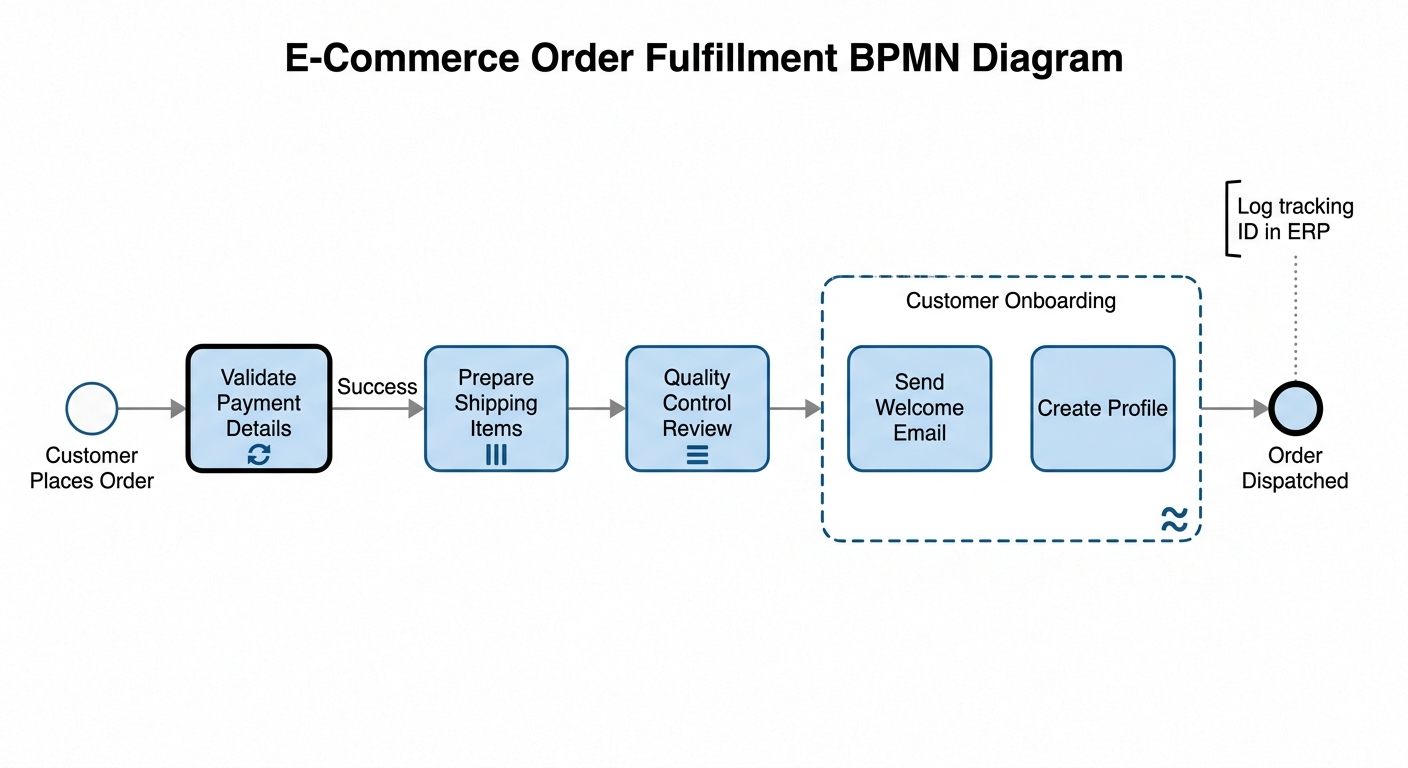
In the world of business process modeling, standard sequence flows often fail to capture the complexity of real-world operations. While a linear path works for simple tasks, modern enterprise systems require advanced logic for retries, concurrency, and conditional execution. This tutorial explores how BPMN Markers transform a basic workflow into a robust, production-ready system architecture. We will walk through a comprehensive E-Commerce Order Fulfillment process to demonstrate the practical application of the five most critical markers.
1. The Loop Marker: Handling Transient Failures
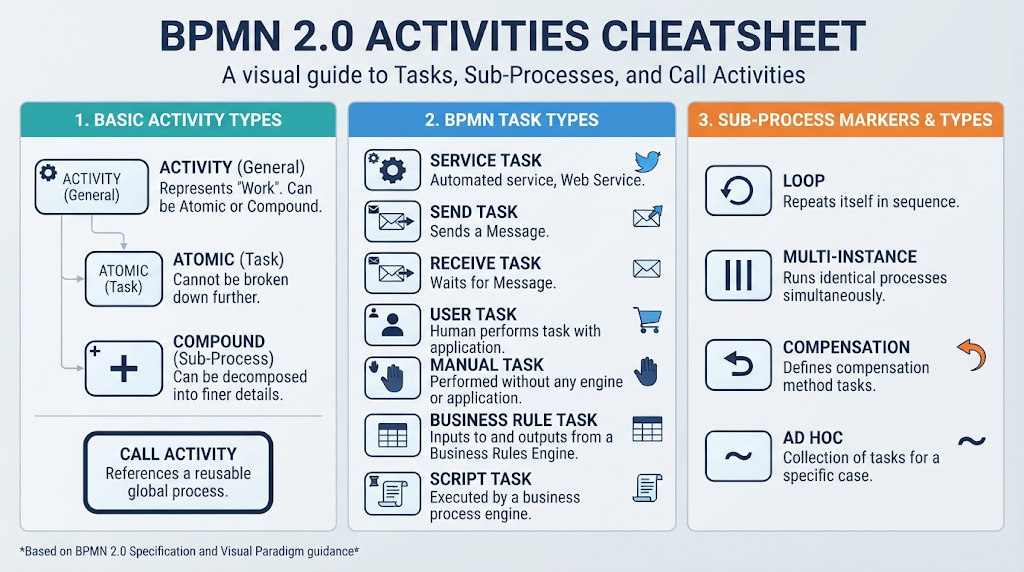
The first challenge in any transactional system is reliability. Networks are flaky, and third-party APIs often time out. The Loop Marker (represented by the circular arrow icon) allows a process to repeat an activity until a specific condition is met or a maximum iteration limit is reached.
Scenario: Payment Validation
When a customer places an order, the system must authorize the credit card. Imagine a scenario where the bank’s server is momentarily unavailable, resulting in a temporary timeout.
Technical Implementation
- Trigger: A boolean condition
isAuthorized == falseis returned by the payment gateway. - Logic: Instead of failing the entire order, the engine enters a loop. It waits for a defined interval (e.g., 2 minutes) and retries the “Validate Payment Details” task.
- Exit Condition: The loop persists until either
isAuthorized == trueORretryCount == 3. This prevents infinite retry storms and ensures the process eventually terminates with a definitive “Payment Failed” state if the bank remains unreachable.
2. The Parallel Multi-Instance Marker: Maximizing Throughput
Efficiency is key in logistics. When an order contains multiple distinct items, processing them one by one creates unnecessary bottlenecks. The Parallel Multi-Instance Marker (represented by three vertical bars) enables the system to spawn multiple independent instances of a task simultaneously.
Scenario: Warehouse Item Preparation
An order arrives containing a book, a laptop sleeve, and a pack of pens. In a traditional sequential process, a worker would pick the book, then the sleeve, then the pens. However, the warehouse is a physical space where distance matters.
Technical Implementation
- Concurrency: The workflow engine dynamically evaluates the order line items and creates three separate process instances.
- Resource Allocation: Three different warehouse workers receive digital pick slips simultaneously. Worker A goes to the Book aisle, Worker B to the Electronics, and Worker C to the Stationery.
- Outcome: This drastically reduces fulfillment lag. The system waits for all three parallel branches to complete before proceeding to the next stage (Quality Control), ensuring that no single slow item holds up the entire shipment.
3. The Sequential Multi-Instance Marker: Managing Resource Constraints
While parallel processing is great for speed, it is not always possible. Sometimes, physical hardware or a specific skill set is the bottleneck. The Sequential Multi-Instance Marker (represented by three horizontal bars) forces instances to execute one after another, effectively creating a queue.
Scenario: Quality Control Review
Once items are picked, they must be inspected. In this facility, there is only one specialized high-speed scanning machine available for the final packaging station.
Technical Implementation
- Serialization: Even though the items arrived in parallel, the scanning task cannot run concurrently. The system creates a sequential stack.
- Dependency: Item 2 must wait for Item 1 to clear inspection before the scanner becomes available. Item 3 waits for Item 2.
- Data Integrity: This prevents data collisions where two items might try to update the inventory database at the exact same millisecond. It ensures dedicated quality focus and maintains a clean audit trail for each physical unit.
4. The Adhoc Marker: Flexible Subprocesses
Not every business process follows a rigid, pre-defined path. Some activities are triggered by events but do not require a strict order. The Adhoc Marker (represented by a tilde symbol ~) defines a subprocess where the sequence is flexible.
Scenario: Customer Onboarding
While the physical box is traveling to the shipping dock, the digital platform triggers a “Customer Onboarding” subprocess. This involves “Create Profile” and “Send Welcome Email.”
Technical Implementation
- Non-Deterministic Ordering: The system does not enforce a “First A, then B” rule. Depending on server load, the email might be sent before the profile is fully generated, or vice versa.
- Completion Logic: The subprocess is considered complete only when all defined activities (profile creation AND email sending) have been executed at least once.
- Use Case: This is ideal for marketing automation where the exact timing of user engagement isn’t critical, but the completion of the task is.
5. The Annotation Marker: Bridging Design and Engineering
Finally, a BPMN diagram is not just for execution; it is a communication tool. The Annotation Marker allows us to add technical specifications or notes without altering the logic of the process itself.
Scenario: Shipping Log Documentation
A system administrator or a new developer reviews the diagram to understand the backend requirements for the “Order Dispatched” event.
Technical Implementation
- Visual Link: An open bracket is attached via a dotted line to the final event milestone.
- Technical Guidance: The label reads: “Log tracking ID in ERP database via REST API.”
- Separation of Concerns: This annotation provides explicit engineering requirements to the development team. It informs them of the necessary database interaction and API endpoint without cluttering the actual workflow logic or affecting the runtime performance of the software.