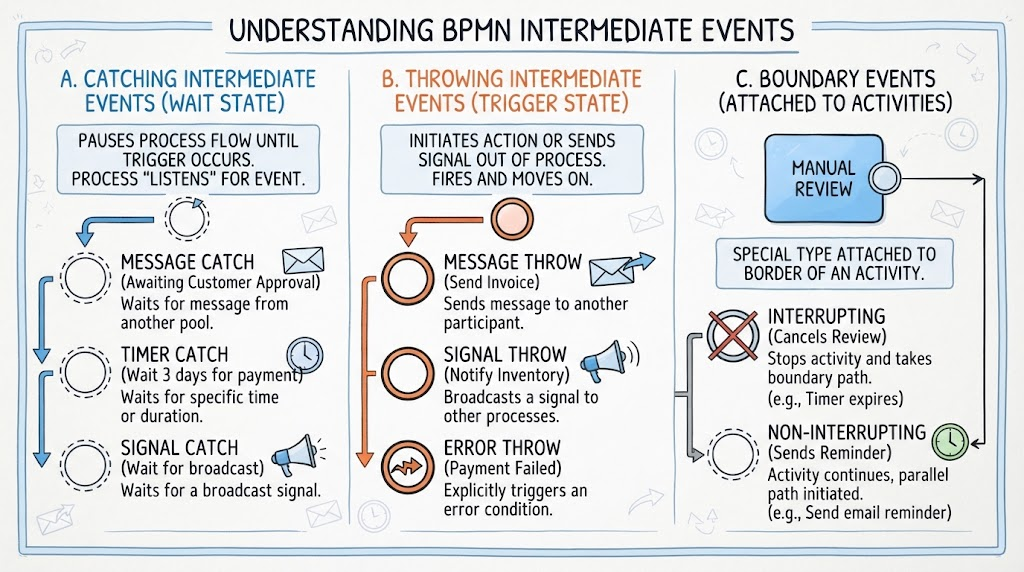
In the world of Business Process Model and Notation (BPMN), timing is everything. While standard tasks represent work being done, Intermediate Events represent the specific moments where a process changes state based on external triggers or internal logic. Understanding these events is crucial for designing robust workflows that can handle delays, send notifications, and manage errors effectively.
This tutorial breaks down the three primary categories of Intermediate Events: Catching (Waiting), Throwing (Triggering), and Boundary Events. We will walk through the visual indicators, behavioral logic, and real-world applications of each.
A. Catching Intermediate Events (The “Wait State”)
Catching Intermediate Events act as a pause button for your process. They represent a point where the process flow “listens” for something to happen before it can proceed. In BPMN terminology, the token (the flow of control) stops at this event and waits until a specific condition is met.
Visual Indicator
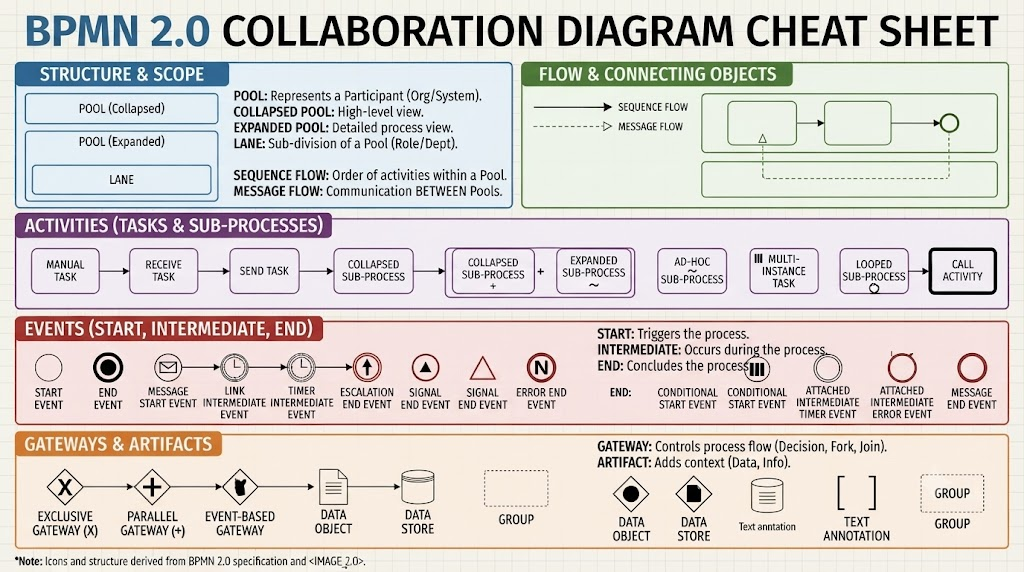
Visually, these are represented by a circle with a thin border. Inside the circle, you will often find a specific marker icon that defines the type of event being caught.
Behavioral Logic
- The process flow halts at the event.
- The system waits for an external input or a specific time duration.
- Once the trigger occurs, the token moves to the next activity.
Common Types of Catching Events
- Message Catch: The process waits for a message from another participant (like a customer or an external system).
- Example: “Awaiting Customer Approval” – The order process stops until the customer clicks “Approve” in the portal.
- Timer Catch: The process waits for a specific time or duration to pass.
- Example: “Wait 3 days for payment clearance” – The invoice remains in a pending state for exactly 72 hours before moving to the next step.
- Signal Catch: The process waits for a broadcast signal from elsewhere in the system. This is often used to synchronize different parts of a complex architecture.
B. Throwing Intermediate Events (The “Trigger State”)
If Catching events are about waiting, Throwing events are about acting. These events occur in the middle of a process and trigger an action or send a signal out of the current process flow. They do not pause the process; they initiate an action and then the flow moves immediately forward.
Visual Indicator
These are represented by a circle with a thick border. They are often filled or contain a solid marker to distinguish them from the thin-bordered Catching events.
Behavioral Logic
- The process actively initiates an action.
- The flow does not stop; it fires the event and continues immediately.
Common Types of Throwing Events
- Message Throw: Sends a message to another participant.
- Example: “Send Invoice to Customer” – The system immediately dispatches the PDF invoice via email as soon as it is generated.
- Signal Throw: Broadcasts a signal to other processes.
- Example: “Notify Inventory System” – When an order is confirmed, a signal is broadcast to tell the warehouse to reserve stock.
- Error Throw: Explicitly triggers an error condition. This is useful for handling exceptions within the process flow that need to be caught by a specific boundary event.
- Example: “Payment Failed” – The system detects a failure and throws an error to be handled by an error handler.
C. Boundary Events (Attached to Activities)
Boundary Events are a special and powerful type of Intermediate Event. Unlike the events described above, which sit on the flow path, Boundary Events are attached to the border of an activity (such as a Task or Sub-process).
They allow you to define what happens if something goes wrong or if a specific condition is met during the execution of a task.
Interrupting vs. Non-Interrupting
Boundary events are critical for error handling and timeouts. They come in two distinct flavors:
1. Interrupting Boundary Events
If the event is triggered, the current activity is stopped immediately, and the process flow diverts to the path defined by the boundary event.
- Visual Indicator: The circle usually has a single thin border with a diagonal cross (X) or a thick fill depending on the specific BPMN version, but conceptually it “kills” the activity.
- Example: A “Cancel” button or a Timer. If a “Timer Expires” boundary event is attached to a “Manual Review” task, the review is canceled, and the process moves to a “Process Canceled” state.
2. Non-Interrupting Boundary Events
If the event is triggered, the current activity continues as normal, but a parallel path is initiated. This is great for sending reminders without stopping the main work.
- Visual Indicator: The circle has a dashed thin border.
- Example: Sending a reminder email. A process might be waiting for a response. If 24 hours pass, a “Timer” boundary event fires a reminder email. The original task (waiting for response) continues to run in parallel.
Summary
By mastering these Intermediate Events, you can move from static process diagrams to dynamic, intelligent workflows. Remember:
- Use Catching Events to pause and wait for inputs.
- Use Throwing Events to send notifications or signals.
- Use Boundary Events to handle timeouts, errors, or parallel reminders attached to specific tasks.