In the dynamic world of Agile product management, processes are rarely linear. They are filled with waits, exceptions, messages, and timers. While Start and End events define the boundaries of a process, Intermediate Events define the life of the process. They represent things that happen during the execution of a process, enabling sophisticated interaction with external systems, handling of exceptions, and management of time-based delays.
This tutorial explores the critical distinction between Catching (waiting for something to happen) and Throwing (triggering an event) intermediate events. We will walk through the visual language of BPMN (Business Process Model and Notation), explore practical usage cases for Agile teams, and demonstrate how Visual Paradigm’s AI-powered tooling can accelerate the creation of these complex diagrams.
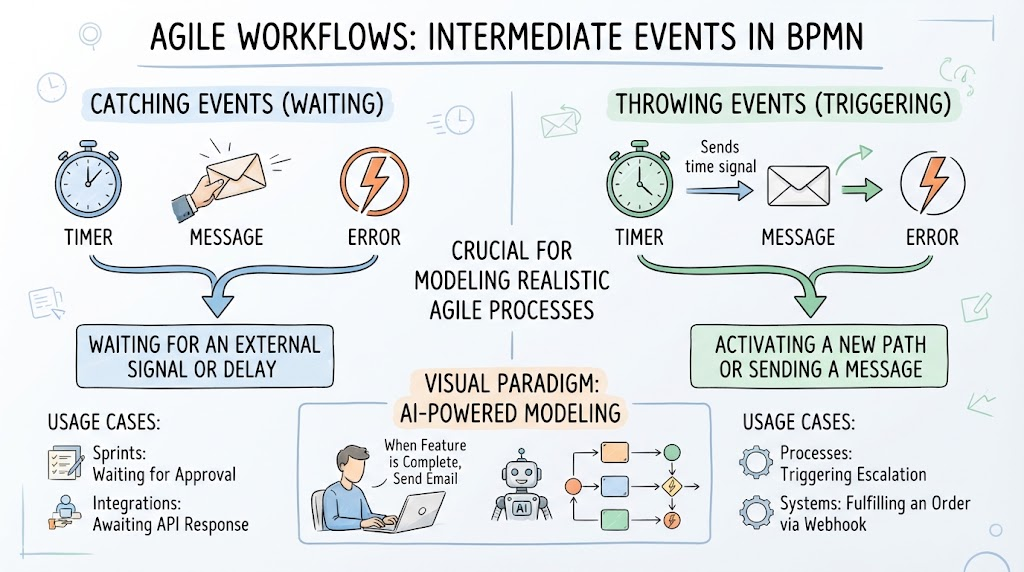
Understanding the Core Concept: Catching vs. Throwing
The fundamental nature of an Intermediate Event determines how it behaves within a workflow. You can visualize this as a two-way street: one side is about receiving input (Catching), and the other is about sending output (Throwing).
1. Catching Events (Waiting)
Catching events represent a state where the process pauses and waits for an external stimulus. The process cannot proceed until this condition is met. Think of these as “hooks” that connect your internal logic to the outside world.
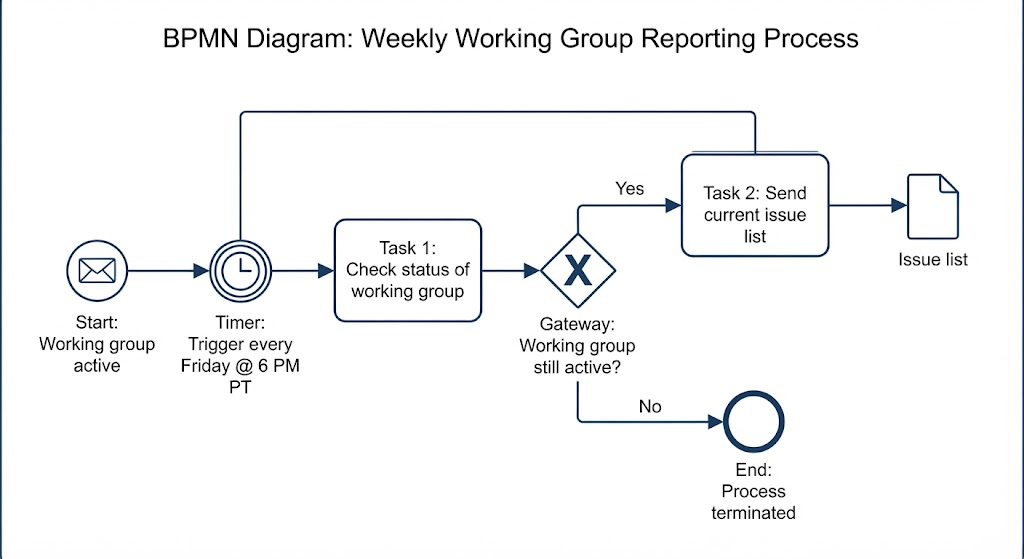
- The Timer: Represents a time-based delay. The process waits for a specific duration or a specific date to pass.
Analogy: A serverless function that wakes up every morning at 9 AM to fetch data.
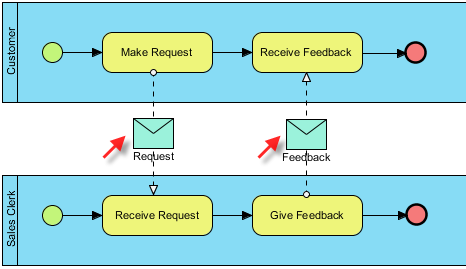
- The Message: Represents the receipt of a message from an external system or user.
Analogy: An email server waiting for a user to reply to a notification.
- The Error: Represents an exception that has occurred. The process catches the error to handle it gracefully rather than crashing.
Analogy: A banking system catching a “Insufficient Funds” error to trigger a retry or alert the user.
2. Throwing Events (Triggering)
Throwing events represent an action taken by the process to affect its environment. They “throw” a signal out into the world to activate a new path or notify a system.
- The Timer: Sends a time signal. This is often used to trigger a deadline or a scheduled notification.
Analogy: Sending a reminder email exactly 3 days before a project deadline.
- The Message: Sends a message to another participant or system.
Analogy: Pushing a status update to a Slack channel when a ticket moves to “Done”.
- The Error: Signals that an error has occurred, potentially triggering a global error handler or alerting a support team.
Analogy: Raising a flag when a critical bug is detected in the build pipeline.
Practical Usage Cases for Agile Teams
Agile workflows are inherently reactive. They respond to user feedback, system status changes, and time constraints. Here is how these events map to real-world Agile scenarios.
Usage Case A: Waiting for Approval (Sprints)
When a developer completes a feature, the process must pause. It enters a Catching Message state, waiting for the Product Owner to approve the code. The process does not move to “Deploy” until that external signal is received.
Usage Case B: Awaiting API Response (Integrations)
When an application needs to fetch data, it sends a request and enters a Catching Timer or Catching Message state. It waits for the external API to respond before calculating the result.
Usage Case C: Triggering Escalation (Processes)
If a task is not completed within 2 days, the system should automatically notify a manager. This is a Throwing Timer event. The process actively “throws” a signal to start a new path of communication.
Usage Case D: Fulfilling an Order (Systems)
Once a payment is verified, the system must inform the warehouse. This is a Throwing Message event. The process sends a webhook to the inventory management system to trigger shipping.
Accelerating Modeling with Visual Paradigm AI
Creating detailed BPMN diagrams can be time-consuming, especially when dealing with complex flows involving multiple intermediate events. This is where Visual Paradigm’s AI-powered modeling transforms the workflow.
Instead of manually dragging and dropping shapes and connecting lines, you can use natural language to describe your process. For example, you can type a prompt like:
“Create a workflow where, when a feature is complete, send an email to the team.”
The AI interprets this narrative and automatically constructs the diagram. It recognizes that:
- The start condition is “Feature is Complete”.
- The action is “Send Email” (a Throwing Message Event).
- The recipients are “The Team”.
This capability allows Agile teams to focus on the logic of the process rather than the syntax of the diagram, significantly speeding up the design and documentation phase.
Conclusion
By mastering Intermediate Events—both Catching and Throwing—you gain the ability to model realistic, resilient, and interactive systems. Whether you are waiting for a user’s response or triggering a webhook to an external service, these events are the heartbeat of your Agile process. With tools like Visual Paradigm, bringing these complex diagrams to life has never been easier.