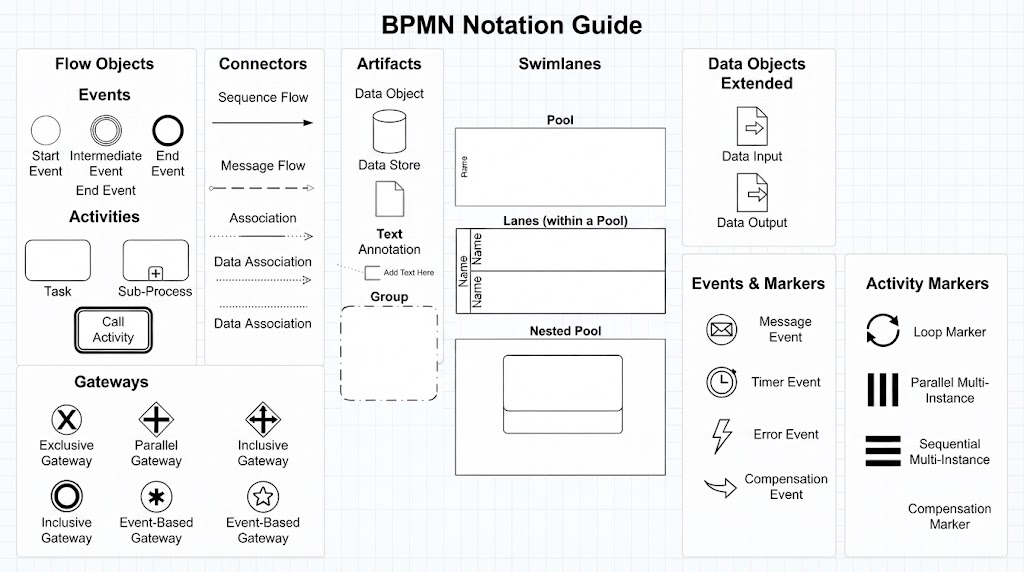
Business Process Model and Notation (BPMN) is the industry-standard graphical notation for specifying business processes in a business process management (BPM) environment. It provides a clear, concise, and easy-to-understand method for modeling business processes.
This guide serves as a comprehensive tutorial on the core elements of BPMN, exploring how to use flow objects, connectors, artifacts, and swimlanes to create effective process diagrams. We will walk through each concept step-by-step, ensuring you have a solid foundation for creating diagrams that drive real business value.
1. Flow Objects: The Heart of Your Process
Flow objects are the primary building blocks of a BPMN diagram. They define what happens in the process and are connected by sequence flows to create a logical workflow.
Events: The Triggers
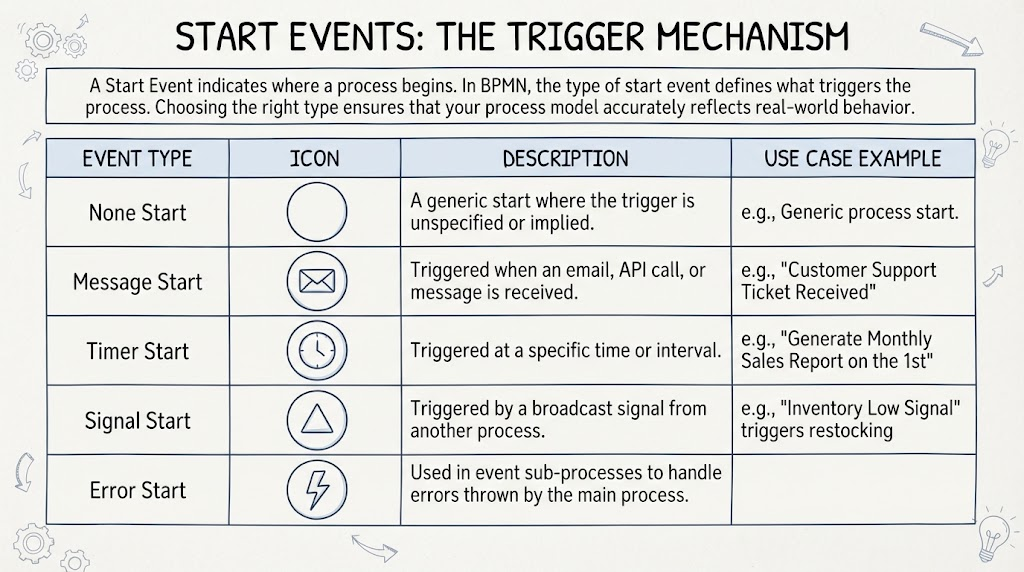
Events are represented by circles and signify something that happens during the process. They are categorized into three types:
- Start Events: These trigger the beginning of a process. Visually, they are depicted as a single thin circle. Example: “Customer submits order.”
- Intermediate Events: These occur between the start and end of a process, such as waiting for a message or a timer. They are shown as a double-line circle. Example: “Payment confirmed.”
- End Events: These mark the completion of a process. They are depicted as a thick double-line circle. Example: “Order shipped.”
Activities: The Work
Activities represent work that needs to be performed. They are depicted as rounded rectangles.
- Tasks: An atomic unit of work that cannot be broken down further. Example: “Verify Customer Identity.”
- Sub-processes: A compound activity that contains its own internal flow. These are shown with a plus sign (+) in the center, indicating they can be expanded. Example: “Process Payment.”
Gateways: The Logic
Gateways are diamond-shaped elements that control the flow of the process by splitting or merging paths based on conditions.
- Exclusive Gateway (XOR): Only one path can be taken. It is represented by an ‘X’ inside the diamond. Example: “Is payment approved? Yes/No.”
- Parallel Gateway (AND): Multiple paths execute simultaneously. It is represented by a ‘+’ sign inside the diamond. Example: “Notify warehouse” AND “Send confirmation email.”
- Inclusive Gateway (OR): One or more paths may be taken based on conditions. It is represented by a circle inside the diamond.
2. Connectors: Linking Your Process
Connectors establish the sequence and communication between flow objects. They are crucial for showing the order of operations and interactions.
Sequence Flow
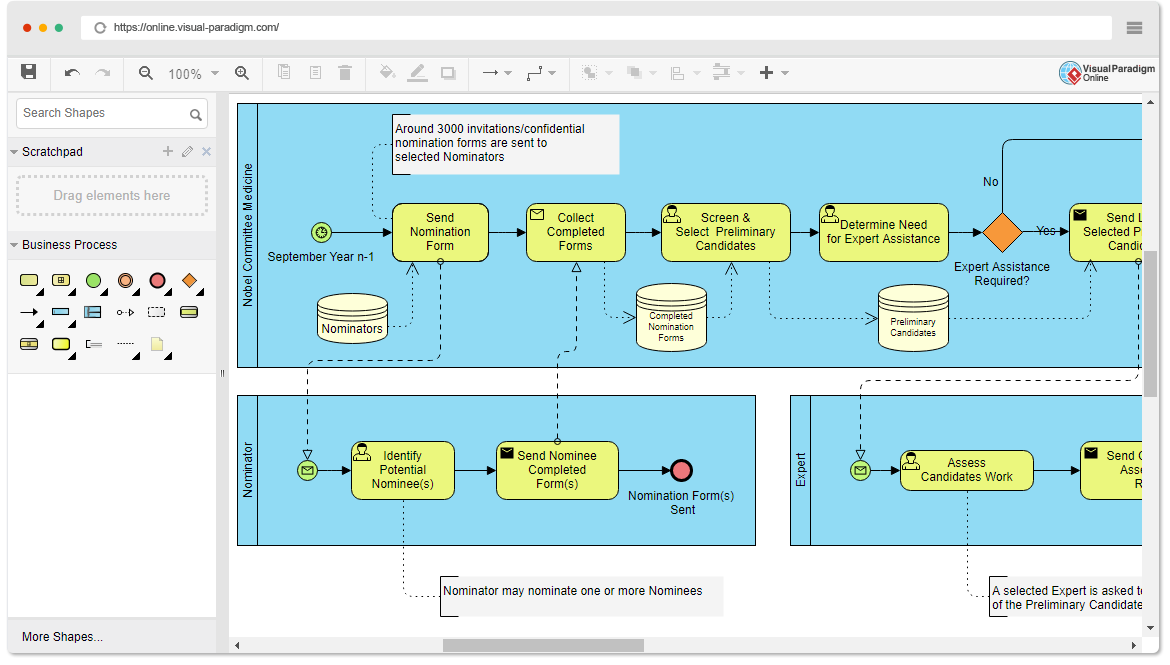
A solid line with a solid arrowhead, Sequence Flow shows the order in which activities are performed within the same pool. Example: “Receive Order” → “Validate Order” → “Process Payment”.
Message Flow
A dashed line with an open circle and arrowhead, Message Flow illustrates communication between different pools (participants). Example: A message from the “Customer” pool to the “Order Processing” pool representing “Submit Order Request”.
Association
A dotted line, Association links annotations or data objects to flow objects without affecting execution. Example: Connecting a data object “Customer Profile” to the “Verify Identity” task.
3. Artifacts: Adding Context
Artifacts provide supplementary information to enhance understanding without changing the execution flow.
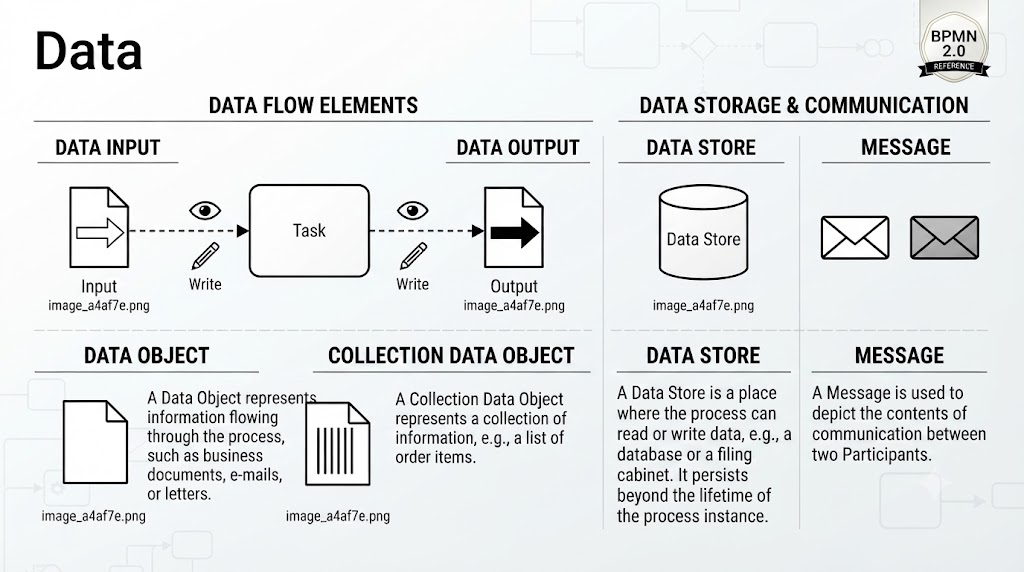
- Data Objects: Represented by a folded paper icon, these show input or output data. Example: An invoice document produced by a task.
- Text Annotation: A bracketed text box that allows designers to add explanatory notes. Example: “Approval required for orders over $5,000.”
- Group: A dashed-dotted rounded box that visually categorizes related activities for better organization.
4. Swimlanes: Defining Responsibilities
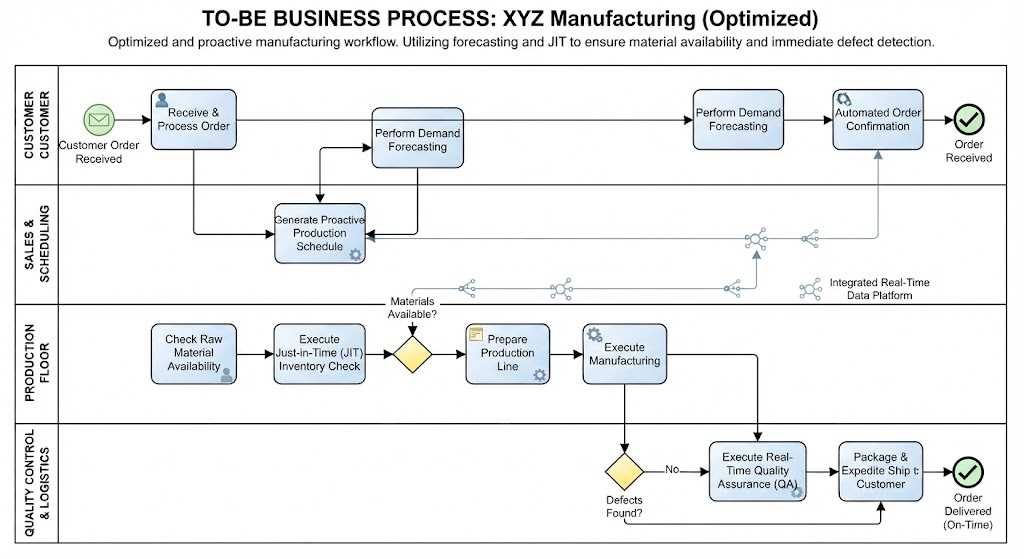
Swimlanes clarify who does what in a process by organizing activities into logical partitions.
Pools
Pools represent independent participants or organizations. Each pool contains its own process flow. Example: A vendor procurement process might have separate pools for “Buying Company” and “Supplier”.
Lanes
Lanes are sub-divisions within a pool that assign activities to specific roles, departments, or systems. Example: Within the “Buying Company” pool, lanes could include “Procurement Team”, “Finance Department”, and “IT System”.
5. Advanced Notations and Markers
Beyond the basic elements, BPMN includes extended notations for more complex scenarios.
Extended Data Objects
- Data Input: Represents data entering a process.
- Data Output: Represents data leaving a process.
- Data Store: Represents a repository for data storage.
Events & Markers
- Message Event: A circle with an envelope icon, indicating a message is sent or received.
- Timer Event: A circle with a clock icon, indicating a time-based trigger.
- Compensation Event: A circle with a curved arrow, indicating a process compensation action.
Activity Markers
- Loop Marker: A circular arrow indicating a task is repeated.
- Parallel Multi-Instance: Three vertical bars indicating a task is performed multiple times in parallel.
- Sequential Multi-Instance: Three horizontal bars indicating a task is performed multiple times in sequence.
By mastering these elements, you can create clear, actionable process diagrams that effectively communicate business logic and drive operational efficiency.