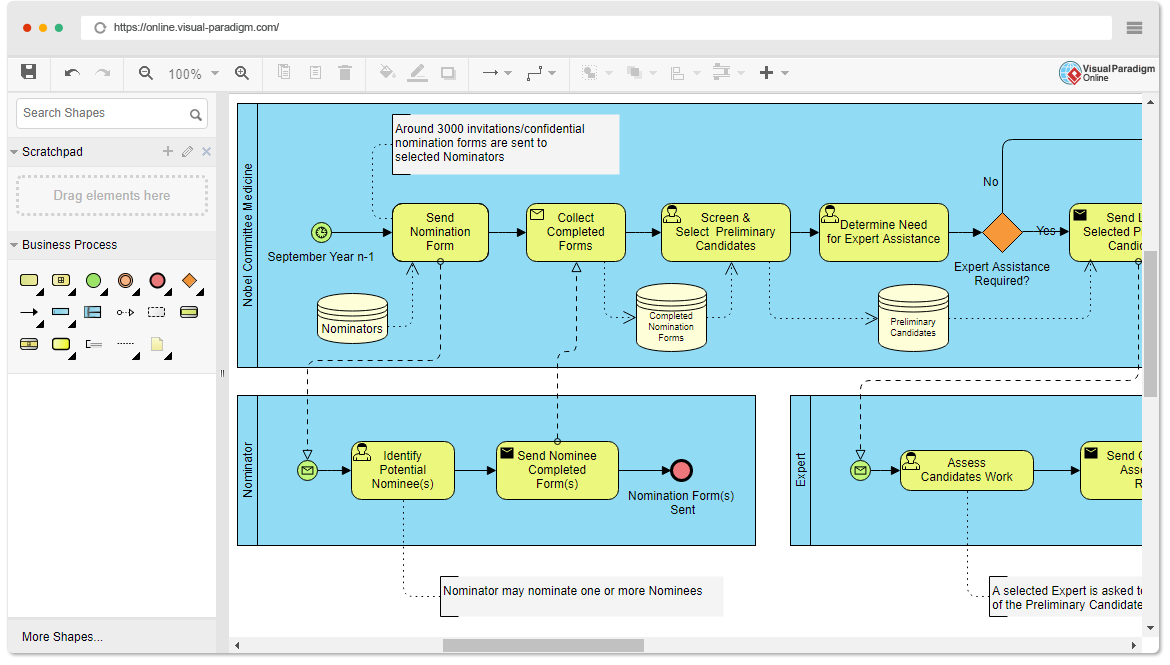
In the world of systems analysis and software engineering, visualizing complex workflows is essential for clarity and efficiency. The screenshot provided displays a sophisticated Business Process Model and Notation (BPMN) diagram created using the Visual Paradigm Online tool. This specific diagram illustrates the intricate, multi-party process of the Nobel Prize in Medicine nomination.
By breaking down this diagram, we can understand how different stakeholders—The Nobel Committee, Nominators, and Experts—interact over time. This tutorial will guide you through the architecture of this diagram, explaining the swimlanes, the flow of data, and the decision-making logic used to model real-world business processes.
1. Understanding Swimlanes: Separating Responsibilities
The most striking feature of this diagram is the use of Swimlanes. In BPMN, a swimlane is a visual container that groups activities by the party responsible for them. Think of a swimlane as a column in a spreadsheet where each row represents a specific actor.
- Nobel Committee Medicine (Top Lane): This is the central orchestrator. They initiate the process, manage the data, and make high-level decisions.
- Nominator (Bottom Left Lane): This represents external agents (scientists or professors) invited to suggest candidates. They act on behalf of the Committee but outside its direct control.
- Expert (Bottom Right Lane): This represents a specialized role. Experts are only brought into the workflow if the Committee determines their specific knowledge is required.
2. The Core Workflow: The Nobel Committee’s Journey
The top swimlane, “Nobel Committee Medicine,” drives the primary timeline of the process. Let’s trace the steps chronologically, starting from the left.
The Initiation and Data Source
The process begins with a green circle icon labeled “September Year n-1”. In BPMN, this is a Start Event. It signifies that the process kicks off in September of the year prior to the award year (Year n).
Immediately following this is the task “Send Nomination Form”. Notice the connection to the Data Store cylinder labeled “Nominators.” This is a crucial modeling concept: the Committee must access a database or list of qualified individuals (the Nominators) before they can send out the invitations.
The Collection and Screening Phase
An annotation box in the diagram clarifies the scale: “Around 3000 invitations/confidential nomination forms are sent to selected Nominators.” This highlights how process modeling handles volume and context.
The workflow moves to the task “Collect Completed Forms”. Here, a dashed arrow connects back to the Nominator lane, indicating that the Committee is waiting for an external input. Once received, the data is saved into a Data Store cylinder labeled “Completed Nomination Forms.”
The next step is “Screen & Select Preliminary Candidates.” This is a filtering process where the Committee reviews the thousands of nominations to find the most promising candidates. The output of this step is saved into a new Data Store: “Preliminary Candidates.”
The Decision Gateway
After screening, the Committee reaches a yellow diamond shape labeled “Determine Need for Expert Assistance.” This is a Exclusive Gateway (or Decision Point).
The diagram asks: “Expert Assistance Required?”
- No: The process ends (implied, though the diagram cuts off).
- Yes: The flow branches to the right, triggering the involvement of the “Expert” swimlane.
3. The Nominator’s Workflow: External Interaction
The bottom-left swimlane, “Nominator,” illustrates the lifecycle of a single nomination form. This lane operates in parallel to the Committee’s main timeline.
- Message Start Event: The green envelope icon indicates that the Nominator’s process begins when they receive a message (the nomination form) from the Committee.
- Identify Potential Nominee(s): The Nominator performs the research to find a candidate. An annotation notes that a “Nominator may nominate one or more Nominees,” adding flexibility to the process model.
- Send Nominee Completed Form(s): The final action is sending the data back. The red circle represents an End Event, marking the completion of the Nominator’s specific task.
4. The Expert’s Workflow: Conditional Assessment
The bottom-right swimlane, “Expert,” is unique because it is not always active. It is only triggered if the Committee answers “Yes” to the decision gateway.
- Message Start Event: Similar to the Nominator, the Expert receives a message (likely the candidate’s work or profile).
- Assess Candidates Work: This is the core value-add activity. An annotation explains: “A selected Expert is asked to assess the work of the Preliminary Candidate.”
- Send Assessment Report: The Expert outputs their findings, which presumably feeds back into the “Preliminary Candidates” data store or the Committee’s decision-making process.
5. Key BPMN Symbols Explained
To create diagrams like this in Visual Paradigm or similar tools, you must master the standard notation:
- Events (Circles): Represent “something that happens.”
- Green Circle: Start Event (Process begins).
- Green Envelope: Message Start Event (Process begins due to receiving a message).
- Red Circle: End Event (Process ends).
- Tasks (Rounded Rectangles): Represent “work to be done.” These are the yellow boxes like “Send Nomination Form” or “Screen & Select.”
- Data Stores (Cylinders): Represent databases or filing cabinets where information is persisted. Notice how the Committee reads from “Nominators” and writes to “Completed Nomination Forms.”
- Gateways (Diamonds): Represent a decision point. The logic here splits the path based on a condition (Expert Assistance Required?).
- Annotations (Rectangular boxes with dotted lines): These provide context and extra information that doesn’t change the flow but helps the reader understand the “Why” and “How” (e.g., the note about 3000 invitations).
Conclusion
This diagram is a perfect example of Contextual Modeling. It doesn’t just show what the Committee does; it shows how they rely on external data (Nominators) and specialized knowledge (Experts) to achieve a goal. By using swimlanes and standard BPMN notation, complex, multi-year processes like the Nobel Prize nomination become understandable, manageable, and auditable.