


In the world of systems engineering and software development, a persistent challenge plagues projects: documentation drift. The moment a diagram is drawn, it begins to age. As the system evolves, the static PDFs and Word documents that were once the “source of truth” become obsolete, leaving engineers guessing and stakeholders confused.
This is where Visual Paradigm OpenDocs steps in. Based on the architectural flow shown in the diagram, OpenDocs is not just a documentation tool; it is a synchronization engine. It transforms rigid, static models into living, contextual knowledge bases. This tutorial will walk you through the three-stage architecture of OpenDocs: Input, Processing, and Output, and explain why this approach is revolutionizing technical communication.
1. The Input: Capturing Static Reality
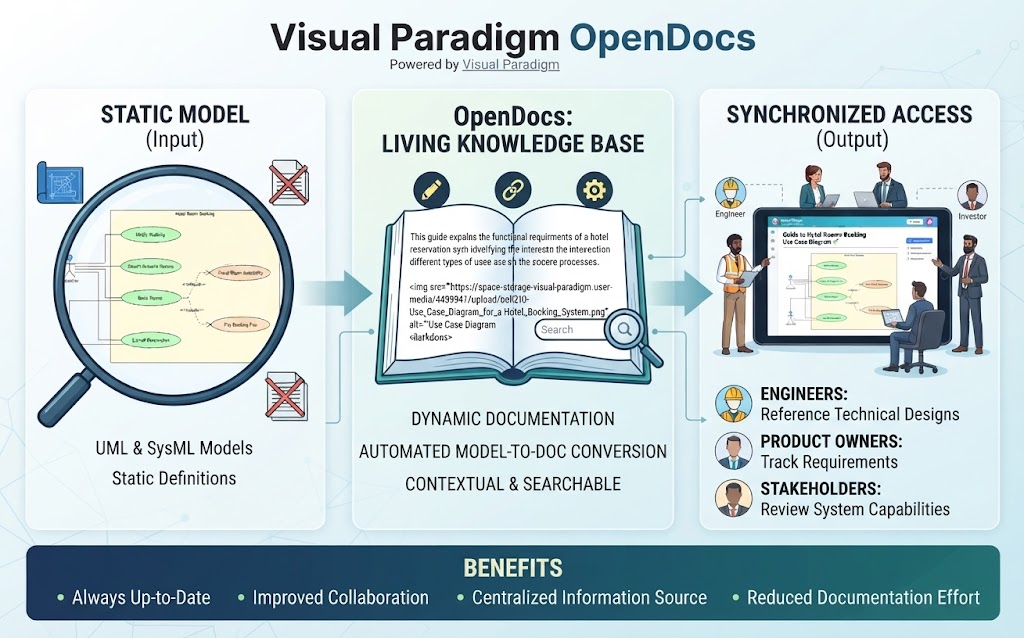
The process begins on the left side of the architecture diagram, labeled “Static Model (Input)”. In traditional workflows, we often start with a blank page. In the OpenDocs ecosystem, the starting point is the UML (Unified Modeling Language) or SysML (Systems Modeling Language) model.
- The Source of Truth: The image shows a magnifying glass focusing on a Use Case Diagram for a “Hotel Room Booking” system. This represents the rigorous definitions of your system—actors, use cases, and relationships.
- Static Definitions: These models are “static” in the sense that they are data structures. They define the rules, the boundaries, and the functional requirements of the software or system.
OpenDocs recognizes that these models are the most accurate representation of the system’s design. Instead of asking engineers to manually re-type requirements into a Word document (a process prone to human error), OpenDocs treats the model as the primary data source.
2. The Engine: The Living Knowledge Base
The heart of the system is the central panel: “OpenDocs: Living Knowledge Base”. This is where the magic of automated model-to-doc conversion takes place.
Imagine an open book, but instead of static text, it is connected to a live database. This section highlights three critical capabilities:
Dynamic Documentation
The documentation is not a snapshot in time. It is a dynamic interface. As you see in the diagram, the book contains text describing functional requirements alongside a generated image tag (<img src="...>). This indicates that the visual diagrams are embedded dynamically. If the underlying UML model changes, the image in the documentation updates automatically.
Contextual & Searchable
OpenDocs doesn’t just dump a whole model onto a page. It structures the knowledge. It extracts specific elements from the model to create a narrative. This makes the documentation searchable, allowing users to find specific requirements or design patterns instantly, rather than scrolling through hundreds of pages of static text.
3. The Output: Synchronized Access
The final stage is “Synchronized Access (Output)”. This panel illustrates the distribution of the documentation to different stakeholders. The key word here is Synchronized.
In traditional workflows, an engineer might send a PDF to a product owner. If the engineer updates the model later, the product owner never sees the update. OpenDocs solves this by providing a centralized web-based portal where everyone sees the current state of the system.
Role-Based Utility
The diagram highlights three distinct user groups, each deriving specific value from the synchronized data:
- Engineers: They use the system to Reference Technical Designs. Instead of hunting for files in a shared drive, they go to the knowledge base to understand the architecture.
- Product Owners: They use it to Track Requirements. They can verify that the system design matches the business requirements without needing to understand the complex syntax of SysML.
- Stakeholders: Investors or managers use it to Review System Capabilities. They get a high-level overview of what the system can do, derived directly from the technical models.
Why This Architecture Matters: The Benefits
The bottom section of the infographic summarizes the tangible benefits of adopting this architecture. By moving from static models to a living knowledge base, organizations achieve:
- Always Up-to-Date: The “Living” aspect ensures that the documentation is never out of sync with the design. If the diagram changes, the documentation changes.
- Improved Collaboration: Because it is web-based, engineers, owners, and stakeholders are all looking at the same “truth.”
- Centralized Information Source: There is no more version control confusion (e.g., “SystemDesignv2_FINAL.docx”). There is only one web link.
- Reduced Documentation Effort: Automation is the key. You stop writing documentation manually and start generating it from your models.
Conclusion
Visual Paradigm OpenDocs represents a shift in how we handle technical information. It moves us away from the era of static, disconnected documents and toward a future where documentation is an active, searchable, and synchronized component of the system design itself. By leveraging the power of UML and SysML models, OpenDocs ensures that knowledge is not just captured, but is constantly alive and accessible.
Related posts:
 Mastering Diagram-as-Code with VPasCode: Architecture, AI, and Workflow
 Mastering Knowledge Management: A Deep Dive into Visual Paradigm OpenDocs & Pipeline Architecture
 Mastering BPMN Swimlanes: A Visual Guide to Process Responsibilities
 Mastering BPMN: A Comprehensive Guide to Process Modeling Elements & Best Practices