


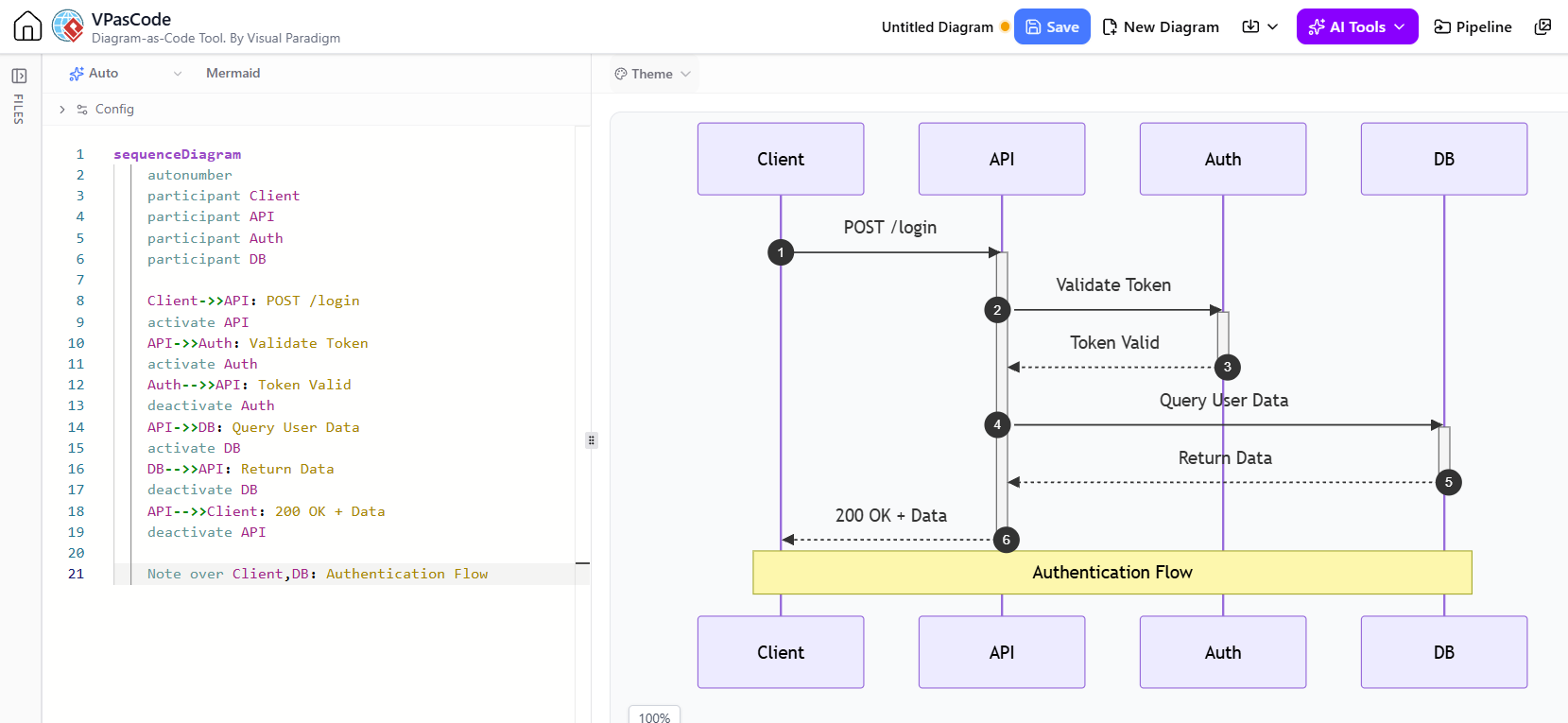
In the realm of software architecture, understanding the dynamic flow of data is just as critical as understanding the static structure. Sequence diagrams are the industry standard for visualizing this temporal behavior, but mastering them requires more than just drawing arrows between boxes. This tutorial explores how to construct sophisticated sequence diagrams using the VPasCode tool, focusing on advanced modeling concepts like activations and notes.
By combining visual modeling with code-as-a-diagram (DaC) principles, developers can create robust documentation that clearly delineates system responsibilities. We will analyze a specific scenario: the Authentication Flow for a login request, breaking down how the Client, API, Auth service, and Database interact.
The Anatomy of a Complex Sequence Diagram
A sequence diagram is essentially a conversation between objects or components. However, to make it “complex” and truly useful for high-level discussions, we must manage the lifecycle of these interactions. This is where the concept of Activation becomes vital.
1. Defining Participants (The Cast of Characters)
Before the action begins, we must define the participants. In our Mermaid syntax, this is the foundation of the diagram. We define four key actors in our system:
- Client: The user interface or application initiating the request.
- API: The entry point for the backend services.
- Auth: The dedicated authentication microservice handling security logic.
- DB: The persistent storage layer retrieving user data.
2. The Interaction Flow (The Script)
The core of the diagram lies in the message passing. In our scenario, the Client sends a POST /login request. This is a synchronous message, indicated by a solid line with an arrowhead. The flow is:
- Client -> API: The request initiates the process.
- API -> Auth: The API delegates the security check.
- Auth -> API: The Auth service returns a boolean or status (Token Valid).
- API -> DB: Once validated, the API queries the database.
- DB -> API: The database returns the user data.
- API -> Client: Finally, the API constructs the response (200 OK).
3. Managing Activations (The Focus of Control)
The most advanced feature in this diagram is the Activation bar (the thin rectangle on the lifeline). An activation bar represents a period during which an object is performing an action or waiting for a response. It visually answers the question: “Who is busy right now?”
In our flow:
- API Activation: The API is “active” from the moment it receives the login request until it sends the final response back to the client.
- Auth Activation: The Auth service is active only during the token validation window.
- DB Activation: The Database is active only while executing the query and returning data.
Without explicit activation/deactivation commands, the diagram would be a flat list of messages. With them, we visualize the nested nature of the process—the API holds the “thread” of execution while it waits for the Auth and DB services to finish their tasks.
Implementing Logic with VPasCode
Using a tool like VPasCode allows us to write this diagram as code. This approach ensures that the diagram is version-controlled and easily editable. Below is the breakdown of the syntax used to achieve this complex flow.
sequenceDiagram
    autonumber
    participant Client
    participant API
    participant Auth
    participant DB

    Client->>API: POST /login
    activate API
    API->>Auth: Validate Token
    activate Auth
    Auth-->>API: Token Valid
    deactivate Auth
    API->>DB: Query User Data
    activate DB
    DB-->>API: Return Data
    deactivate DB
    API-->>Client: 200 OK + Data
    deactivate API
Notice the use of autonumber. This is a powerful configuration option that automatically numbers the messages, making it easier to reference specific steps during code reviews or architecture discussions.
Adding Context with Notes
Complex diagrams can sometimes get cluttered. To maintain clarity without adding noise, we use Notes. A note is a visual container that provides context, explanation, or constraints regarding the interaction.
In our example, a note spans across the Client, API, Auth, and DB lifelines. It labels the entire sequence as an “Authentication Flow.” This is a high-level abstraction that tells the reader, “The block of interactions above this line represents the complete authentication process.”
Note over Client,DB: Authentication FlowThis note syntax (Note over) allows you to span a note across multiple participants, creating a clear visual grouping of the related operations.
Why Code-Based Diagramming Matters
Traditional drag-and-drop diagramming tools often suffer from layout issues and lack of version control. By using VPasCode and Mermaid syntax:
- Consistency: The layout is generated algorithmically, ensuring straight lines and aligned boxes.
- Maintainability: Adding a new participant or step is as simple as editing a line of text.
- Clarity: The separation of logic (code) and rendering (diagram) allows developers to focus on the flow rather than the aesthetics.
Conclusion
Building a sequence diagram is not just about drawing arrows; it is about modeling the lifecycle of a request. By utilizing activations to show who is active and notes to provide context, you transform a simple flowchart into a comprehensive architectural document. Whether you are using VPasCode for AI-assisted generation or writing the code manually, the principles of clear, structured communication remain the same.