


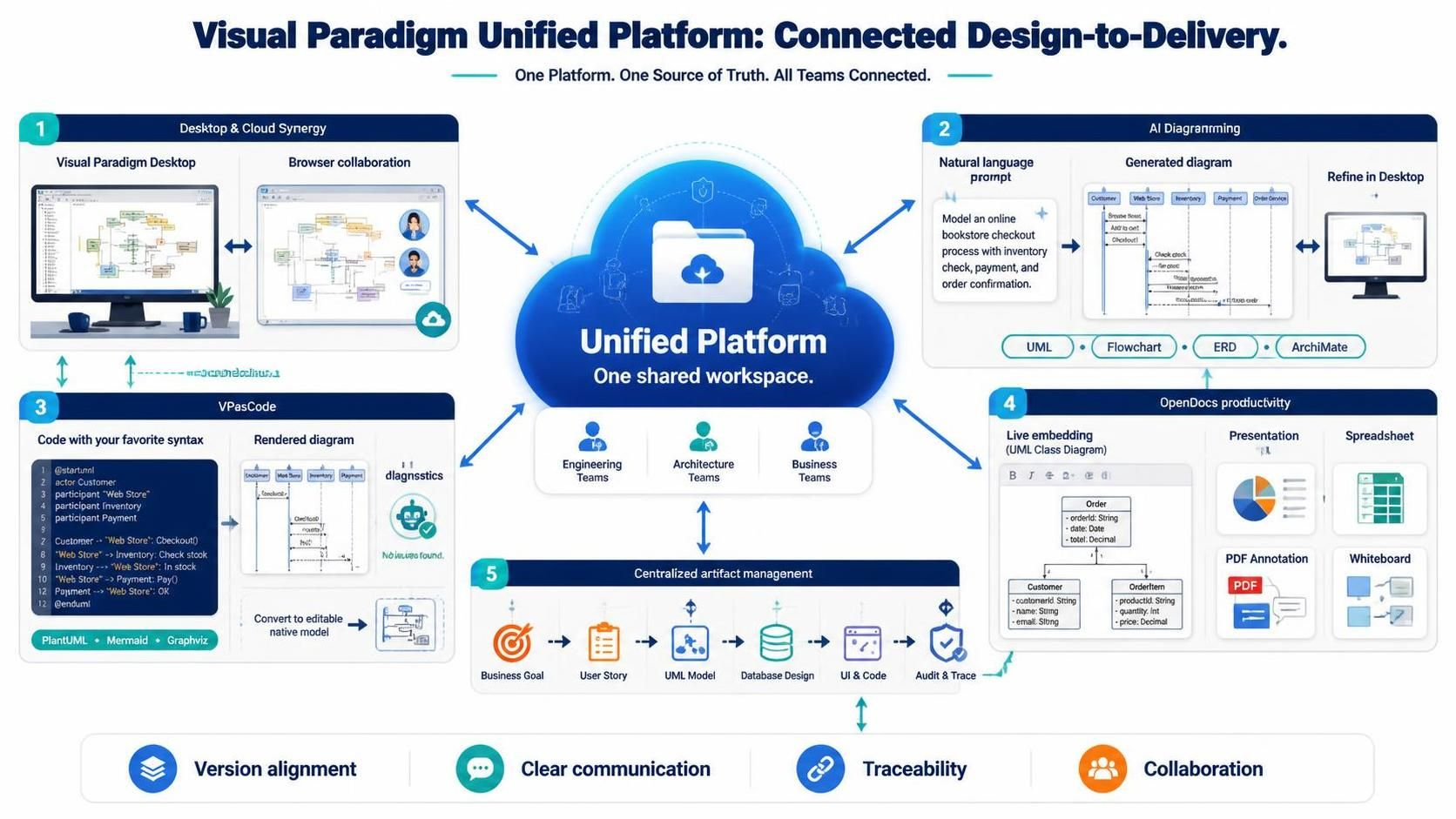
In the modern enterprise landscape, the gap between engineering precision and business agility often leads to fragmented workflows. The Visual Paradigm Unified Platform addresses this by creating a single source of truth that bridges the gap between heavy-duty desktop modeling and lightweight cloud collaboration.
This tutorial explores the five core pillars of this ecosystem, guiding you through the architecture of connected design-to-delivery. We will move from the high-level synergy of desktop and cloud environments to the cutting-edge capabilities of AI-driven diagramming and syntax-based modeling.
1. Desktop & Cloud Synergy: The Centralized Hub
The foundation of the Unified Platform is its ability to dissolve the boundaries between local and remote work. Historically, engineers relied on complex desktop applications for deep modeling, while business stakeholders used browser-based tools for documentation. This separation often resulted in version control nightmares.
The Unified Platform resolves this by acting as a centralized digital hub. It creates a drive-like space accessible via both a browser interface and a desktop menu. This architecture ensures that local projects and cloud assets coexist seamlessly. When you save a project in Visual Paradigm Desktop, it is instantly synced to the cloud, making it available for collaboration without the friction of file transfers.
- Visual Paradigm Desktop: Used for deep, professional modeling requiring heavy computational power.
- Browser Collaboration: Allows stakeholders to view and comment on diagrams in real-time without installing software.
2. AI Diagramming: From Natural Language to Structure
One of the most transformative features of the platform is its integration of Artificial Intelligence for diagram generation. This capability lowers the barrier to entry for complex modeling, allowing users to start with ideas rather than blank canvases.
The workflow follows a “Prompt-to-Diagram” logic. A user provides a natural language prompt describing a process, and the AI engine generates a structured diagram. For instance, a prompt regarding an online bookstore checkout process can automatically generate a sequence of interactions involving customers, inventory checks, and payments.
This approach supports multiple modeling standards:
- UML: For software architecture.
- Flowcharts: For business process mapping.
- ERD: For database schema design.
- ArchiMate: For enterprise architecture.
3. VPasCode: The Power of Syntax-Based Modeling
For developers and technical architects who prefer precision over drag-and-drop, the Unified Platform offers VPasCode. This feature allows users to create diagrams using code, similar to how developers write software. It supports familiar syntaxes like PlantUML, Mermaid, and Graphviz.
The VPasCode environment works on a “Write-Render” loop. You write the logic in a text editor on the left side of the screen, and the diagram renders instantly on the right. This is particularly useful for:
- Version Control: Text files are easy to diff and merge in Git repositories.
- Reusability: You can copy and paste code snippets to generate similar diagrams quickly.
- Diagnostics: The system provides instant feedback on syntax errors, ensuring the model is valid before rendering.
Once the code is finalized, the system can convert the text-based model into an editable native model. This means you can start with code for speed and efficiency, but still gain the ability to drag-and-drop elements later if your requirements change.
4. OpenDocs Productivity: Live Embedding
Modeling should not be an isolated activity. The Unified Platform enables Live Embedding, which allows diagrams to be embedded directly into other productivity tools like presentations and spreadsheets. This ensures that the visual data presented in a meeting is always the latest version from the central hub.
For example, a UML Class Diagram can be embedded into a presentation slide. If the underlying model is updated in the cloud, the presentation automatically reflects those changes. This eliminates the common pitfall of presenting outdated diagrams.
5. Centralized Artifact Management
Finally, the platform unifies the entire lifecycle of a project. It manages artifacts from the initial Business Goal and User Story phases through to UML Models, Database Design, and UI & Code generation.
This centralized management ensures Traceability. You can link a specific business requirement directly to the code that implements it. This creates a clear audit trail, allowing teams to verify that every line of code serves a defined business purpose.
Summary of Benefits
By integrating these five pillars, the Visual Paradigm Unified Platform delivers:
- Version Alignment: Everyone works on the latest data.
- Clear Communication: Visual models bridge the gap between technical and non-technical teams.
- Traceability: End-to-end visibility from concept to code.
- Collaboration: Seamless interaction across engineering, architecture, and business domains.