


In the modern software development lifecycle (SDLC), the gap between high-level architectural modeling and executable code has never been narrower. Visual Paradigm offers a robust ecosystem where you can design complex system architectures visually and then transform those diagrams into code artifacts. A pivotal component of this ecosystem is the integration between Visual Paradigm Desktop, the Pipeline, and VPasCode.
This tutorial explores the specific workflow demonstrated in the provided interface: moving a UML Class Diagram from the desktop environment into the Pipeline. This process is the foundational step for enabling “Diagram-as-Code” capabilities, allowing your visual models to be version-controlled, shared, and converted into programming languages.
Understanding the Architecture: The Pipeline Connection
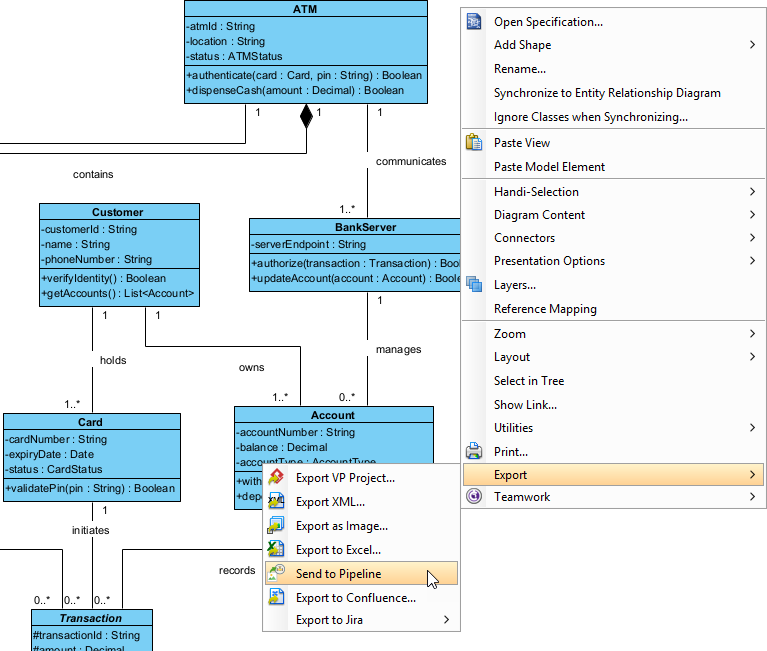
The image provided illustrates a classic Unified Modeling Language (UML) Class Diagram representing a banking system. It includes entities such as ATM, Customer, Card, and BankServer, connected by relationships like “contains,” “owns,” and “manages.” While these visual elements define the structure of the application, they exist in a proprietary format on your local machine.
The “Pipeline” acts as the intermediary bridge. It is a repository that stores artifacts (models, diagrams, code) in a standardized format that is accessible to various tools in the Visual Paradigm suite. By exporting a diagram to the Pipeline, you are effectively “cloudifying” your local model, preparing it for automated processing.
Why Export to Pipeline?
- Centralization: It moves the diagram from a local project file to a central repository.
- Automation: Artifacts in the Pipeline are the inputs for automated code generation tools like VPasCode.
- Collaboration: It allows other team members or build servers to access the specific version of the diagram.
Step-by-Step: The Export Procedure
Based on the interface shown in the image, here is the precise procedure to transfer your diagram into the system.
- Open the Diagram: Ensure the specific Class Diagram (in this case, the Banking System architecture) is open in Visual Paradigm Desktop.
- Access the Context Menu: Move your cursor to the empty background area of the diagram. It is crucial to click on the background rather than a specific box (like the “Customer” class) to ensure the context applies to the entire diagram.
- Navigate the Export Path:
- Right-click to open the context menu.
- Select the Export option.
- From the submenu, select Send to Pipeline.
- Name Your Artifact: A dialog box will appear. The system will likely pre-fill this with the diagram’s current name. Enter a descriptive name for the artifact, such as
BankingSystemModel. - Confirm and Send: Click OK. The system will process the request, and you will see a progress indicator. Once complete, the diagram is stored in the Pipeline.
From Diagram to Code: The VPasCode Integration
Once the diagram is in the Pipeline, the workflow continues into the VPasCode phase. VPasCode (Visual Paradigm as Code) is designed to treat models as text files. This means the diagram you just exported can now be:
- Committed to a Git repository.
- Reviewed via Pull Requests.
- Converted into Java, C#, or other programming languages automatically.
This workflow transforms the “Banking System” from a static image into a living, version-controlled specification. The relationships defined in the image—such as the aggregation between ATM and Customer—are interpreted by VPasCode to generate the corresponding class skeletons and interfaces in your chosen programming language.
Best Practices for Artifact Management
When exporting to the Pipeline, consider the following best practices to ensure smooth integration with VPasCode:
- Consistent Naming: Use clear, camelCase or snake_case naming conventions for your artifacts to avoid issues in code generation.
- Diagram Completeness: Ensure all classes in your diagram have the necessary attributes and methods defined. VPasCode often relies on this metadata to generate valid source code.
- Version Control: Once in the Pipeline, treat the diagram like code. If you make changes to the model, re-export it to update the version in the repository.