


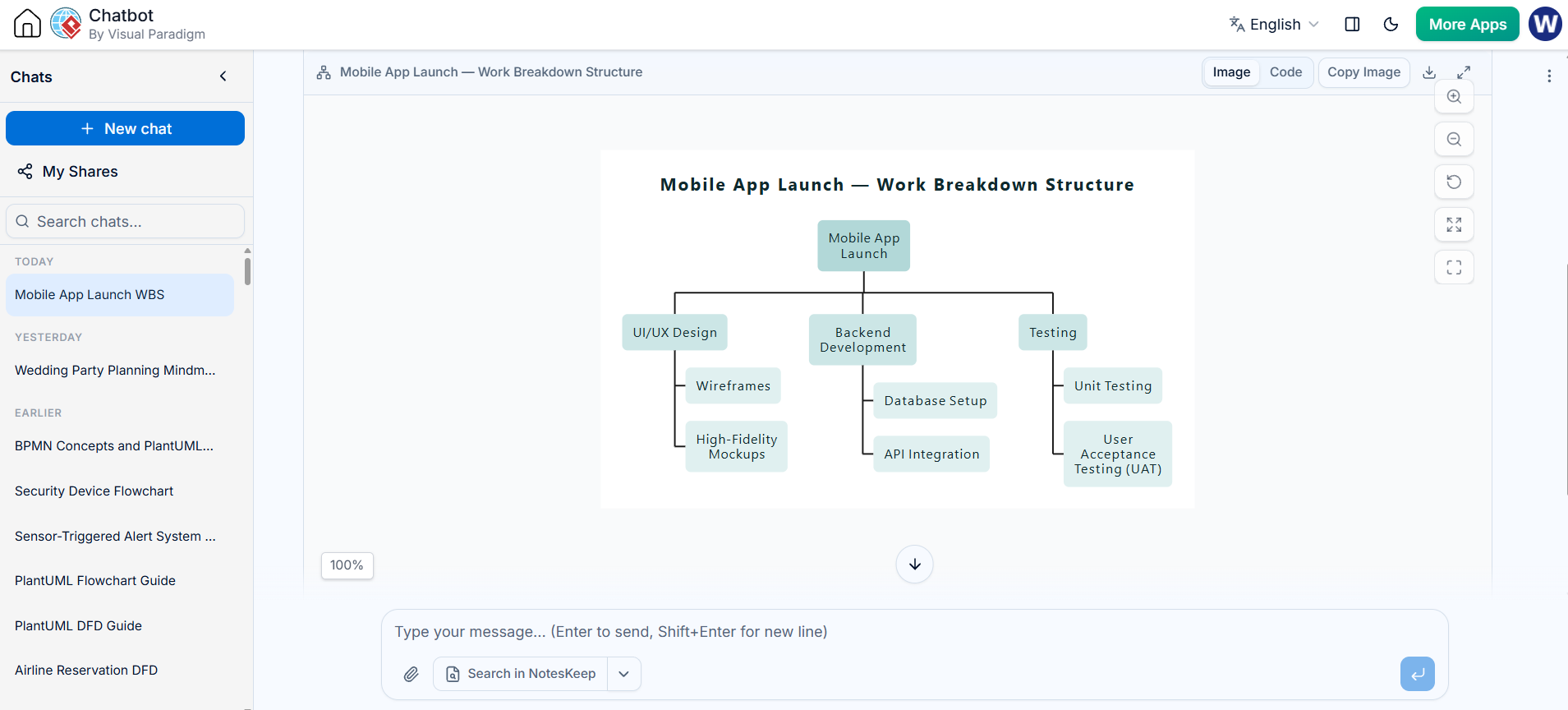
Creating a Work Breakdown Structure (WBS) is the foundational step in project management, transforming a complex project scope into manageable, actionable components. This tutorial explores how to leverage the Visual Paradigm AI Chatbot and the VPasCode tool to generate professional, editable WBS diagrams.
By combining natural language prompts with structured modeling syntax, you can move from high-level ideas to detailed project hierarchies instantly. Below, we break down the theoretical concepts and provide the technical PlantUML syntax used to render the diagram shown in your context.
1. The Core Concepts of WBS
Before generating the diagram, it is crucial to understand the structural rules that govern a valid WBS. A WBS is not merely a list; it is a hierarchical decomposition of the total scope of work.
The Hierarchy
- Level 1: The top-level project deliverable (e.g., “Mobile App Launch”).
- Level 2: Major phases or primary deliverables (e.g., “UI/UX Design”, “Backend Development”).
- Level 3: Sub-deliverables broken down further (e.g., “Wireframes”).
- Work Packages: The lowest level of the WBS, where cost and time are estimated.
Deliverable-Oriented vs. Activity-Oriented
Visual Paradigm’s AI tools prioritize the Deliverable-Oriented approach. This focuses on what is being produced rather than the how (the activity).
- Deliverable-Oriented: “User Login Module” (Focus on the product).
- Activity-Oriented: “Code Login Page” (Focus on the action).
Using a deliverable orientation ensures that scope verification is clear; if a deliverable is missing, the scope is incomplete.
2. The 100% Rule in Modeling
The most critical rule in WBS creation is the 100% Rule. The WBS must include 100% of the work defined by the project scope. If it is not in the WBS, it is not in the project. Conversely, everything in the WBS must be required for the project.
When using VPasCode, the syntax structure enforces this hierarchy. Every node must be properly nested under a parent to maintain the integrity of the project scope.
3. Generating the WBS with VPasCode
The diagram in the provided image was generated using Visual Paradigm’s AI capabilities. The AI interprets natural language requests and translates them into PlantUML code, which is then rendered into a visual chart.
Understanding the PlantUML Syntax
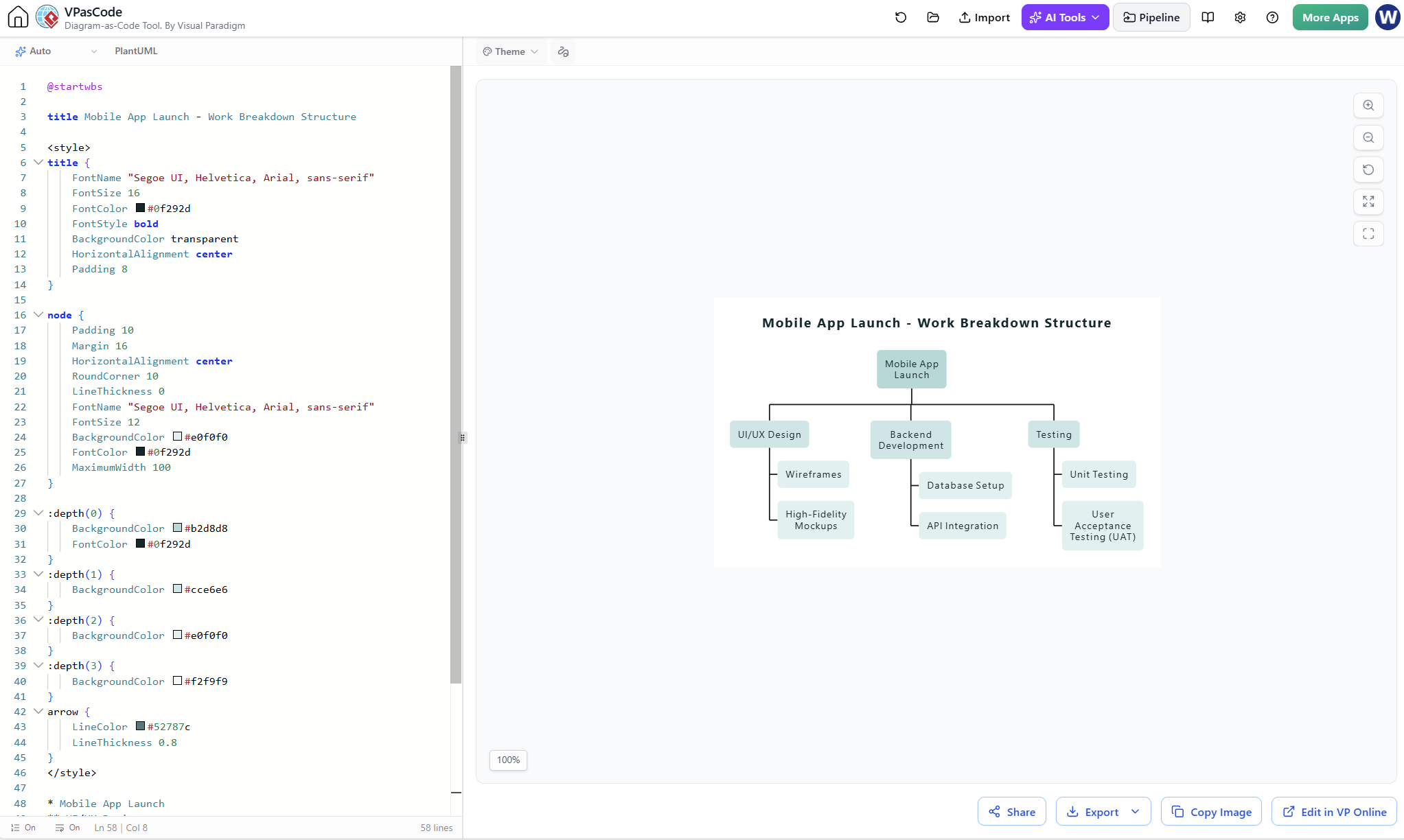
To replicate this structure or modify it, you need to understand the underlying PlantUML syntax for hierarchical diagrams. The code below represents the logic used to generate the “Mobile App Launch” WBS.
@startwbs

title Mobile App Launch - Work Breakdown Structure

<style>
title {
    FontName "Segoe UI, Helvetica, Arial, sans-serif"
    FontSize 16
    FontColor #0f292d
    FontStyle bold
    BackgroundColor transparent
    HorizontalAlignment center
    Padding 8
}

node {
    Padding 10
    Margin 16
    HorizontalAlignment center
    RoundCorner 10
    LineThickness 0
    FontName "Segoe UI, Helvetica, Arial, sans-serif"
    FontSize 12
    BackgroundColor #e0f0f0
    FontColor #0f292d
    MaximumWidth 100
}

:depth(0) {
    BackgroundColor #b2d8d8
    FontColor #0f292d
}
:depth(1) {
    BackgroundColor #cce6e6
}
:depth(2) {
    BackgroundColor #e0f0f0
}
:depth(3) {
    BackgroundColor #f2f9f9
}
arrow {
    LineColor #52787c
    LineThickness 0.8
}
</style>

* Mobile App Launch
** UI/UX Design
*** Wireframes
*** High-Fidelity Mockups
** Backend Development
*** Database Setup
*** API Integration
** Testing
*** Unit Testing
*** User Acceptance Testing (UAT)
@endwbsStep-by-Step Logic Breakdown
- Declaration: The diagram starts with
@startwbsand ends with@endwbs. - Root Node: “Mobile App Launch” is the root of the hierarchy.
- Indentation: In PlantUML WBS, indentation (or tabulation) defines the level of the hierarchy.
UI/UX Designis a Level 2 node (Child of Root).Wireframesis a Level 3 node (Child of UI/UX Design).
- Rendering: The VPasCode tool parses this text and automatically draws the connecting lines and boxes, ensuring the visual representation matches the text structure.
4. Best Practices for AI-Assisted Modeling
When working with the VP Chatbot, clarity in your prompt is key. Since the AI generates the PlantUML code for you, you don’t need to memorize the syntax, but you should ensure your terminology is precise.
Example Prompt Strategy: “Create a WBS for a Mobile App Launch. Break it down into UI/UX Design, Backend Development, and Testing. Under Design, include Wireframes and Mockups. Under Testing, include Unit Testing and UAT.”
Conclusion
By utilizing Visual Paradigm’s AI integration, you can streamline the WBS creation process. This ensures that your project scope is broken down logically, adhering to the 100% rule and maintaining a clear, deliverable-oriented structure.