Introduction to Web-Based Modeling
Welcome to this tutorial session on modern modeling tools. When we talk about software engineering or system design today, the barrier to entry has never been lower. You don’t need a high-performance workstation anymore; you just need a browser. In this lesson, we will explore the “Free Tier” of Web-Based Visual Paradigm Online, understanding what it offers and who benefits most from it.
Understanding the License Model
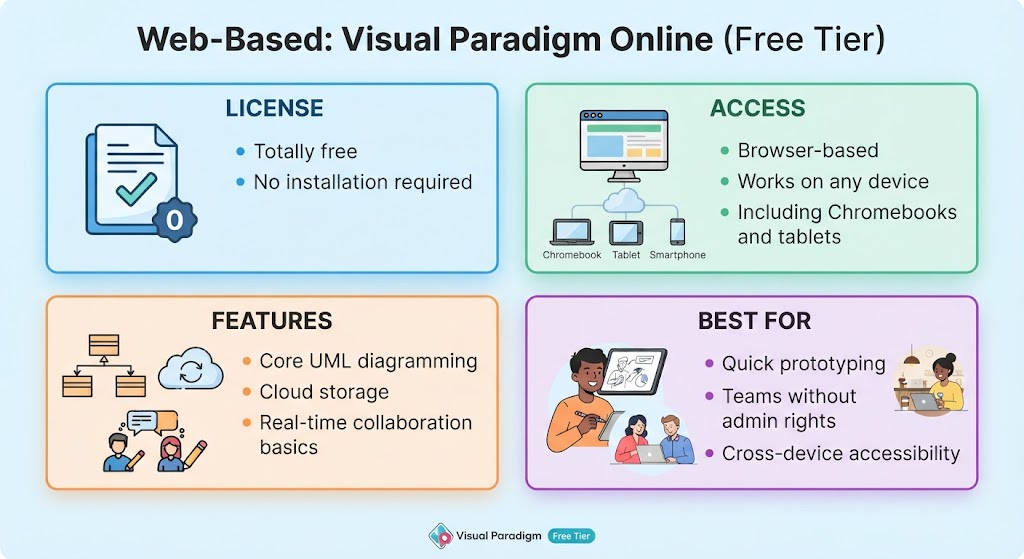
Let’s start with the basics: the cost and setup. One of the biggest hurdles in adopting new software is the financial commitment and the time spent configuring it. The visual guide highlights that this specific tier is Totally Free. This means there are no hidden fees for accessing these core capabilities.
Furthermore, it emphasizes that there is No Installation Required. Think of this as the ultimate convenience feature. Whether you are at home, in a library, or traveling, you simply log in, and you are ready to work. There are no complex installers to run or licenses to activate locally.
Access Anywhere, Any Device
The second pillar of this platform is its accessibility. We often find ourselves needing to review a diagram or make a quick edit while away from our primary desktop computer. The infographic illustrates that this tool is Browser-based.
This creates a unified experience across all your devices. Whether you are using a standard laptop, a tablet, or even a smartphone, the interface adapts to fit the screen. Specifically, it notes compatibility with Chromebooks. For educational institutions where students might only have access to lightweight web browsers, this cross-device capability ensures that everyone can participate equally in the learning process.
Core Capabilities: What Can You Build?
You might wonder if a free, web-based version lacks power compared to desktop versions. Let’s look at the features provided:
- Core UML Diagramming: You get access to the essential tools needed to draw Unified Modeling Language (UML) diagrams. This includes class diagrams, sequence diagrams, and use cases—fundamental tools for any developer.
- Cloud Storage: Your work is saved automatically to the cloud. This eliminates the fear of losing data due to a local hard drive crash.
- Real-time Collaboration Basics: Perhaps the most powerful feature here is the ability to work together. Multiple users can view or edit the model simultaneously, which is crucial for group projects or team brainstorming sessions.
Ideal Scenarios for Use
So, when should you reach for this specific version of the tool? Based on the “Best For” section of the diagram, there are three distinct user groups:
- Quick Prototyping: If you have an idea and want to sketch out a structure immediately without setting up a full project environment, this is perfect.
- Teams Without Admin Rights: In many corporate environments, employees cannot install new software on their machines due to security policies. Since this runs in a browser, it bypasses those restrictions entirely.
- Cross-Device Accessibility: As mentioned earlier, if your workflow involves switching between a phone and a laptop frequently, this ensures continuity.
Summary of Key Learnings
To wrap up this tutorial, let’s recap the essentials of the Web-Based Visual Paradigm Free Tier. It provides a zero-installation, cost-free solution for creating professional UML diagrams. Its strength lies in its accessibility across all devices—including Chromebooks—and its built-in collaboration tools. It is particularly valuable for quick prototyping and for users working in restricted IT environments where installing software isn’t an option.