Understanding BPMN Compensation: When Things Go Wrong After They’ve Gone Right
Welcome to this tutorial session on Business Process Model and Notation (BPMN). Today, we are diving into a critical concept that often trips up process designers: Compensation. In real-world business scenarios, things rarely go 100% according to plan. Often, a process starts successfully, only to fail at the very last step. How do we handle that? We use compensation to “undo” the work that was already done.
The Scenario: E-Commerce Order Processing
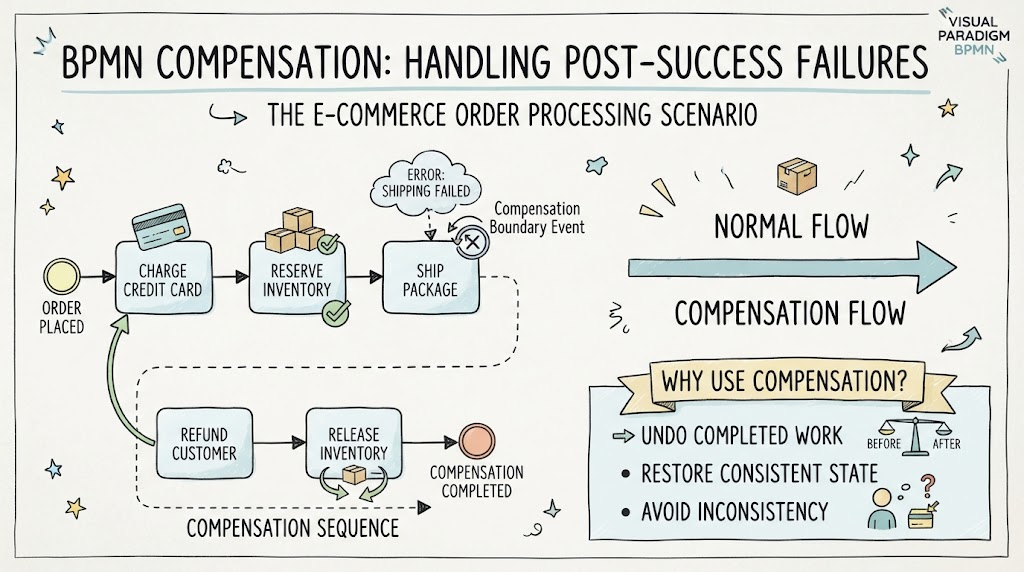
Let’s look at a concrete example provided in our visual guide: an e-commerce order processing scenario. Imagine a customer places an order. In the Normal Flow, the system performs a sequence of successful actions:
- Charge Credit Card: The customer’s payment is processed.
- Reserve Inventory: The warehouse system marks the items as sold and reserved for this specific order.
- Ship Package: The logistics team prepares the box for delivery.
This is the ideal path where everything works as intended. However, let’s introduce a realistic problem. What happens if the shipping carrier loses the package? The diagram illustrates this with a cloud labeled “Error: Shipping Failed.” This failure occurs after the money has been taken and the inventory has been reserved.
The Mechanism: The Compensation Boundary Event
This is where the magic of BPMN compensation comes into play. Notice the circle with an ‘X’ inside attached to the “Ship Package” task. This is a Compensation Boundary Event. It acts as a safety net. It tells the process engine: “If this specific task fails, do not just stop the process. Trigger a special recovery sequence.”
Without this event, the process would simply terminate in an error state, leaving the customer charged for nothing and the inventory locked away. The compensation event ensures we have a plan for recovery.
Executing the Compensation Sequence
Once the “Shipping Failed” error is detected, the system follows the dashed line at the bottom of the diagram, known as the Compensation Flow or Compensation Sequence. This is essentially a set of “undo” operations designed to restore the system to a consistent state before the order was placed. The sequence includes:
- Refund Customer: The system automatically initiates a refund to the credit card used in the first step. This reverses the financial transaction.
- Release Inventory: The system updates the warehouse management system to make the items available for sale again. This reverses the inventory reservation.
Once these steps are complete, the process reaches the “Compensation Completed” state, effectively canceling the transaction cleanly.
Why Use Compensation?
You might wonder why we don’t just delete the order or ignore the failure. The diagram highlights three vital reasons for using compensation:
- Undo Completed Work: Some actions, like charging a credit card, cannot be magically reversed by a system restart. They require specific counter-actions (like a refund).
- Restore Consistent State: If we charge the card but don’t refund it because of a shipping failure, the customer’s account and the company’s ledger would be out of sync.
- Avoid Inconsistency: By releasing the inventory, we ensure that other customers can actually buy the items we thought were reserved but never shipped.
In summary, BPMN compensation is your safety net. It allows complex business processes to fail gracefully, ensuring that even when the last step doesn’t go right, the previous steps are cleaned up properly, maintaining the integrity of your business data.