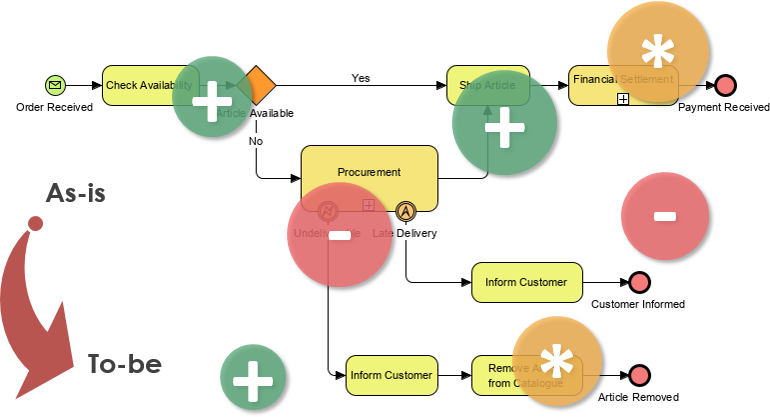
Mastering Process Transformation: From As-Is to To-Be
Welcome to this comprehensive tutorial on process modeling. In the world of business management and IT, success often depends on understanding not just where you want to go, but strictly analyzing where you currently stand. Today, we will demystify the concepts of As-Is and To-Be processes, explore the power of Business Process Diagrams, and learn how to use Visual Paradigm to bridge the gap between your current reality and your future goals.
Defining the Current and Future States
To improve a business, you must first understand its mechanics. This starts with two distinct perspectives:
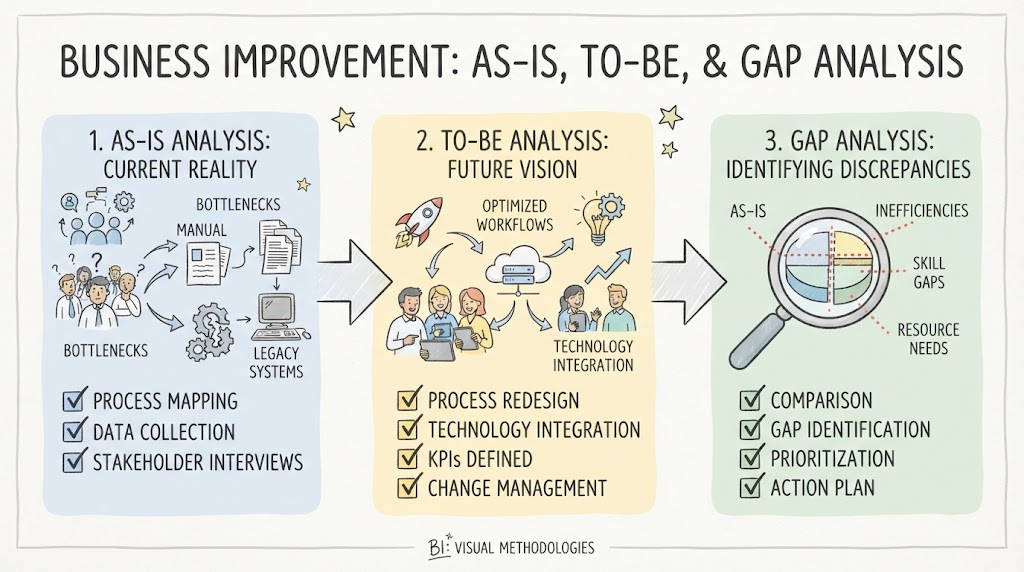
- The As-Is State: This represents the “now.” It is an accurate, unbiased documentation of how a process actually operates today, including all its inefficiencies, workarounds, and manual steps. It is the baseline of truth.
- The To-Be State: This is the future state. It describes how the process should operate after improvements, optimizations, or digital transformations have been applied.
The journey between these two states is defined by the Gap Analysis. A gap refers to the space between where you are (the present state) and where you want to be (the target state). By measuring metrics such as time, money, and labor in the As-Is state and comparing them to the To-Be targets, management can create a concrete action plan to fill these performance gaps.
The Language of Business: BPMN
How do we communicate these complex changes to stakeholders? We use a universal language. Business Process Modelling Notation (BPMN) is the industry standard for business process modeling. It supports the specification of business processes in a graphical notation known as a Business Process Diagram (BPD).
Based on the concept of activity diagrams from UML, BPMN provides businesses with the capability of understanding their internal procedures visually. This ensures that all stakeholders—whether they are business analysts, IT professionals, or executives—can communicate effectively. It enables organizations to deal with changes clearer, quicker, and better.
Practical Tutorial: Modeling Process Transformation
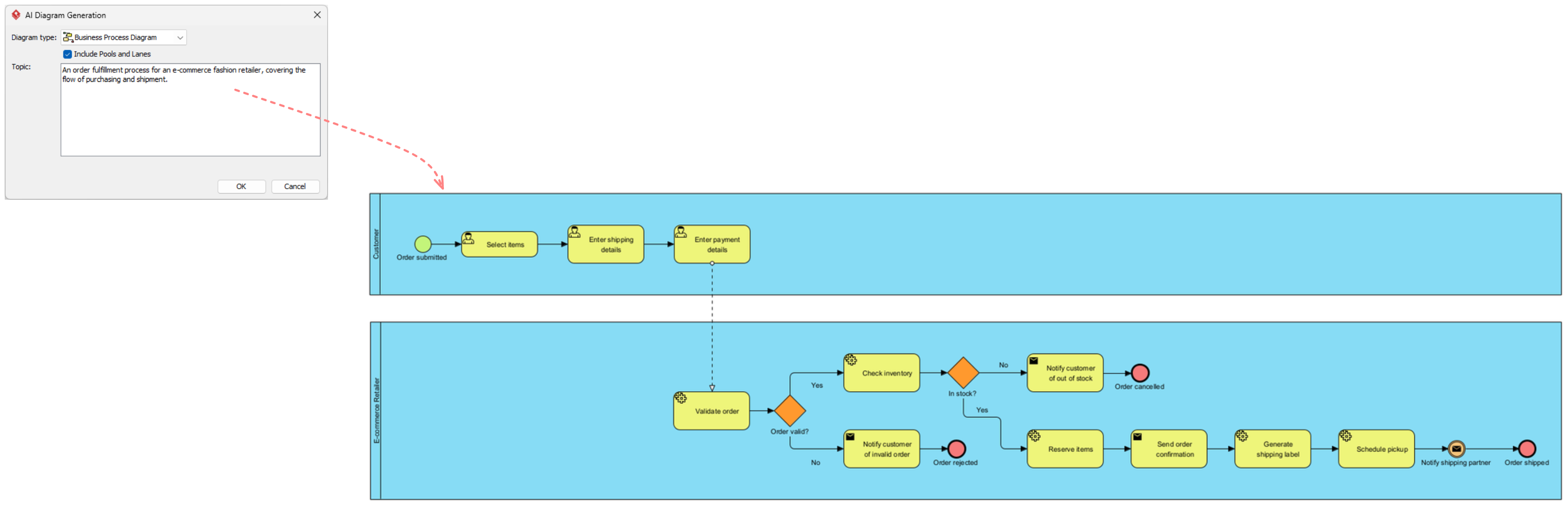
To truly grasp these concepts, let’s walk through a practical example using Visual Paradigm. We will model a simplified “Order Fulfillment” process, moving from a manual As-Is state to an automated To-Be state.
Step 1: Modeling the As-Is State
Let’s assume your company currently handles orders manually. An order comes in via email, a staff member checks stock in an Excel file, and if stock is low, they manually call a supplier. This is slow and prone to error.
Using Visual Paradigm to capture the As-Is:
- Open Visual Paradigm: Launch the tool and select a new BPMN 2.0 project.
- Select the Palette: On the left-hand side, locate the BPMN palette. You will see categories like Events, Activities, and Gateways.
- Drag and Drop:
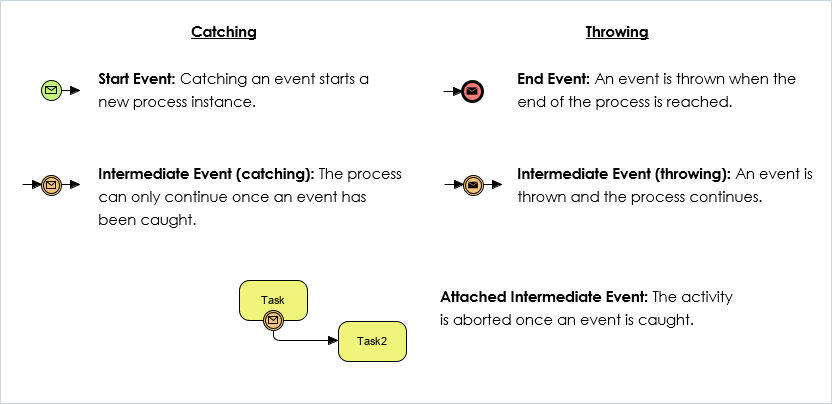
- Drag an Start Event (Envelope icon) labeled “Order Received”.
- Connect it to a Task labeled “Check Stock via Email”.
- Add a Exclusive Gateway” (Diamond shape) to represent the decision point: “Is Stock Available?”.
- If “No”, draw a path to a User Task labeled “Call Supplier”.
- Review: Notice how Visual Paradigm automatically aligns your elements. You now have a visual representation of the current pain points.
Step 2: Identifying the Gap
Once your As-Is diagram is complete, you analyze it. You might notice that the “Call Supplier” step adds 2 days to the process. This is your Gap. The gap is the inefficiency you must close.
Step 3: Designing the To-Be State
Now, let’s design the future. We want to automate the stock check and the supplier notification.
Refining with Visual Paradigm:
- Copy the Diagram: Duplicate your As-Is diagram to keep a record, then start editing for the To-Be state.
- Replace Manual Tasks with Automation:
- Replace “Check Stock via Email” with a Service Task (Airplane icon) labeled “Query ERP System”. This implies an automated system call.
- Replace “Call Supplier” with another Service Task labeled “Auto-Generate PO”.
- Optimize the Flow: In the As-Is state, you might have had a manual approval step. In the To-Be state, you can change this to a Script Task that automatically approves orders under $500, removing a bottleneck.
- Visualize the Improvement: Visual Paradigm allows you to add annotations or labels. You can label the new Service Tasks as “Automated” to clearly distinguish them from the manual User Tasks.
Using Visual Paradigm for Advanced Gap Analysis
Visual Paradigm goes beyond simple drawing; it offers tools specifically designed for the Gap Analysis described in our context.
Visualizing Differences
One of the most powerful features in Visual Paradigm is the ability to compare two versions of a process. You can overlay your As-Is and To-Be diagrams. The tool can highlight the differences—showing you exactly which tasks were removed, which were added, and which were modified. This visual “Gap” analysis is invaluable for presenting to stakeholders.
Metrics and Simulation
Don’t just guess your improvements. Visual Paradigm allows you to attach Key Performance Indicators (KPIs) to your tasks.
- As-Is Metrics: Assign a duration of “15 minutes” to the manual check.
- To-Be Metrics: Assign a duration of “2 seconds” to the automated check.
By running a simulation, the software will calculate the total time saved across the entire process, giving you hard data on the value of your transformation.
Usage Cases for As-Is / To-Be Modeling
Understanding these concepts is critical in several business scenarios:
- Business Process Reengineering (BPR): When an organization needs a radical overhaul of its operations, mapping the As-Is and To-Be states is the first step to identifying what needs to be scrapped and what needs to be built.
- IT System Implementation: Before installing new software (like SAP or Salesforce), companies model the To-Be process to ensure the software can actually support the desired workflow. The As-Is model helps define the data migration requirements.
- Compliance and Auditing: Auditors often require an As-Is model to verify that current processes comply with regulations. The To-Be model helps plan for future compliance standards.
- Organizational Change Management: When merging two companies, the As-Is models of both entities are compared to create a unified To-Be process.
Conclusion
Transitioning from the As-Is state to the To-Be state is the essence of business improvement. It requires a clear understanding of current operations, a vision for the future, and the tools to bridge the gap. By utilizing BPMN and leveraging the robust capabilities of Visual Paradigm, you can move beyond abstract theories and create concrete, actionable roadmaps for your organization’s success.
Remember, the goal is not just to draw a pretty picture, but to facilitate clear communication, identify inefficiencies, and drive measurable performance improvements.