In the world of Business Process Management Notation (BPMN), understanding how different entities interact is just as critical as understanding how tasks happen within a single entity. This tutorial dives deep into one of the most powerful yet misunderstood elements of BPMN: the Message Flow. Using a real-world example of a medical appointment process, we will break down how to model communication between distinct participants.
What is a Message Flow?
A Message Flow represents the communication or exchange of information between two distinct process participants. Imagine two separate organizations, or perhaps two different departments within a large company, trying to coordinate a task. Unlike internal process steps, these interactions happen “outside” of your immediate control.
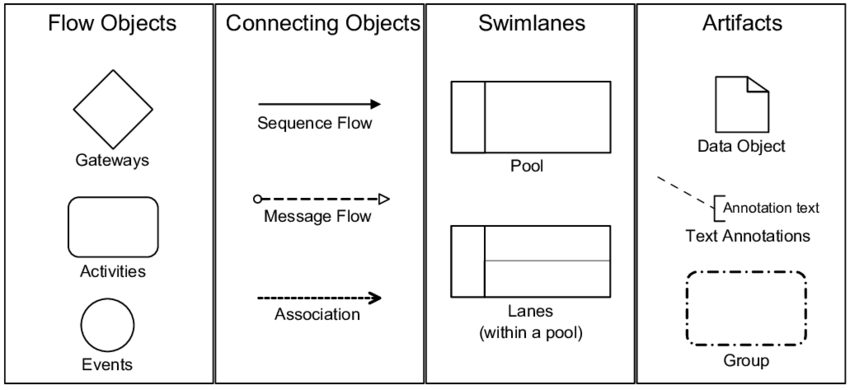
Visually, a Message Flow is depicted as a dashed line with an open arrowhead. It signifies the transmission of data, such as sending an email, making an API call, or physically handing over a document.
Anatomy of a Collaborative Process
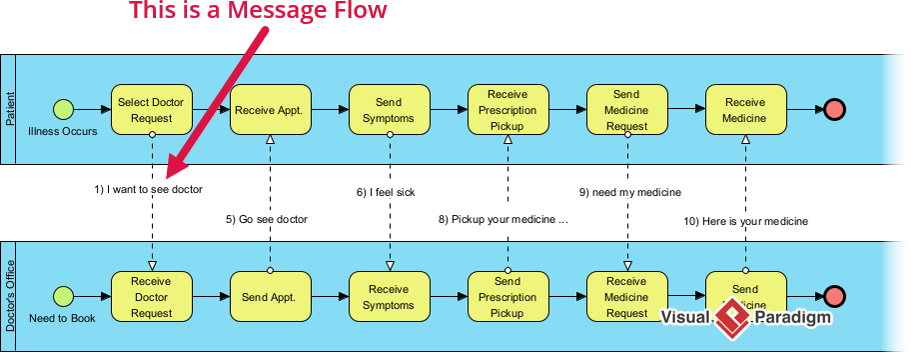
To understand Message Flows, we must first understand the containers that hold them: Pools. In the diagram provided, we see two distinct blue areas called Pools:
- The Patient Pool: Represents the external entity initiating the process.
- The Doctor’s Office Pool: Represents the service provider receiving the request.
These Pools act as boundaries. A sequence flow (the solid black line with a closed arrowhead) cannot cross from one Pool to another. When a process needs to “talk” across that boundary, we must use a Message Flow.
Case Study: The Medical Appointment Workflow
Let’s walk through the specific interactions shown in the diagram. This process illustrates a collaborative workflow where a patient seeks medical help.
1. Initiating the Contact
The process begins on the left side. The Patient encounters an illness (the green start circle) and performs the task “Select Doctor Request”. This internal action triggers a message flow across the boundary to the Doctor’s Office.
The dashed line connecting these two tasks is labeled “1) I want to see doctor”. This text bubble represents the actual payload of the message—the content being communicated.
2. The Exchange Cycle
The process continues as a back-and-forth dialogue. Notice how the flow alternates between the two pools:
- Step 5: The Doctor’s Office sends a confirmation message “Go see doctor” back to the Patient.
- Step 6: The Patient performs a task “Receive Symptoms” and sends a new message “I feel sick” to the doctor.
- Step 8: The Doctor sends a prescription message “Pickup your medicine…”.
3. Receiving the Outcome
Finally, the process concludes with the exchange of the medicine itself. The Patient sends a “need my medicine” request, and the Doctor’s Office sends the final confirmation “Here is your medicine”.
Message Flow vs. Sequence Flow
It is a common beginner mistake to confuse Message Flows with Sequence Flows. Here is the technical distinction you must remember:
- Scope: Sequence Flows occur inside a single Pool. Message Flows connect different Pools (or elements inside different pools).
- The Token: This is the most critical technical difference. A Sequence Flow carries a “process token”—a virtual marker that indicates the process is actually moving forward. A Message Flow does not carry a token. It merely signifies that information has been sent. If the doctor never receives the email, the Patient’s process doesn’t necessarily stop; it just waits.
Pro Tip: Modeling with AI Assistants
When using modern AI tools to generate BPMN diagrams, precision is key. AI models often struggle to distinguish between internal logic and external communication. To get the best result, be explicit in your prompts.
Try this specific prompt:
Include Message Flows between the Customer Pool and the Vendor Pool to show order requests and confirmations. Ensure the dashed lines connect the two separate pools to represent external communication.
By specifying “Message Flows” and defining the “Pools,” you ensure the AI understands that you are modeling a collaborative system, not just a linear internal workflow.
Conclusion
Mastering Message Flows allows you to model complex, real-world scenarios where multiple stakeholders are involved. By clearly distinguishing between what happens inside an organization (Sequence Flow) and what happens between organizations (Message Flow), you create diagrams that are not just technically accurate, but also clear and actionable for all business participants.