


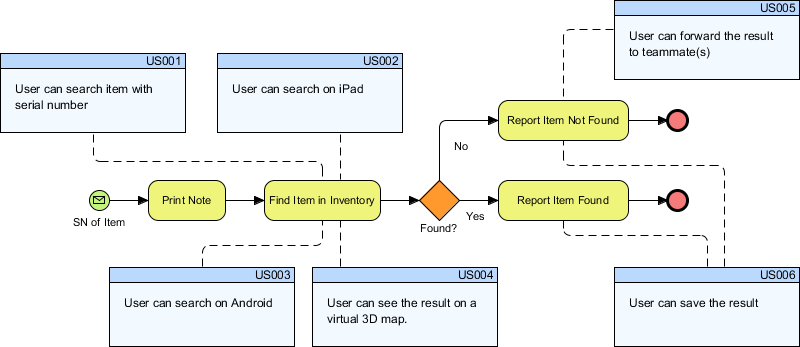
In modern software development, a common friction point exists between the “process” view of a system (how things work) and the “agile” view (what features are being built). Business Process Model and Notation (BPMN) diagrams often become static documentation artifacts that are ignored once the design phase is over. However, in an Agile environment, these models must be living parts of the development lifecycle.
This tutorial explores a specific implementation of Agile Integration using Visual Paradigm. We will analyze a system architecture diagram that links a central business process directly to specific User Stories (US), demonstrating how a single process model can drive multiple development backlogs across different platforms.
Understanding the Core Process: The “Find Item” Workflow
At the center of the provided diagram is a standard BPMN workflow representing a logistics or inventory check process. Let’s break down the technical elements of this flow:
- Start Event (Green Envelope Icon): The process is triggered by the input of an SN of Item (Serial Number).
- Task (Yellow Rounded Rectangle): The first action is Print Note, followed by the critical task Find Item in Inventory.
- Exclusive Gateway (Orange Diamond): The process encounters a decision point labeled Found?. This splits the logic into two paths based on whether the item exists in the database.
- Task (Yellow Rounded Rectangle):
- If Yes, the system proceeds to Report Item Found.
- If No, the system proceeds to Report Item Not Found.
- End Events (Red Circles): Both paths converge on a termination state, signaling the completion of the transaction.
The Agile Integration: Linking Process to User Stories
The true power of this diagram lies in the dashed lines connecting the BPMN tasks to the blue User Story boxes. This visual linkage represents the “Agile Integration” feature of Visual Paradigm. It ensures that every step in the business process is explicitly mapped to a user requirement.
1. Input and Platform Agnosticism (US001, US002, US003)
Notice how the first task, Print Note, is linked to US001: “User can search item with serial number”. This establishes the baseline requirement.
However, look at the second task, Find Item in Inventory. It has three dashed lines connecting to it:
- US002: “User can search on iPad”
- US003: “User can search on Android”
- US001: (Implicitly linked as the base requirement)
This architecture demonstrates that the logic (Find Item in Inventory) is universal, but the implementation is split into specific Agile stories based on the device the user is using. This allows developers to work on the iPad app (US002) and Android app (US003) simultaneously while contributing to the same core process step.
2. The “Yes” Path: Enriching the User Experience (US004, US005, US006)
When the item is found (the “Yes” path from the gateway), the process moves to the task Report Item Found. This is a complex task that supports three distinct value-added features:
- Visualization (US004): “User can see the result on a virtual 3D map.” This implies the system integrates a mapping service to show the item’s location.
- Collaboration (US005): “User can forward the result to teammate(s).” This adds a communication layer to the inventory check.
- Persistence (US006): “User can save the result.” This ensures the data is archived for future reference.
Why This Architecture Matters
This diagram solves the “silo” problem in software development. Without this integration, the BPMN model might sit in a folder, while the User Stories sit in a Jira board. By visually connecting them:
- Traceability: Stakeholders can immediately see which User Stories contribute to which part of the business process.
- Completeness: If a process step (like Report Item Found) has no User Stories attached, it indicates a gap in requirements.
- Living Documentation: As the team develops US004 (3D Map), the BPMN model updates. The diagram is no longer a snapshot of the past; it is a real-time view of the current development status.
By using tools like Visual Paradigm to synchronize workflow components into user stories, teams ensure that their process models remain relevant, accurate, and directly tied to the value being delivered to the end-user.
Related posts:
 Understanding Mortgage Application Flows with BPMN
 Mastering BPMN Collaboration: A Guide to Cross-Platform Modeling with Visual Paradigm Online
 Mastering BPMN Markers: A Technical Deep Dive into E-Commerce Order Fulfillment
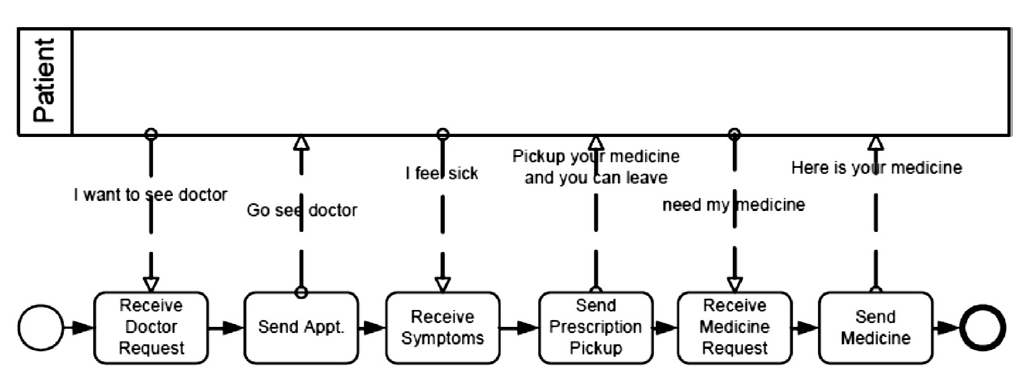 Mastering BPMN Public Processes: An Architectural Guide to External Interfaces