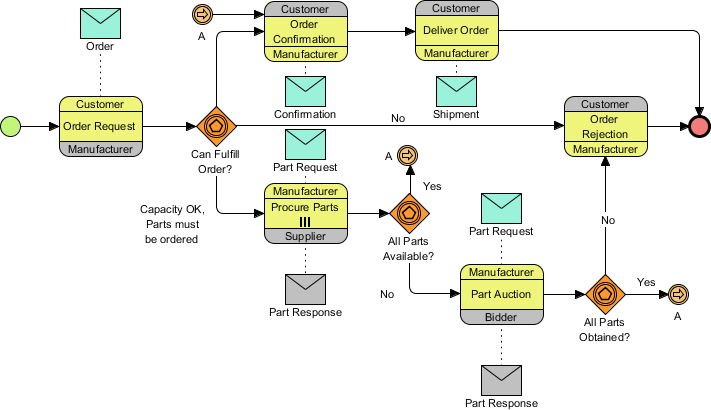
In the world of business process management, understanding how different organizations interact is just as critical as understanding internal workflows. This is where BPMN 2.0 Choreography Diagrams shine. Unlike standard flowcharts that focus on a single entity’s internal tasks, choreography diagrams visualize the dance between multiple participants.
The diagram presented here is a sophisticated example of a supply chain interaction involving a Customer, a Manufacturer, a Supplier, and a Bidder. It demonstrates a complex “Order Fulfillment” process where parts must be procured, auctioned, and verified before an order can be delivered.
Understanding the Architecture: The Participants
Before diving into the logic, we must identify the “dancers” in this choreography. In BPMN, these are represented as Participant Pools (though simplified here as lanes or swimlanes). Each box represents a distinct organization or role:
- Customer: The initiator of the process. They place the order and await delivery.
- Manufacturer: The central hub. They assess feasibility, procure parts, manage auctions, and handle delivery.
- Supplier: A partner providing standard parts to the Manufacturer.
- Bidder: An external entity involved in an auction process for specific parts.
Step-by-Step Process Analysis
Let’s walk through the lifecycle of this order, breaking down the logic flow from start to finish.
Phase 1: The Request and Feasibility Check
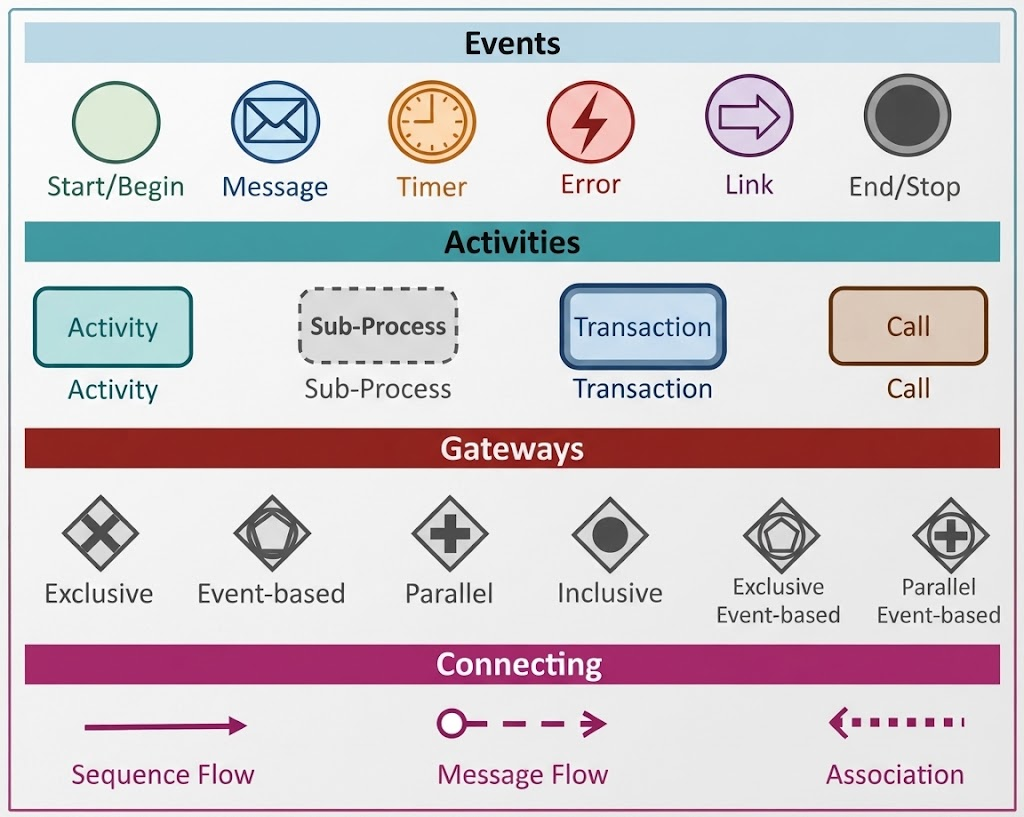
The process begins on the far left with a Start Event (the green circle). The Customer initiates the interaction by sending an Order Request message to the Manufacturer.
Upon receiving the request, the Manufacturer enters a decision point represented by a Gateway (the diamond shape): Can Fulfill Order?. This is a critical business rule check.
- The “No” Path: If the Manufacturer cannot fulfill the order (perhaps due to capacity constraints), the flow moves to the Order Rejection activity. The Customer receives this rejection, and the process terminates at the End Event (the red circle).
- The “Yes” Path: If the order is feasible, the text annotation “Capacity OK, Parts must be ordered” indicates that while the order is possible, the Manufacturer needs to source specific components.
Phase 2: Procurement and Inventory Checks
Assuming the order is viable, the Manufacturer engages in Procure Parts. This involves a message exchange with the Supplier:
- The Manufacturer sends a
Part Request. - The Supplier responds with a
Part Response.
Immediately following the response, the Manufacturer checks a second gateway: All Parts Available?
- Looping Mechanism (Path A): If the answer is No, the flow follows the sequence flow labeled A back to the
Part Request. This creates a retry loop, ensuring the Manufacturer keeps asking the Supplier until the parts are secured. - Progression: If the answer is Yes, the Manufacturer proceeds to the next phase.
Phase 3: The Auction Process
Some parts may require a bidding process. The Manufacturer initiates a Part Auction activity, communicating with a Bidder.
- The Manufacturer initiates the auction.
- The Bidder sends a
Part Response(likely a bid or availability confirmation).
This triggers the final decision gateway: All Parts Obtained?
- Looping Mechanism (Path A): If the answer is No (e.g., the bid was rejected or parts unavailable), the flow loops back via A to the Part Auction, restarting the bidding process.
- Success: Once the answer is Yes, the Manufacturer has all necessary components.
Phase 4: Delivery and Closing
With parts secured, the Manufacturer executes the Deliver Order activity. This initiates a final handshake between the Manufacturer and the Customer:
- Deliver Order: The Manufacturer sends the order details to the Customer.
- Order Confirmation: The Customer acknowledges receipt of the delivery details.
- Shipment: The Manufacturer sends the physical shipment (or shipping confirmation) to the Customer.
Once the shipment is confirmed, the process reaches the End Event, signifying a successful transaction.
Technical Deep Dive: Key BPMN Concepts
To truly master this diagram, you must understand the specific symbols used to convey complex logic.
1. Message Flows (Dashed Lines)
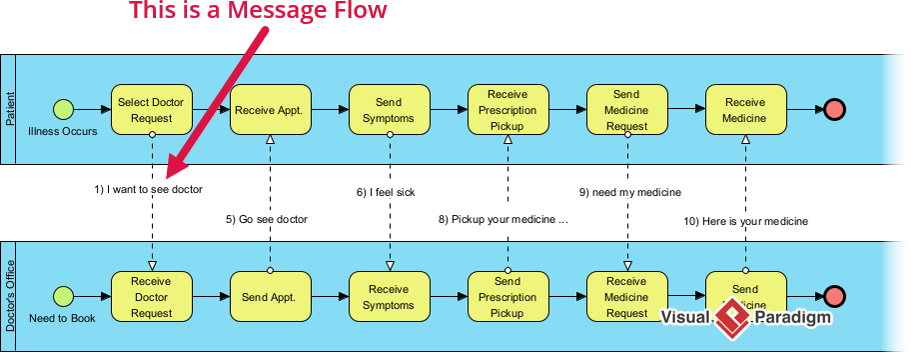
Notice the lines connecting different participants are dashed. In BPMN, this represents a Message Flow. It indicates that information is being passed between different organizations (or pools), rather than a simple internal task sequence.
2. Gateways (Diamonds)
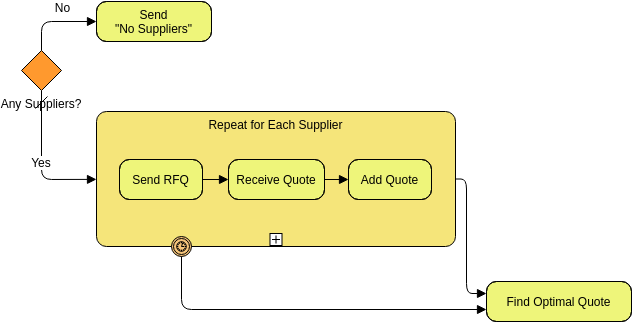
The orange diamonds are XOR Gateways (Exclusive Gateways). They represent a decision point where only one path can be taken.
- Can Fulfill Order?
- All Parts Available?
- All Parts Obtained?
3. Sequence Flow Loops (The “A” Connector)
The arrow labeled A is a Sequence Flow loop. It is a powerful modeling technique that allows you to visualize a “retry” mechanism without drawing a massive, messy circle. It tells the reader: “If this condition is not met, go back to step A and try again.”
Conclusion
This Choreography Diagram is more than just a picture; it is a contract of interaction. It clearly defines who says what to whom, under what conditions, and what happens when things go wrong (like parts not being available). For Business Analysts and Architects, mastering this notation is essential for designing robust, resilient supply chains where multiple independent entities must work in perfect sync.