


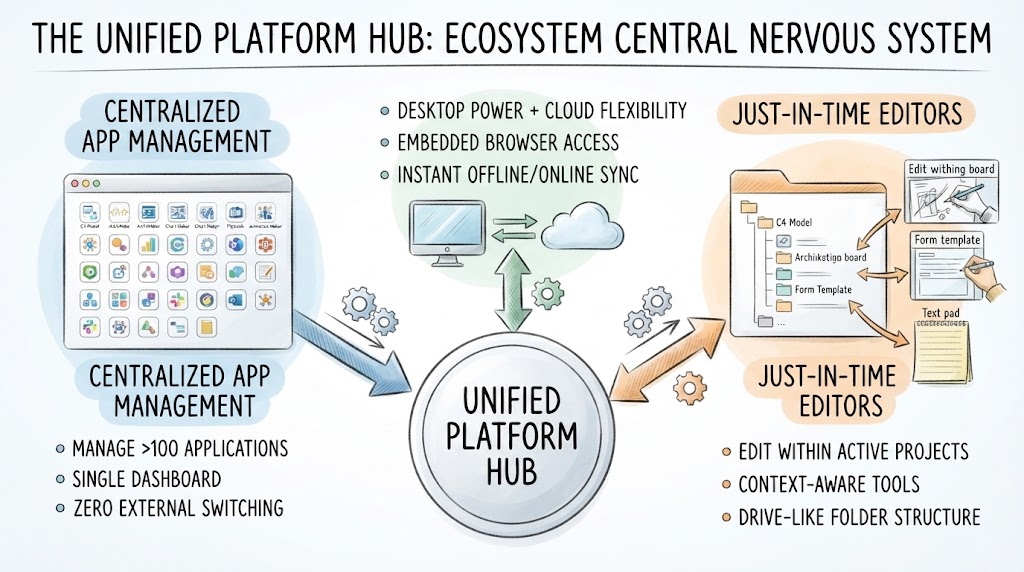
In the modern landscape of software development and systems engineering, the fragmentation of tools is a common bottleneck. Teams often find themselves toggling between disparate applications for modeling, coding, and documentation. The Unified Platform Hub represents a paradigm shift in how these tools interact, serving as the central nervous system of the entire ecosystem. This tutorial explores the architectural design of this hub, breaking down how it unifies over 100 applications into a cohesive, streamlined workflow.
1. The Core Architecture: A Centralized Nervous System
At the heart of the system lies the Unified Platform Hub. In architectural terms, this is the central orchestrator. Rather than a loose collection of standalone tools, the platform is designed as a single, integrated environment. The diagram illustrates this hub as the gravitational center that pulls all other functionalities into alignment.
The primary goal of this architecture is to eliminate the “silo effect.” Instead of data residing in isolated applications, the Hub ensures that diverse tools—from rigorous SysML modeling to flexible sketching—work in harmony. This allows the ecosystem to adapt to the specific needs of different stakeholders, whether they are system architects defining complex models or product managers sketching user journeys.
2. Centralized Application Management
The left side of the architecture diagram highlights the concept of Centralized App Management. This feature addresses the complexity of managing a large suite of tools. The architecture achieves this through three key mechanisms:
- Single Dashboard Control: The platform manages more than 100 distinct applications under a single interface. This means users do not need to navigate a cluttered menu system to find the right tool; they are all accessible from one view.
- Zero External Switching: This is a critical design principle. Users can find, create, or alter elements within a single, drive-like folder structure. There is no need to launch separate executables or switch between disparate file systems.
- Unified Context: By keeping everything in one place, the system maintains the context of the project, ensuring that data integrity is preserved across the different modeling languages (such as PlantUML or SysML) used within the suite.
3. Just-In-Time Editors: Context-Aware Tooling
On the right side of the architecture, we see the implementation of Just-In-Time Editors. This is an innovative approach to user interface design that prioritizes workflow continuity over rigid tool separation.
How It Works
Instead of forcing a user to leave their current project to open a generic drawing board or text pad, the platform “pulls up” the necessary editor right inside the active project context. This creates a seamless experience similar to editing a document directly within a folder view.
Key Components
- Context-Aware Editing: The tools adapt to the current task. If you are working on a C4 model, the editors available are optimized for that specific diagram type.
- Drive-Like Folder Structure: The visual interface mimics a file explorer. You can see a hierarchy of projects (e.g., “Archikitecto board,” “Form Template”) and interact with them directly.
- Versatile Input Modes: The system supports various input types simultaneously, including casual drawing boards, structured forms, and text pads, all accessible without leaving the workspace.
4. Desktop & Web Synergy: The Hybrid Approach
The top-center section of the diagram illustrates the Desktop & Web Synergy. This architectural feature bridges the gap between the performance of native desktop applications and the accessibility of cloud-based collaboration.
- Embedded Browser Access: The desktop software does not merely launch a website; it opens the platform through an embedded browser. This ensures a native-feeling experience while retaining web capabilities.
- Instant Synchronization: The architecture supports a hybrid workflow where local offline work and cloud data synchronize instantly. This provides the “best of both worlds”: the robust processing power required for complex modeling tasks and the flexibility to collaborate in real-time.
- Seamless Transition: Users can start a session on their desktop, continue it in the browser, and have their data updated everywhere without manual file transfers or version conflicts.
Conclusion: A Future-Ready Foundation
The Unified Platform Hub is more than just a dashboard; it is a comprehensive architectural solution designed to streamline the entire software development lifecycle. By integrating AI chatbots, specialized web apps, and a unified file structure, the Visual Paradigm ecosystem reduces the barrier to entry for complex modeling.
For organizations, this architecture translates to:
- Improved documentation accuracy through a single source of truth.
- Better collaboration between technical teams (developers, architects) and non-technical stakeholders.
- A future-ready foundation where visual designs are living components of the development process, not static images.
Whether you are managing Git scripts or sketching user journeys, this ecosystem adapts to your workflow, ensuring that your tools serve you, rather than the other way around.
Related posts:
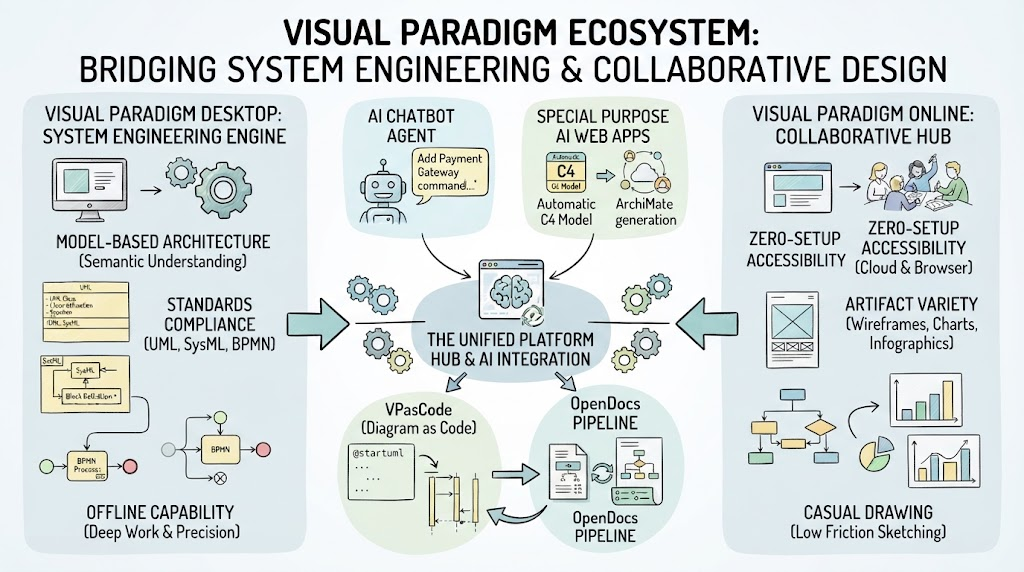 Mastering the Visual Paradigm Ecosystem: Bridging System Engineering & Collaborative Design
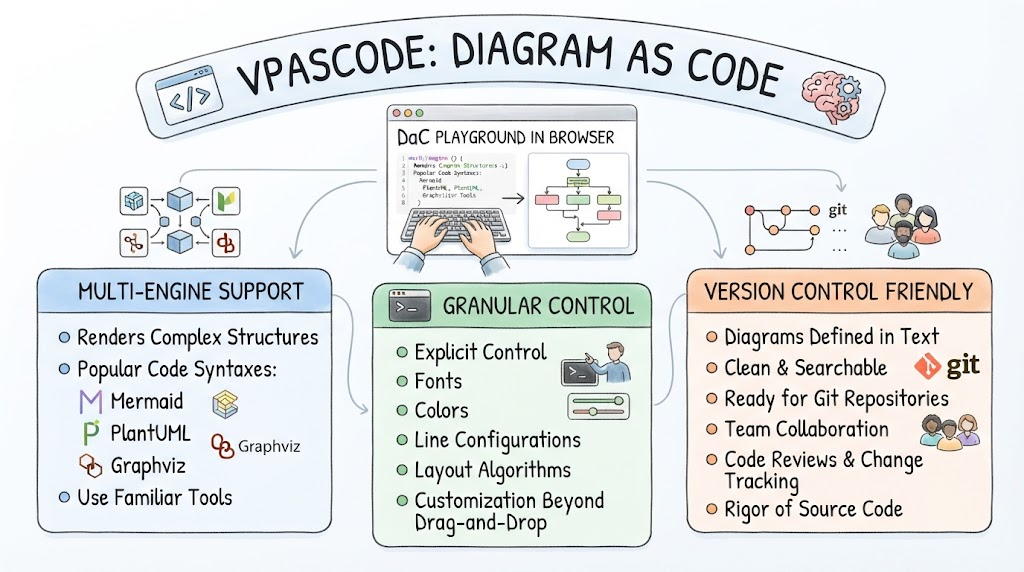 Mastering Diagram as Code: An Architectural Guide to VPasCode
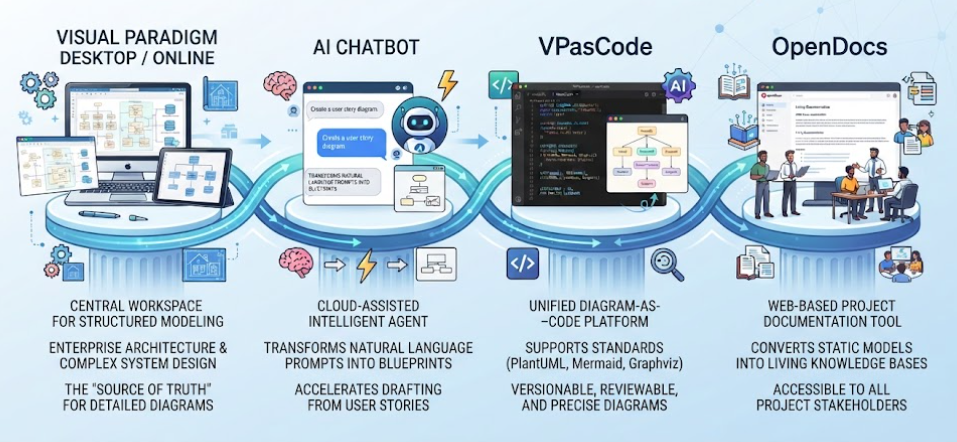 Mastering the Modern Software Design Workflow: From Ideation to Living Documentation with Visual Paradigm
 Mastering AI-Driven System Modeling: From Frameworks to Workflows