In the world of software engineering, requirements are rarely static. They evolve. A simple request like “Create Course Content” often hides complex backend logic, validation rules, and state management. Traditional modeling tools often struggle to keep up, forcing developers to redraw diagrams from scratch when requirements shift. However, modern AI-driven modeling platforms, such as Visual Paradigm, are changing the game by allowing for iterative refinement without losing context.
This tutorial explores the architecture of an intelligent sequence diagram workflow. We will walk through a specific example where a high-level system interaction is decomposed into a detailed Model-View-Controller (MVC) architecture using AI assistance.
1. The Starting Point: High-Level System Interaction
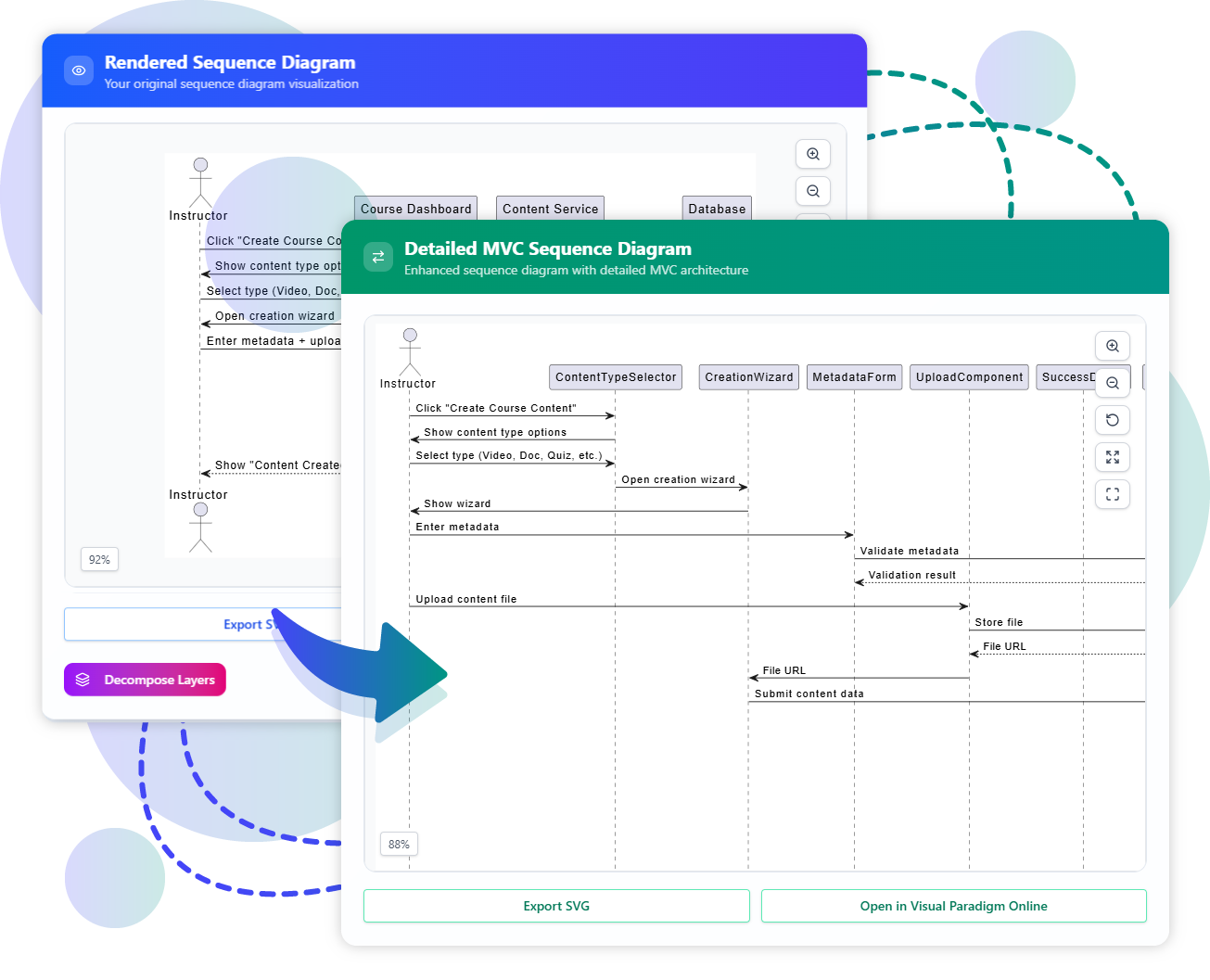
Let’s begin by analyzing the “Rendered Sequence Diagram” shown on the left side of the visualization. This represents the initial “Level 0” or high-level view of the system.
- The Actor: We see a stick figure labeled Instructor. This is the user initiating the process.
- The Trigger: The action begins when the Instructor clicks “Create Course Content”.
- The System Response: The system immediately reacts by showing content type options and opening a creation wizard.
At this stage, the diagram is functional but abstract. It tells us what happens, but not how the internal components collaborate to make it happen. In a generic AI context, a request to “make this more detailed” might result in the AI hallucinating a completely new diagram that ignores the original context.
2. The Refinement: Decomposing Layers
The core innovation lies in the action indicated by the blue arrow and the Decompose Layers button. This represents the AI Chatbot’s ability to understand the intent behind the diagram and refine it iteratively.
Instead of rewriting the entire diagram, the system understands that the “Create Course Content” block is a composite action. It needs to be broken down into its constituent parts. This is where the AI acts as a senior architect, suggesting a structural improvement based on best practices.
3. The Result: A Detailed MVC Architecture
The “Detailed MVC Sequence Diagram” on the right reveals the internal architecture that was previously hidden. This transition demonstrates the power of maintaining state context while adding complexity.
Breaking Down the Components
The AI has decomposed the system into specific objects that follow the MVC pattern. Here is the technical breakdown of the new lifelines:
- ContentTypeSelector (View): This component is responsible for presenting the user with choices (Video, Doc, Quiz, etc.). It handles the initial UI interaction.
- CreationWizard (Controller): This acts as the brain of the operation. It receives the selection from the View and coordinates the next steps, such as opening the wizard.
- MetadataForm (View): Once the wizard is open, the system needs to collect data. This component handles the input of metadata.
- UploadComponent (Controller/Model): This handles the heavy lifting of file storage. It manages the validation of metadata and the actual storage of the file.
Tracing the Flow
Notice the detailed message flow that replaces the high-level abstraction:
- Click “Create Course Content” triggers the
ContentTypeSelector. - The
CreationWizardis opened, guiding the user. - When the user Enters metadata, the
MetadataFormvalidates this data before proceeding. - Finally, the
UploadComponentstores the file and returns the File URL.
4. Why This Matters: Reliability and Agile Refinement
This visualization highlights three critical benefits of using an AI-assisted modeling tool over a static drawing tool or a generic LLM.
A. Maintaining State Context
Unlike generic Large Language Models (LLMs) that might generate a completely new, unrelated diagram from scratch, Visual Paradigm’s AI updates the existing model. It preserves the Instructor actor and the core trigger. This ensures that the detailed diagram is a true refinement of the original requirement, not a hallucination.
B. Handling Agile Requirements
Software requirements change. Imagine a stakeholder asks for a specific change: “Add a timeout event if the payment gateway doesn’t respond in 30 seconds.” In a standard diagram tool, you would have to manually draw a timeout box. In this AI environment, you can simply ask the chatbot to add the constraint. The AI updates the specific interaction lifeline without breaking the rest of the diagram.
C. Structural Refinement
Consider another requirement: “Split the ‘Admin’ lane into ‘Support Admin’ and ‘Super Admin’.” The AI understands the concept of Separation of Concerns. It doesn’t just draw a line; it restructures the logical flow to reflect that different permissions are required for different tasks. This leads to higher quality, more maintainable software architecture.
Conclusion
By moving from a “Rendered Sequence Diagram” to a “Detailed MVC Sequence Diagram,” we have bridged the gap between business requirements and technical implementation. The AI Chatbot facilitates this by acting as a collaborative partner that understands software architecture patterns like MVC. This ensures that your diagrams remain reliable, high-quality, and accurate reflections of your system’s evolving reality.