In the world of Business Process Model and Notation (BPMN), the logic of a process is not just about drawing boxes and arrows; it is about movement. Specifically, it is about the movement of a token. Understanding how tokens flow, split, and synchronize is the fundamental key to building robust automation. When this concept is ignored, processes fail, resulting in infinite loops or deadlocks.
This tutorial explores the critical importance of token synchronization, the common mistakes developers make when designing parallel tasks, and how simulation tools like Visual Paradigm can help you validate your architecture before a single line of code is written.
1. The Core Concept: The Token Model
BPMN operates on a token-based execution model. You can visualize a token as a small ball of energy that travels along the sequence flows of your diagram.
- Start: A token is created at the Start Event.
- Flow: The token moves through tasks and gateways.
- Split: If the token encounters a Parallel Split (a diamond with a plus sign
+), it forks. A token is sent down every outgoing path simultaneously. - Join: If the token encounters a Parallel Join (a diamond with a plus sign
+), it waits. It will not proceed until all incoming paths have received a token.
2. The Mistake: Ignoring the Join Gateway
A common architectural error in process modeling is designing a parallel split without a corresponding join mechanism. This creates an imbalance in the flow that the automation engine cannot resolve.
The Scenario: “Verify Identity” vs. “Check Credit”
Imagine a developer implementing a user onboarding process. The logic requires two distinct, parallel tasks:
- Verify Identity
- Check Credit
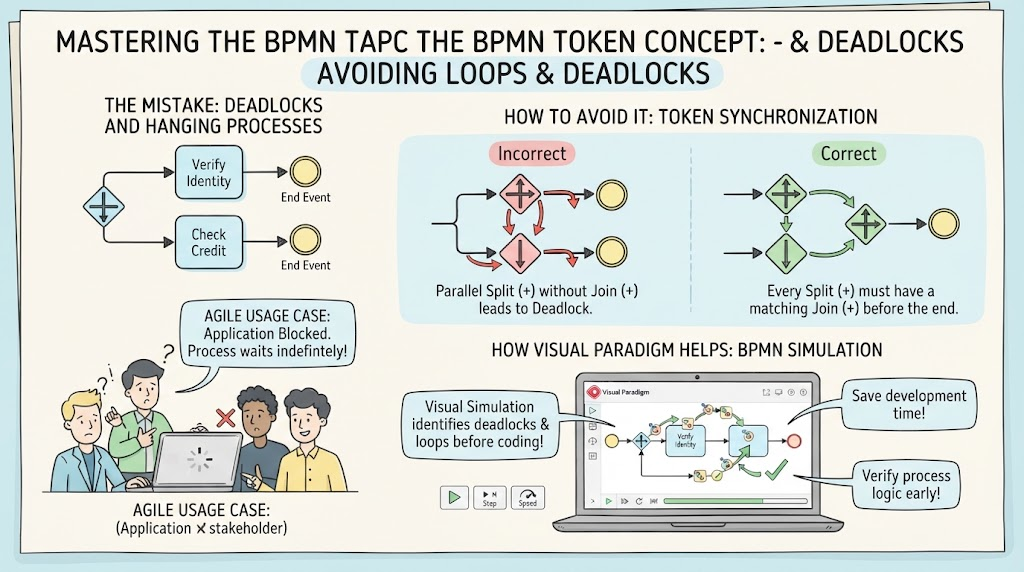
The Incorrect Approach: The developer draws a parallel split that creates two paths. One path leads to “Verify Identity” and ends at an End Event. The other path leads to “Check Credit” and ends at a separate End Event.
The Consequence: This is the “Endless Loop & Deadlock” scenario. The engine creates two tokens. One token successfully reaches the first End Event, and the other reaches the second. However, if the process definition expects the two tasks to merge back into a single flow (which is standard for complex workflows), the engine is now in a deadlock.
It is waiting indefinitely for a token to arrive at a specific point to continue the process, but because the paths were allowed to terminate independently, that token never arrives. The automation engine halts, and the user’s application is blocked.
3. The Solution: Token Synchronization
To avoid deadlocks, you must ensure that every Parallel Split (+) has a corresponding Parallel Join (+). This ensures that the “energy” of the process is conserved and synchronized.
Correct Modeling Pattern
In a correct BPMN model:
- The process splits into parallel branches (Parallel Split).
- Both branches execute their respective tasks.
- The branches meet at a Parallel Join.
- The join gateway holds the flow until it has received a token from every incoming path.
- Once synchronized, a single token continues down the main path to the End Event.
By adding the join gateway, you force the system to wait for both “Verify Identity” and “Check Credit” to complete before proceeding to the next step. This prevents the engine from hanging or getting stuck in an unreachable state.
4. Agile Usage Case: Application Blocked
Why does this matter in an Agile development context? When a developer implements a process logic that lacks a proper join, the resulting software behaves unpredictably.
The Failure: The application hangs. The user clicks “Submit,” the system processes the request in parallel, but the user sees a loading spinner forever because the system is waiting for a synchronization point that will never be met.
This is a classic example of a “Process Wait Indefinitely” error. It is often difficult to debug because the code might look correct syntactically, but the logic flow is flawed.
5. How Visual Paradigm Helps: BPMN Simulation
Visual Paradigm offers a powerful solution to this problem: BPMN Simulation. Instead of guessing if your process logic is sound, you can run it.
- Visualize Token Movement: The simulation tool animates the token as it moves through your diagram. You can watch it split, travel down the parallel branches, and (if modeled correctly) merge at the join.
- Identify Deadlocks Early: If your diagram contains a Parallel Split without a Join, the simulation will highlight the error. You will see the tokens stuck in the branches or the engine failing to progress.
- Save Development Time: By identifying these logic errors before writing code, you save valuable time that would otherwise be spent debugging runtime errors.
Key Takeaway: Always ensure your Parallel Split (+) has a matching Parallel Join (+). Use simulation tools to verify that your tokens can reach the End Event without getting stuck.