In the modern landscape of software development, the gap between high-level business requirements and technical execution is often bridged by process modeling. While Business Process Model and Notation (BPMN) has long been the standard for visualizing workflows, the traditional manual creation of these diagrams can be time-consuming and prone to human error. This tutorial explores a revolutionary workflow: transforming natural language text descriptions directly into complex, executable BPMN diagrams using AI-driven tools.
We will walk through the process of generating an Order Fulfillment Process diagram, moving from a simple text prompt to a fully detailed model that includes swimlanes, decision gateways, and error handling.
Step 1: The AI Input Interface
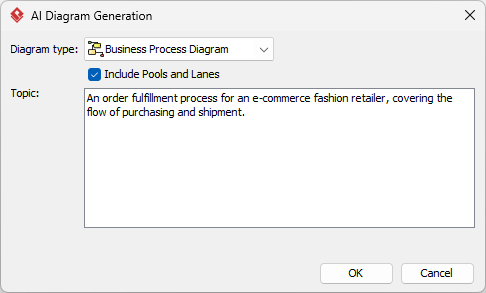
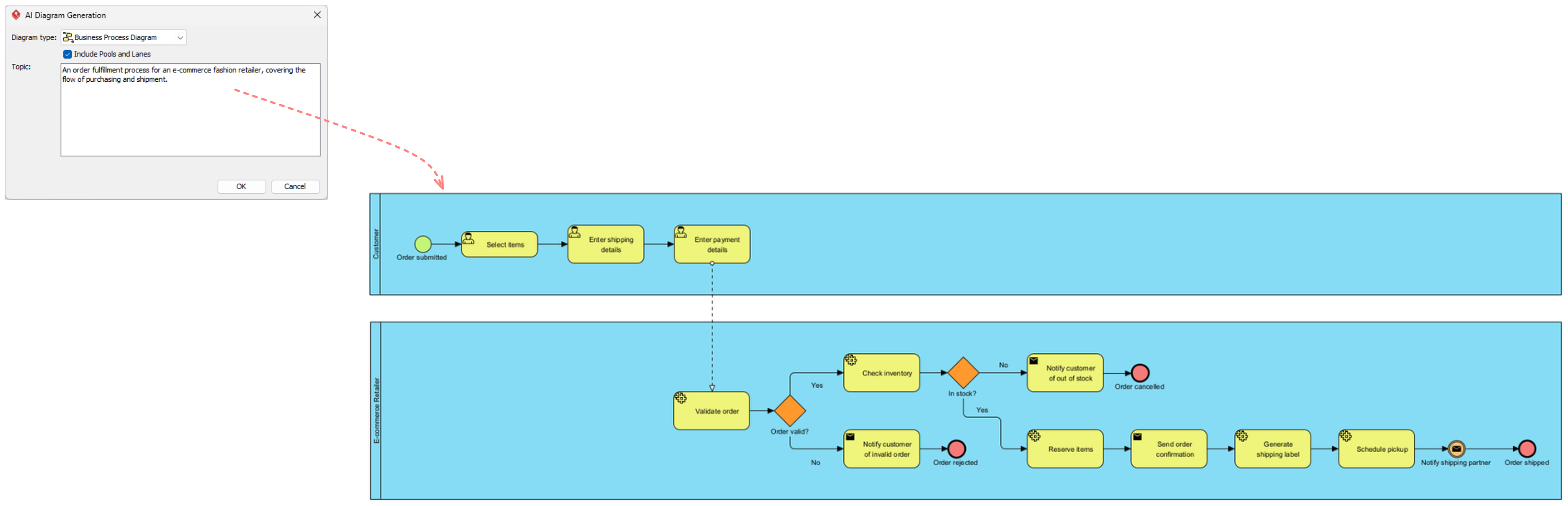
The journey begins with the “AI Diagram Generation” interface. This tool allows users to bypass the initial drafting phase by providing a high-level description of the desired system behavior. Instead of dragging and dropping symbols, the analyst simply defines the scope.
Consider the following input scenario:
- Diagram Type: Business Process Diagram (BPMN)
- Configuration: Include Pools and Lanes (Swimlanes)
- Topic Description: “An order fulfillment process for an e-commerce fashion retailer, covering the flow of purchasing and shipment.”
This text prompt acts as the seed for the model. The AI engine interprets keywords such as “fulfillment,” “retailer,” and “shipment” to hypothesize the necessary actors and process steps.
Step 2: Understanding the Swimlane Architecture
Once the AI generates the diagram, the first thing to observe is the structural layout. The resulting model is divided into Swimlanes (or Pools), which represent the different actors or departments involved in the process. This separation is crucial for clarity and accountability.
The “Customer” Lane
Located at the top of the diagram, this lane represents the external actor initiating the event. The process starts with a Start Event (the green circle labeled “Order submitted”).
The sequence of activities here is linear and represents the “Happy Path” of user interaction:
- Select Items: The user browses the catalog.
- Enter Shipping Details: Logistics information is provided.
- Enter Payment Details: Financial transaction data is entered.
Notice the dashed arrow connecting the “Enter shipping details” task to the backend system. This visual cue indicates a system interaction or a data handoff from the user to the organization.
The “E-commerce Retailer” Lane
The bottom lane contains the backend logic. This is where the complexity of business rules resides. The AI has modeled the internal processing steps required to fulfill the customer’s request.
Step 3: Navigating Logic and Gateways
The true power of BPMN lies in its ability to visualize decision-making logic. The diagram uses specific shapes to denote flow control. In the Retailer lane, we see the process branching into two distinct paths based on a decision.
Validation and Error Handling
After the order is submitted, the first internal task is Validate order. Following this, an Inclusive Gateway (the orange diamond) determines the validity of the order:
- The “No” Path (Error Handling): If the order is invalid, the flow diverts to Notify customer of invalid order. This leads to an Intermediate Catch Event (red circle) labeled “Order rejected,” effectively terminating that specific process instance.
The “Happy Path” Logic
When the validation returns “Yes,” the process continues to the Check inventory task. Immediately following this is another gateway, this time checking stock availability (“In stock?”).
- Out of Stock Scenario: If the item is not in stock, the diagram routes to Notify customer of out of stock and terminates via the “Order cancelled” event.
- Stock Available Scenario: If the item is in stock, the process proceeds through a series of fulfillment tasks:
- Reserve Items: Locking inventory for the specific order.
- Send order confirmation: Informing the customer the order is being processed.
- Generate shipping label: Preparing logistics documentation.
- Schedule pickup: Coordinating with the carrier.
Step 4: Best Practices for AI-Assisted Modeling
While the AI generates a robust starting point, a skilled analyst must review and refine the output. Here are three best practices for this workflow:
- Iterative Refinement: Treat the AI output as a first draft. The generated diagram covers the “Happy Path” (the ideal scenario) well, but you must verify that all edge cases (like payment failures or partial shipments) are represented.
- Traceability: Use the diagram to maintain traceability. Ensure that every task in the BPMN diagram (like “Check Inventory”) maps to a specific requirement in your backlog. This prevents “feature creep” or missing business rules.
- Validation with Simulation: Advanced tools allow you to simulate the diagram. You can virtually “walk” the order through the process to ensure there are no dead ends (e.g., ensuring the “Order cancelled” event is properly terminated).
Conclusion
By leveraging AI-driven diagram generation, teams can rapidly prototype complex business processes. This approach shifts the focus from the mechanics of drawing symbols to the logic of the business itself. The resulting diagram serves as a single source of truth, bridging the gap between the Customer’s intent and the Retailer’s operational reality.