


In the realm of software engineering and system architecture, organizing code and data into logical hierarchies is essential for maintainability and scalability. This tutorial dives deep into two critical concepts found in Unified Modeling Language (UML) class diagrams: Generalization (often referred to as inheritance) and Abstract Classes.
By understanding how these structures function, you can design systems that reduce redundancy and enforce strict architectural rules. We will also explore how modern AI-driven tooling, specifically Visual Paradigm and VPasCode, can automate these complex modeling tasks.
Understanding Generalization: The “Is A” Relationship
Generalization is the fundamental mechanism in object-oriented programming that allows for code reuse. It represents a semantic relationship where one class (the subclass or child) is a specialized version of another class (the superclass or parent).
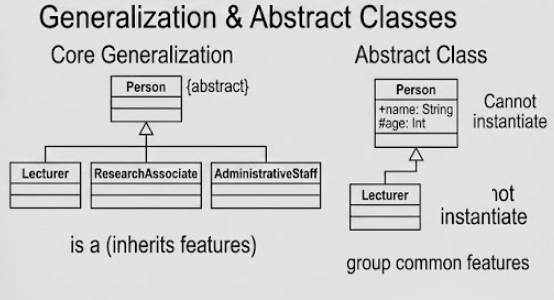
As illustrated in the provided diagram under “Core Generalization,” this relationship is strictly an “is a” relationship. This means:
- A
Lectureris aPerson. - A
ResearchAssociateis aPerson. - An
AdministrativeStaffis aPerson.
How It Works
When a subclass inherits from a superclass, it automatically acquires all visible attributes (data) and operations (methods) defined in the parent class. This eliminates the need to rewrite common code for every specific role within your system.
In the diagram, the Person class acts as the general template. The solid line with a hollow triangle pointing to Person is the standard UML notation for Generalization. It signifies that the specific roles below it are direct implementations of the abstract concept of a “Person.”
The Power of Abstract Classes
While generalization allows us to group things together, sometimes we want to define a group that cannot exist in the real world on its own. This is where Abstract Classes come into play.
Defining the Abstract Class
An abstract class is a blueprint for other classes. It is labeled in UML with the tag {abstract} or by writing the class name in italics. As shown in the “Abstract Class” section of the diagram:
- The
Personclass is marked as Abstract. - It contains common attributes like
+name: Stringand#age: Int. - Crucially, it cannot be instantiated. You cannot create a raw object called
new Person().
Why Use Abstract Classes?
Imagine trying to instantiate a generic “Person.” Does it make sense? In most systems, no. You don’t have a “Person” sitting at your desk; you have a “Lecturer” or an “AdministrativeStaff.”
The diagram highlights that the Person class exists solely to group common features. By marking it as abstract, the system architecture enforces the rule that specific implementations (the subclasses) must be created to handle the actual logic. This ensures data integrity and prevents the creation of invalid objects.
Supplementary Note: Recommended Tooling for UML Modeling
Creating complex UML diagrams manually can be time-consuming and prone to syntax errors. Fortunately, modern development environments have evolved to include intelligent assistance. For this tutorial, we recommend the following integrated approach:
Visual Paradigm UML + AI + VPasCode
Visual Paradigm is a powerful enterprise-grade modeling tool. By integrating AI and VPasCode (Visual Paradigm Scripting), you can streamline your architecture design process:
- AI-Assisted Modeling: Use AI features to automatically generate class diagrams based on natural language descriptions. You can describe the “Person” hierarchy, and the AI can suggest the correct generalization structure.
- VPasCode Automation: For developers who prefer code-first approaches, VPasCode allows you to define your UML models using scripting. You can programmatically define the
Personclass as abstract and link the subclasses, ensuring that your diagram matches your actual codebase perfectly. - Consistency: This toolchain ensures that your diagrams (like the one above) remain synchronized with your source code, reducing the “documentation debt” that often plagues software projects.
By mastering these concepts and leveraging the right tools, you can build robust, scalable systems that are easy to understand and maintain.
Related posts:
 Mastering the 14 UML Diagram Types: A Comprehensive Tutorial for Software Architects
 Introduction to Conversational Modeling with VP AI Chatbot
 Mastering the UML Class Box: A Comprehensive Guide to Software Architecture and Modeling
 From Abstract Ideas to Concrete Code: Mastering UML Class vs. Object Diagrams