In the world of Business Process Model and Notation (BPMN), precision is paramount. BPMN serves as the global standard for visualizing business workflows, acting as a universal language between business stakeholders and technical developers. At the heart of every BPMN diagram lies the Activity. While events serve as triggers and gateways control the logic flow, activities are where the actual work happens. They represent the “verbs” of your business model—the specific actions taken by people or systems to achieve a goal.
However, not all activities are created equal. A common pitfall in process modeling is the lack of granularity. Understanding the critical distinction between Atomic Tasks and Compound Sub-Processes is essential for creating diagrams that are both readable and technically accurate. This guide explores these fundamental concepts and demonstrates how to effectively model them using Visual Paradigm.
The Atom of Process Modeling: Atomic Tasks
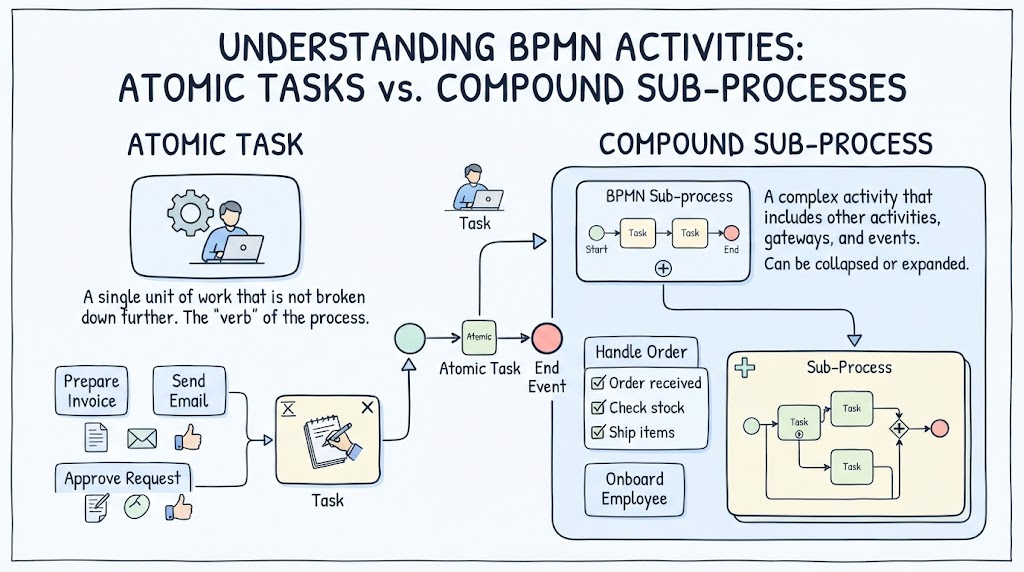
An Atomic Task is the most granular unit of work in a BPMN diagram. As the name implies, it is the smallest indivisible element. In the context of process modeling, an atomic task represents a single step that is not broken down further within the current scope of the diagram.
- Definition: A single unit of work that is not broken down further. It is the “verb” of the process.
- Scope: It assumes the work is simple enough to be performed in one go, or that the details of how it is performed are irrelevant to the current diagram level.
- Visual Representation: Typically depicted as a rounded rectangle with a white background and the label “Task”.
Example: In a “Handle Order” process, an atomic task might be “Send Email” or “Prepare Invoice”. You do not need to know the technical steps to send an email; you simply know that the action happens.
The Building Block of Complexity: Compound Sub-Processes
As processes grow in complexity, a single “Task” is no longer sufficient to describe the work. This is where the Compound Sub-Process comes into play. A sub-process is a complex activity that includes other activities, gateways, and events. It essentially acts as a “black box” containing a mini-process.
- Definition: A complex activity that includes other activities, gateways, and events.
- Functionality: It can be collapsed or expanded. When collapsed, it provides a high-level overview; when expanded, it reveals the internal logic.
- Visual Representation: Typically a rounded rectangle containing a + symbol in the center.
Example: Consider the task “Onboard Employee”. This is too complex to be a single action. It involves checking stock, shipping items, and handling orders. Therefore, “Onboard Employee” is modeled as a Compound Sub-Process, which internally contains the sequence of tasks required to complete the onboarding.
Visual Paradigm: The Tool for Precision
To effectively model these distinctions, you need a robust tool. Visual Paradigm is a leading tool for enterprise architecture and process modeling, offering a comprehensive environment to design BPMN diagrams that adhere to strict standards while remaining intuitive.
Step-by-Step: Modeling in Visual Paradigm
Visual Paradigm allows you to switch between different levels of abstraction effortlessly. Here is how you would structure the concepts discussed in this article within the software.
1. Creating an Atomic Task
Start by dragging a Task shape from the BPMN palette onto your canvas. This represents the atomic level.
- Drag and Drop: Select the “Task” shape (often labeled simply as “Task”).
- Labeling: Double-click the shape to rename it. For our example, type “Prepare Invoice”.
- Context: If you need to associate data or roles, use the properties panel to assign a Business Skill (e.g., “Accountant”) or a Business Object (e.g., “Invoice”).
2. Creating a Compound Sub-Process
Now, let’s build the complexity. We will create a sub-process to represent a larger workflow, such as “Handle Order.”
- Insert Sub-Process: Drag the Sub-Process shape (which usually has a + icon) onto the canvas.
- Naming: Rename the sub-process to “Handle Order”.
- Entering the Sub-Process: Double-click the sub-process shape. Visual Paradigm will open a new tab or view specifically for the internal elements of this sub-process.
- Internal Modeling: Inside this view, you are now free to add your own Start Events, Tasks, Gateways, and End Events.
- Add a Start Event.
- Add a Task for “Check Stock”.
- Add a Task for “Ship Items”.
- Add an End Event.
Why This Distinction Matters
The ability to toggle between atomic tasks and compound sub-processes is the key to Modeling Abstraction. By using Visual Paradigm, you can create a “Level 0” diagram that shows high-level activities (Sub-Processes) to management, and then drill down into specific tabs to show the “Level 1” details (Atomic Tasks) to the operations team.
Whether you are designing a simple workflow like “Approve Request” or a complex enterprise system, mastering the difference between an Atomic Task and a Compound Sub-Process ensures your BPMN diagrams are clear, scalable, and professional.