In the world of business process modeling, few tools are as powerful or ubiquitous as Business Process Model and Notation (BPMN). It provides a standardized graphical language that bridges the gap between business stakeholders and technical developers. To truly understand how BPMN works, we need to look beyond abstract definitions and examine a practical scenario. Today, we are deconstructing a classic example: The Pizza Order Process.
This tutorial will guide you through the specific architecture of a pizza delivery workflow, explaining how different event types, tasks, and decision points interact to create a robust system. By the end of this article, you will have a clear understanding of how a simple order transforms into a complex, managed workflow.
1. The Starting Point: Initiating the Order
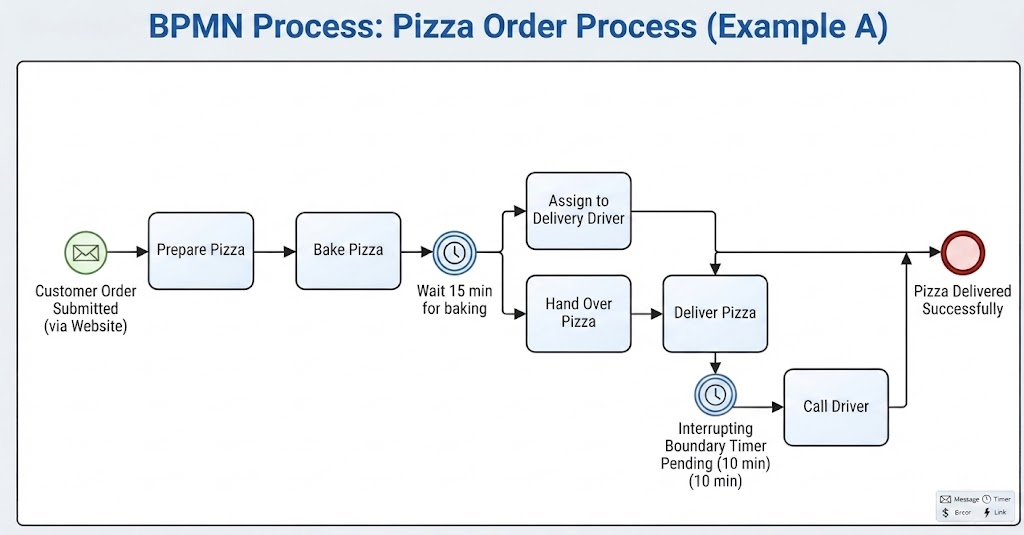
Every business process requires a trigger. Without an event to start the flow, the process remains dormant. In our diagram, we see a distinct symbol on the far left that represents the genesis of this workflow.
The Message Start Event
- Visual Representation: A green circle containing an envelope icon.
- Technical Meaning: This is a Message Start Event.
- Contextual Application: The label “Customer Order Submitted (via Website)” tells us that this process is asynchronous. It is not triggered by a human manually starting a script or a timer; it is triggered by an external entity—a customer—sending a digital message (the order) into the system.
2. The Execution Flow: From Preparation to Baking
Once the order is received, the system moves into the execution phase. In BPMN, these phases are represented by Tasks, depicted as rounded rectangles. This section of the process is linear and sequential.
- Prepare Pizza: The first task involves the physical preparation of the ingredients.
- Bake Pizza: The process moves to the oven. This is a critical step where the state of the data changes from “raw” to “cooked.”
Notice the simplicity of the arrows connecting these boxes. They indicate a “Sequence Flow,” meaning that as soon as one task is completed, the next one immediately begins. There are no decision points or interruptions here; the kitchen must complete these steps before moving forward.
3. Managing Time: The Intermediate Timer Event
Real-world processes often involve waiting periods. In our scenario, after baking the pizza, the system cannot proceed to the next step instantly. It must wait for the food to be ready for the next stage.
Understanding the Intermediate Timer
BPMN handles this delay using an Intermediate Timer Event. You can identify this by the double circle with a clock icon inside.
- Function: This event acts as a pause button. It is placed specifically after the “Bake Pizza” task.
- The Logic: The label “Wait 15 min for baking” indicates that the process flow enters a holding state. The system will not pass through this event until the timer expires. This allows the model to accurately represent the duration of the baking process without blocking the entire system.
4. Diverging Paths: Parallel Processing
Once the pizza is baked and the wait time has elapsed, the process hits a fork in the road. The diagram splits into two parallel branches. This is a common pattern in logistics: while one part of the process finishes, another can begin independently.
- Branch 1 (Top): “Assign to Delivery Driver.” This handles the logistics and assignment of personnel.
- Branch 2 (Bottom): “Hand Over Pizza.” This represents the physical hand-off of the goods from the kitchen to the logistics team.
These branches eventually converge at the “Deliver Pizza” task, illustrating that both assignment and hand-off must occur (or are happening concurrently) before the actual delivery can take place.
5. Handling Exceptions: The Boundary Timer Event
The most complex part of this architecture is the error handling mechanism. In a perfect world, the driver accepts the pizza and leaves immediately. But what if they don’t? This is where BPMN shines by allowing for Boundary Events.
The Interrupting Boundary Timer
Attached directly to the “Deliver Pizza” task is a smaller circle with a clock icon. This is a Boundary Timer Event.
- Placement: Because it is attached to a task, it acts as an “interrupter.” It hangs over the task, waiting to see if the task completes in time.
- The Trigger: The label “Interrupting Boundary Timer Pending (10 min)” defines the condition. If 10 minutes pass without the task completing (i.e., the driver confirming pickup), the flow is interrupted.
- The Consequence: The standard flow is stopped. Instead, the process diverts to a new task: “Call Driver.”
This demonstrates a crucial concept in system design: exception handling. The system anticipates failure (the driver not showing up) and has a built-in automated response to fix it. Once the “Call Driver” task is complete, the flow rejoins the main line to proceed to the end.
6. Conclusion: The End Event
The process concludes on the far right with a thick red circle. This is the End Event. It signifies the successful termination of the process instance. The label “Pizza Delivered Successfully” confirms that all tasks—including the primary flow and any potential exception handling—have been resolved.
Key Takeaways
By analyzing this Pizza Order Process, we have learned how to:
- Model Asynchronicity: Using Message Start Events for external triggers.
- Manage Delays: Utilizing Timer Events to represent real-world wait times.
- Handle Complexity: Using parallel gateways and boundary events to manage concurrent tasks and exceptions.
Understanding these building blocks is the first step toward mastering system architecture and process optimization.