Business Process Model and Notation (BPMN) is the industry-standard language for visualizing, analyzing, and improving business processes. Among its most powerful yet frequently misunderstood constructs are Intermediate Events. These events sit at the heart of process dynamics—they capture what happens during a process rather than just at its beginning or end.
Whether you are modeling a simple approval workflow or a complex multi-party transaction, understanding how to correctly place and configure intermediate events is essential for producing accurate, executable process models. This guide explores the two primary categories of intermediate events—those embedded within the normal flow and those attached to activity boundaries—and demonstrates how to model them effectively using Visual Paradigm.
1. Intermediate Events in Normal Flow
Intermediate events can be placed directly on a sequence flow between two tasks. These events represent occurrences that happen during the execution of the process, distinct from the start or end of the process itself.
Catching vs. Throwing Events
The behavior of these events is defined by the direction of the arrow on the connecting line:
- Catching Events: Represented by a solid arrow. These events pause the process flow and wait for an external trigger (such as a message, timer, or signal) to occur before continuing.
- Throwing Events: Represented by a hollow arrow. These events signal that something has happened (like a timer expiring or a message being sent) and immediately trigger the next step in the process.
Practical Examples from the Diagram
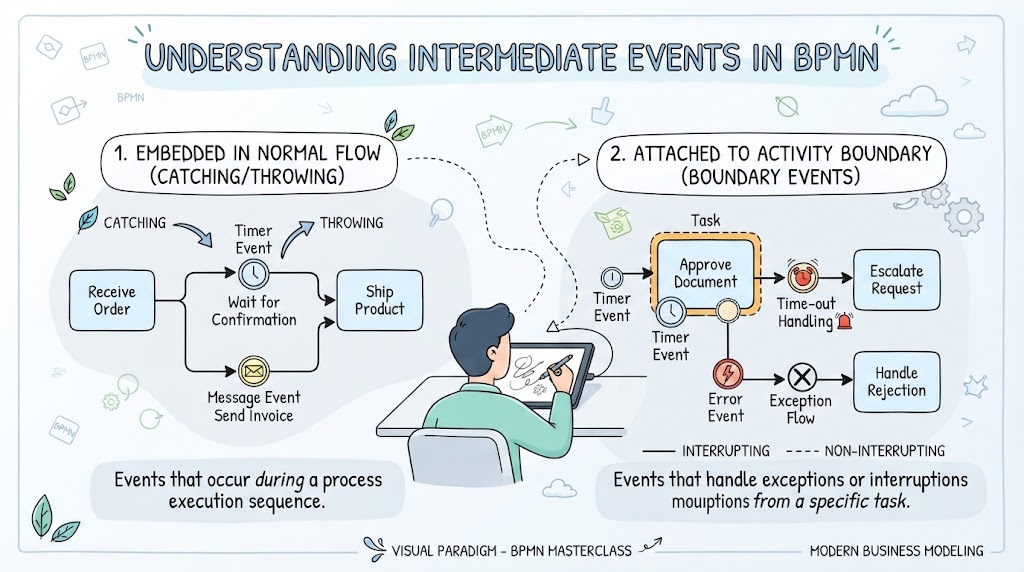
Consider the “Receive Order” workflow shown in the diagram:
- Timer Event (Catching): The process pauses at “Wait for Confirmation” to catch a timer event. The process waits until a specific time passes before moving forward.
- Message Event (Throwing): Once the confirmation is received, the process reaches a message event to “Send Invoice.” This throws a message to an external system or stakeholder, effectively triggering the next phase of the workflow.
2. Intermediate Events Attached to Activity Boundaries
The second category involves Boundary Events. These are attached to the edge (boundary) of an activity (task) rather than the sequence flow. They represent exceptions or interruptions that occur while a specific task is running.
Handling Exceptions and Time-outs
Boundary events allow you to model what happens if a task does not complete as expected. Visual Paradigm makes it easy to configure these events to either interrupt the task or allow it to finish.
- Timer Events: As seen in the “Approve Document” task, a timer boundary can be set to trigger if the approval takes too long. In the diagram, this leads to a “Time-out Handling” path.
- Error Events: If a task fails due to a system error or invalid data, an error boundary event can catch this failure and redirect the flow to an “Handle Rejection” task.
3. Interrupting vs. Non-Interrupting
One of the most critical distinctions in BPMN boundary events is whether the event stops the main task or runs in parallel.
- Interrupting (Solid Line): If you connect a boundary event with a solid line to the task, the event stops the current task immediately upon occurrence. For example, if a “Time-out” interrupting event fires, the “Approve Document” task is cancelled, and the process moves to “Escalate Request.”
- Non-Interrupting (Dashed Line): If you connect the event with a dashed line, the event does not stop the main task. The task continues to run in the background while the boundary event triggers a parallel path (often used for logging or sending notifications).
Conclusion
By distinguishing between events in the normal flow and boundary events, and by correctly applying the logic of catching/throwing and interrupting/non-interrupting behaviors, you can build robust process diagrams that reflect real-world operational logic. Use Visual Paradigm to experiment with these configurations and create models that are not just diagrams, but executable blueprints for your business.