


In the world of Business Process Model and Notation (BPMN), the flow of a process is rarely a straight line. Real-world business scenarios often involve waiting for external signals or time passing before a specific task can proceed. One of the most powerful yet misunderstood features in BPMN is the Multiple Intermediate Catch Event.
This tutorial delves into the architecture of the “Any-of” trigger scenario, specifically focusing on how to model a shipment tracking process that must react to the first available signal—be it a digital confirmation or a timeout.
Understanding the Core Concept: The “Any-of” Logic
At its heart, the Multiple Intermediate Catch Event allows a process to pause and listen for multiple potential triggers simultaneously. Unlike a standard event which waits for a single condition, this complex event acts as a smart router.
Consider a shipment process. You have a task called “Ship Order”. Once this is complete, the system enters a waiting state. However, what happens next depends on which of the following occurs first:
- The Message Trigger: A confirmation email or API response arrives saying the package has been delivered.
- The Timer Trigger: 7 days have passed since the order was shipped, and no confirmation has been received.
The logic here is exclusive in the sense that the process moves forward immediately when any one of these conditions is met. The moment the first trigger fires, the other waiting condition is cancelled.
Visualizing the Architecture
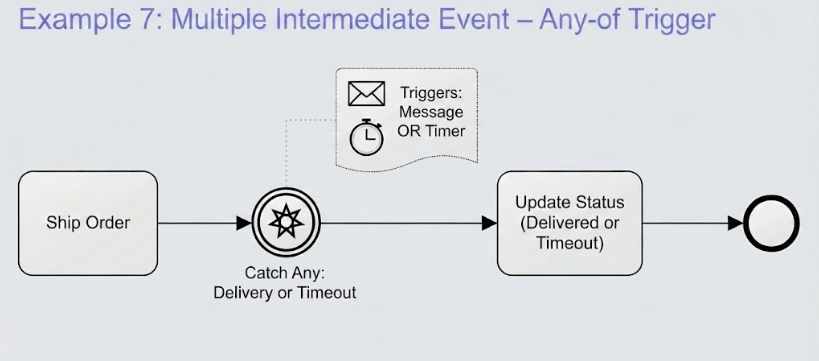
When looking at a BPMN diagram, this logic is represented by a specific glyph. As shown in our example diagram, the event is depicted as a circle containing a star-like symbol. This visual cue tells the reader that the event is “special”—it is waiting for multiple possibilities.
The diagram includes a detailed specification (often shown as a tooltip or attached shape) that breaks down the triggers:
- Message Icon: Represents the external input (e.g., “Delivery Confirmation”).
- Timer Icon: Represents the time-based condition (e.g., “7-day timer”).
- The “OR” Logic: The text connecting these icons clarifies that the event is satisfied if either the message arrives OR the timer expires.
Step-by-Step Modeling Guide
If you are using modeling software like Visual Paradigm to recreate this architecture, here is the precise workflow to implement this logic correctly:
1. Define the Preceding Task
Start with a standard task, such as Ship Order. Connect this to the event that will follow it using a sequence flow.
2. Insert the Intermediate Catch Event
Drag an Intermediate Catch Event onto the canvas. By default, this might be a Message Event or a Timer Event. You need to modify its properties to make it a Multiple Event.
3. Configure the Event Type
Open the properties of the event. You will see an option to set the Type or Multiple flag. Select Multiple. This changes the visual appearance of the event to the “star” shape seen in the diagram.
4. Add Triggers (The “Any-of” Configuration)
This is the critical step. In the specification or settings for the Multiple event, you must add the specific triggers:
- Add a Message trigger. Assign it a specific message name (e.g., “DeliveryConfirmation”).
- Add a Timer trigger. Define the time duration (e.g., “P7D” for 7 days).
5. Select the Behavior: Any vs. All
The system requires you to define the firing logic. There are usually two modes:
- Any (First to Fire Wins): This is the scenario in our example. If the message arrives on day 3, the process proceeds immediately. The 7-day timer is ignored. This is ideal for efficiency.
- All (Wait for All): The process would have to wait for both the message and the timer to occur. This is rarely used in real-world tracking scenarios but might be used for specific compliance checks.
The Technical Outcome
Once the Ship Order task completes, the process instance enters the Catch Any: Delivery or Timeout state. It effectively spawns two internal timers:
- A listener for the
DeliveryConfirmationmessage. - A countdown for the 7-day period.
Whichever event completes first “wins” the race. The process then flows out of the event circle toward the next task, Update Status (Delivered or Timeout). This architecture ensures that your system is responsive to good news (delivery) but also proactive about bad news or delays (timeout), keeping the business logic robust and automated.
Related posts:
 Mastering Business Processes: The Employee Expense Claim Flow
 Mastering Business Process Modeling: The Nobel Prize Nomination Workflow in BPMN
 Mastering Iterative Processes: A Deep Dive into Loop Markers in Visual Paradigm
 Mastering BPMN: A Comprehensive Guide to Process Modeling Elements & Best Practices