Business Process Model and Notation (BPMN) is the industry standard for documenting workflows. Within this framework, End Events serve as the crucial punctuation marks of your diagram. They determine how a process concludes—whether it is a simple stop, a signal to the outside world, or a complex error handling procedure. This tutorial walks you through the technical implementation of these events using Visual Paradigm, ensuring your diagrams are not just visually accurate but technically executable.
1. Accessing the Palette: The Foundation
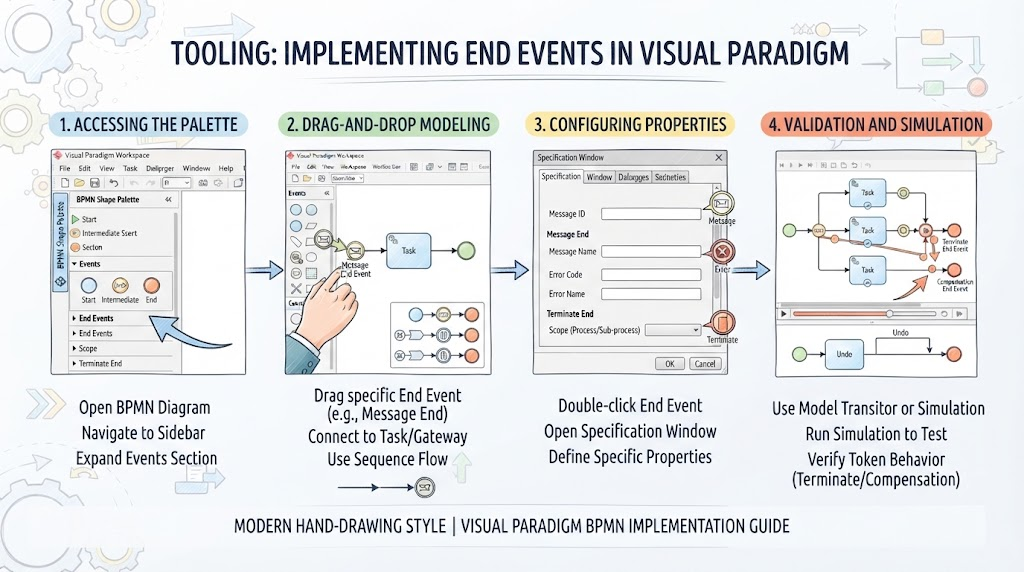
The first step in any modeling project is setting up your environment correctly. In Visual Paradigm, the toolbox is your primary interface for selecting shapes. To implement End Events:
- Open your BPMN Diagram: Ensure you are working within a valid BPMN 2.0 context.
- Navigate the Sidebar: Locate the BPMN Shape Palette, typically docked on the left side of the workspace.
- Expand the Events Section: Click to reveal the hierarchy. You will see categories for Start, Intermediate, and End events.
- Locate End Events: Look specifically for the “End Events” subsection. Here, you will find the core shapes, including the default “None” event, as well as specialized events like Terminate and Message.
2. Drag-and-Drop Modeling: Building the Flow
Once the palette is open, the physical act of modeling is intuitive but requires precision regarding connectivity. Visual Paradigm utilizes a drag-and-drop interface that enforces structural integrity.
- Select the Shape: Click and hold the specific End Event you require (e.g., the Message End Event for inter-process communication).
- Place on Canvas: Drag the shape to the desired location on your process flow.
- Connect with Sequence Flow: This is a critical step. You must connect the preceding activity (a Task or Gateway) to the End Event using a Sequence Flow. In BPMN, this is represented by a solid line with an arrowhead. Without this connection, the process cannot logically terminate.
3. Configuring Properties: The Technical Backbone
Visual Paradigm transforms simple shapes into powerful logic units through the Specification Window. Double-clicking any End Event opens this configuration panel. The configuration varies significantly depending on the event type:
A. Message End Events
These events are used to signal the completion of a process or to send data to a receiving system. To ensure interoperability:
- Message ID: Define the unique identifier.
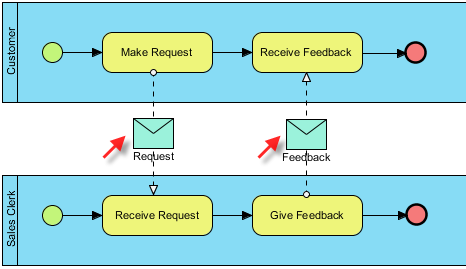
- Message Name: This allows the event to link correctly to a corresponding Message Start Event in a different pool or process, facilitating asynchronous communication.
B. Error End Events
While often used in conjunction with boundary events, configuring an Error End Event requires specific data to ensure the exception is handled correctly.
- Error Code & Name: You must explicitly define these fields. This ensures that if a parallel Error Boundary Event catches the exception, it matches the specific code defined here.
C. Terminate End Events
The Terminate End Event is the most powerful “kill switch” in BPMN. It immediately stops all active tokens in a specific scope.
- Scope Configuration: Visual Paradigm allows you to set the scope to Process or Sub-process. This is a vital safety feature to prevent you from accidentally terminating a parent process when you only intended to stop a specific sub-flow.
4. Validation and Simulation: Testing the Logic
A diagram is only as good as its ability to run. Visual Paradigm’s Model Transitor and Process Simulation features allow you to verify your End Event logic before deployment.
- Run Simulation: Execute the process to observe the flow.
- Verify Token Behavior:
- If using a Terminate End Event, check that it successfully kills parallel tokens as expected, rather than just finishing one branch.
- If using a Compensation End Event, verify that it correctly triggers the associated “undo” tasks to roll back changes.
Conclusion: From Visuals to Executables
End Events are the punctuation marks of business process modeling. While a “None” end event acts as a period—signaling a simple, successful stop—events like “Error,” “Compensate,” and “Terminate” act as exclamation points or semicolons. They add complex logic and control flow to your diagrams.
By mastering these types and utilizing tools like Visual Paradigm to configure their specific properties (such as Error Codes or Message IDs), you ensure your process models are not just visually appealing, but technically accurate and executable. Remember to keep an eye on evolving standards—specifically regarding Link Events—as the BPMN specification continues to mature toward more signal-based architectures.