


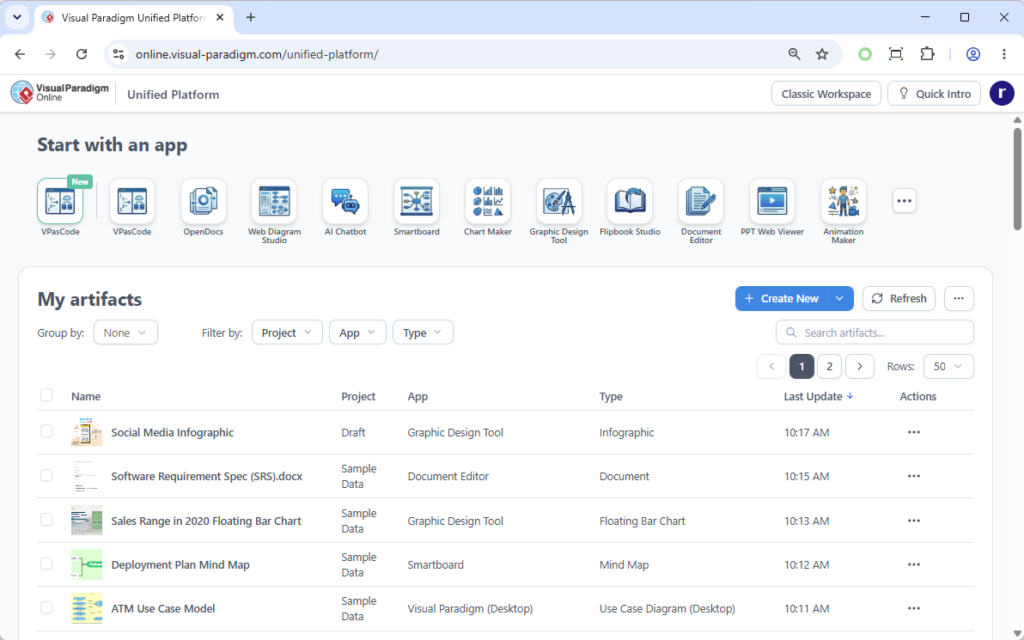
In the realm of modern software engineering, the transition from siloed tools to integrated ecosystems is not just a convenience—it is a necessity for maintaining system integrity. The screenshot provided showcases the Visual Paradigm Unified Platform, specifically the “Start with an app” and “My artifacts” dashboard. This interface represents the central nervous system of a project, where disparate artifacts are unified into a single, traceable lifecycle.
This tutorial will guide you through the architecture of this platform, explaining how it bridges the gap between high-level business goals and low-level implementation code through centralized management and rigorous traceability.
The Architecture of the Unified Dashboard
The interface you see is designed to be the “Single Pane of Glass” for project stakeholders. It aggregates data from various specialized tools within the Visual Paradigm suite, providing a unified view of the project’s health and progress.
1. The Application Launcher (Start with an App)
At the top of the screen, the “Start with an app” section acts as a modular gateway. Instead of navigating complex file systems, users launch specific workflows based on their immediate needs. Notice the variety of specialized tools available:
- VPasCode: For automated code generation and reverse engineering.
- OpenDocs: For document-centric management and review.
- Smartboard & Graphic Design Tool: For visualizing concepts and UI mockups.
- AI Chatbot: Integrating generative AI directly into the modeling workflow.
2. The Artifact Repository (My Artifacts)
The core of the platform is the “My artifacts” table. This is a dynamic data view that lists all objects associated with the current project. It breaks down the project into granular components:
- Name: The specific identifier of the artifact (e.g., “Software Requirement Spec”).
- Project & App: Metadata linking the item to a specific project scope and the tool used to create it.
- Type: Categorization of the artifact (e.g., Document, Mind Map, Use Case Diagram).
- Last Update: Timestamps that facilitate version control and audit trails.
Conceptualizing Traceability
The most critical value proposition of this platform is Traceability. In traditional development, requirements, designs, and code often live in disconnected files. This platform enforces a connected lifecycle.
When a stakeholder views an artifact, such as a Database Table, they are not looking at an isolated data point. Through the platform’s traceability features, they can visualize the lineage of that artifact. The system allows users to click through the dependency chain, ensuring that every technical decision is justified by a business need.
The Traceability Chain
The architecture supports a bi-directional flow of information:
- Upstream (Business Context): Business Goal → User Story → Logical Data Model. This ensures the database design serves a specific user requirement.
- Downstream (Implementation): Physical Database Schema → Source Code Mapping → UI Mockup. This ensures the code actually implements the design.
For example, if a stakeholder asks, “Why was this specific table added?”, the platform allows them to traverse the link back to the original User Story that necessitated it. This provides full context and auditability, a requirement for industries like finance and healthcare.
Code Example: Artifact Dependency Logic
To visualize how the platform might internally structure these relationships for a specific artifact, consider the following pseudocode logic that governs the traceability link:
// Pseudocode: Traceability Link Resolution
function resolveArtifactContext(artifactId) {
    let artifact = getArtifact(artifactId);
    let contextChain = [];

    // Step 1: Identify the artifact type
    if (artifact.type === 'DatabaseTable') {
        // Link to Physical Schema
        contextChain.push(artifact.physicalSchema);

        // Link to Logical Model (Upstream)
        contextChain.push(artifact.logicalModel);

        // Link to User Story (Business Goal)
        contextChain.push(artifact.userStory);
    }

    // Return the full context for the UI
    return {
        id: artifact.id,
        traceabilityPath: contextChain,
        auditStatus: 'Verified'
    };
}
Practical Application: The “Sales Range” Artifact
Looking at the screenshot, you can see an artifact named “Sales Range in 2020 Floating Bar Chart”. In the Unified Platform, this isn’t just a static image file. It is a managed artifact linked to the project’s data.
If this chart were to be updated in the Chart Maker tool, the metadata in the “My artifacts” list would automatically refresh. This ensures that the dashboard always reflects the “Source of Truth” for the project, preventing version mismatches between the report and the underlying data model.
Conclusion
The Visual Paradigm Unified Platform transforms the chaotic nature of software development into a structured, traceable process. By centralizing artifacts and enforcing links between business goals and source code, it reduces the risk of scope creep and ensures that the final product aligns perfectly with the initial vision.