


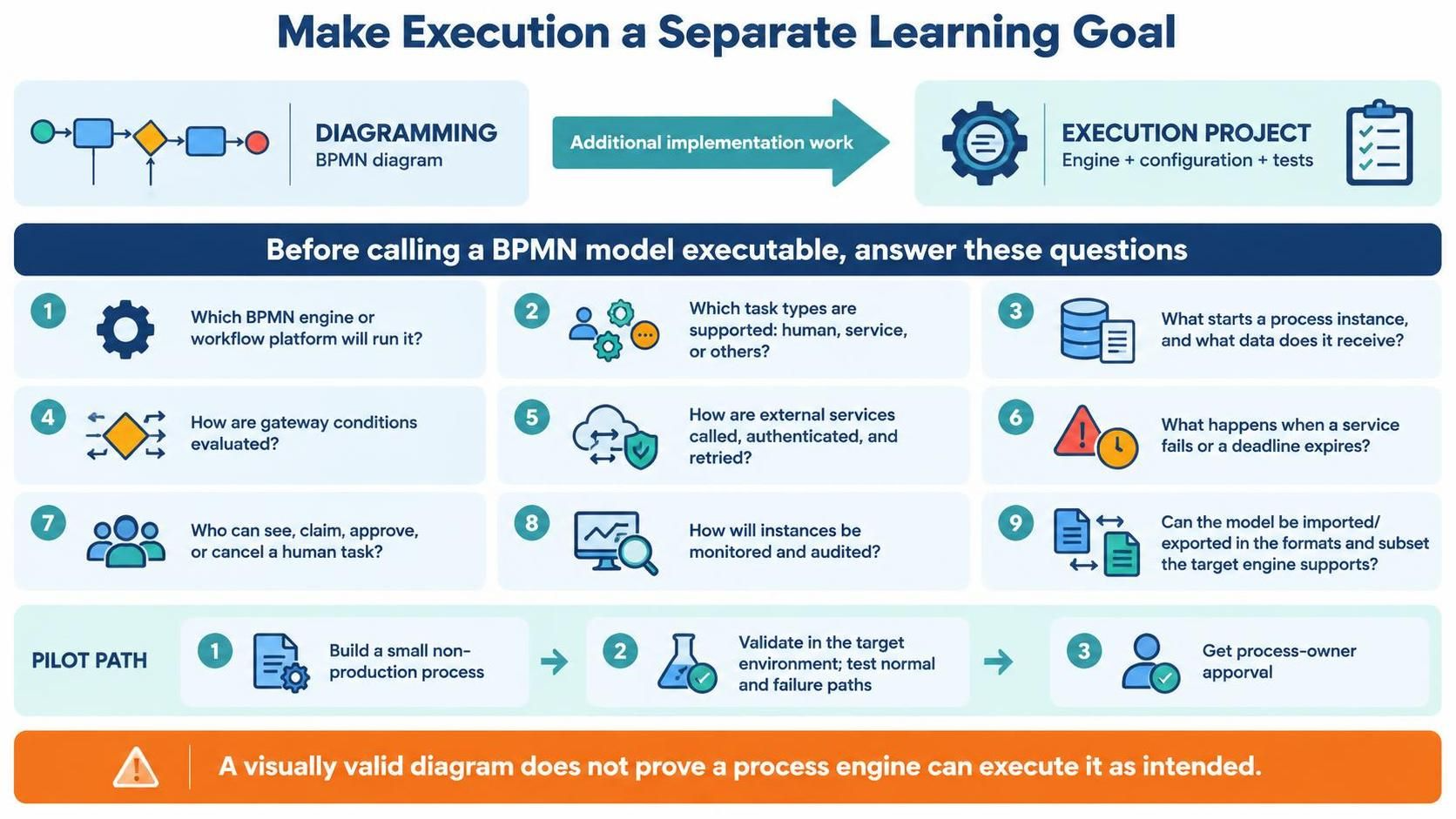
In the world of business process management, a common pitfall is assuming that drawing a process is the same as running it. Visual Paradigm’s progression from basic flowcharts to advanced BPMN execution highlights a critical distinction: Modeling is design; Execution is engineering.
This tutorial explores the “Stage Four” transition—moving from a valid visual diagram to a robust, executable project. We will break down the architecture required to make your models come to life, ensuring that what you see on the canvas functions correctly in the real world.
1. The Architecture of Execution
Before diving into configuration, it is essential to understand the two distinct phases of process creation depicted in the architecture diagram:
- The Diagramming Phase: This is the conceptual layer. Here, you focus on the logical flow using BPMN symbols (Start Events, Gateways, Tasks). It is about semantics and clarity.
- The Execution Phase: This is the implementation layer. It involves the “Engine + Configuration + Tests.” This is where the abstract becomes concrete, requiring infrastructure setup, security policies, and error handling logic.
Between these two phases lies the “Additional Implementation Work.” This is the bridge that transforms a static image into a dynamic workflow engine. Without this bridge, a process is merely a blueprint, not a working machine.
2. The Pre-Execution Checklist
Before declaring a BPMN model executable, you must answer a series of critical technical questions. These questions form the backbone of your system architecture.
Identifying the Engine and Infrastructure
The first decision is determining the runtime environment. Not all BPMN engines are created equal. You must identify which BPMN engine or workflow platform will run your process. Does your organization use a cloud-based SaaS solution, or a self-hosted open-source engine? The choice of engine dictates the specific syntax and capabilities you must use in your modeling tool.
Defining Task Types and Human Interaction
A process is often a mix of automated logic and human decision-making. You must define which task types are supported (e.g., Human Tasks, Service Tasks, Script Tasks). Specifically, for human tasks, you need to answer: How are tasks assigned and authenticated? Is it a pull mechanism (claiming tasks) or a push mechanism (assigned to a specific user)?
Handling External Integrations
Modern processes rarely exist in a vacuum. They rely on external services called via APIs. You must determine how these integrations are authenticated (OAuth, API Keys), how data is passed, and how the system handles failures. If an API call fails, does the process stop, or does it trigger a retry mechanism?
Gateway Logic and Data Flow
Complex processes rely on Gateways (Decision Points). You must define how gateway conditions are evaluated. Is the condition based on a simple variable (e.g., amount > 5000) or a complex script? Furthermore, you must define the data payload: What starts a process instance, and what data does it receive? This is your “Input Contract.”
Monitoring and Auditing
Once the process is running, you need visibility. You must establish how instances will be monitored and audited. Who can see the progress? Who has the authority to approve or cancel a running task? This involves setting up dashboards and defining access control lists (ACLs).
3. The Pilot Path Strategy
To mitigate risk, the recommended approach is to avoid a “Big Bang” deployment. Instead, follow the Pilot Path:
- Build a Small Non-Production Process: Create a simplified version of your process that covers the core logic but operates in a sandbox environment.
- Validate in the Target Environment: Run the pilot to test both “Happy Paths” (normal execution) and “Failure Paths” (what happens when things go wrong).
- Get Process Owner Approval: Once the pilot is stable, present the results to stakeholders for formal sign-off before scaling to production.
4. Leveraging Visual Paradigm for Execution
To support this journey, Visual Paradigm provides an ecosystem that evolves with your skills. It is designed to take you from basic flowcharts to full BPMN execution through a progressive learning path:
- Flowchart: Start with basic logic and decision trees.
- UML Activity Diagram: Introduce object flows and object nodes.
- BPMN: Adopt standard industry notation for business processes.
- Execution: Utilize VPasCode and the OpenDocs ecosystem to bridge the gap between model and code.
By utilizing these tools, you ensure that your model is not just a drawing, but a specification ready for deployment.
Conclusion
Remember the core warning: A visually valid diagram does not prove a process engine can execute it as intended. Treat execution as a separate, rigorous goal. By following the checklist, planning your pilot path, and utilizing the right tooling ecosystem, you can successfully transform your business ideas into automated reality.