In the world of business analysis and system architecture, few diagrams are as critical as the Business Process Model and Notation (BPMN) diagram. It serves as the universal blueprint for how a business operates, translating complex workflows into visual language. This tutorial explores a comprehensive case study: A Loan Application and Approval Process in a Retail Bank, modeled using Visual Paradigm Online.
By breaking down this diagram, we will uncover the logic behind automated banking workflows, the importance of decision gateways, and how different organizational roles interact within a single system.
Understanding the Architecture: Swimlanes
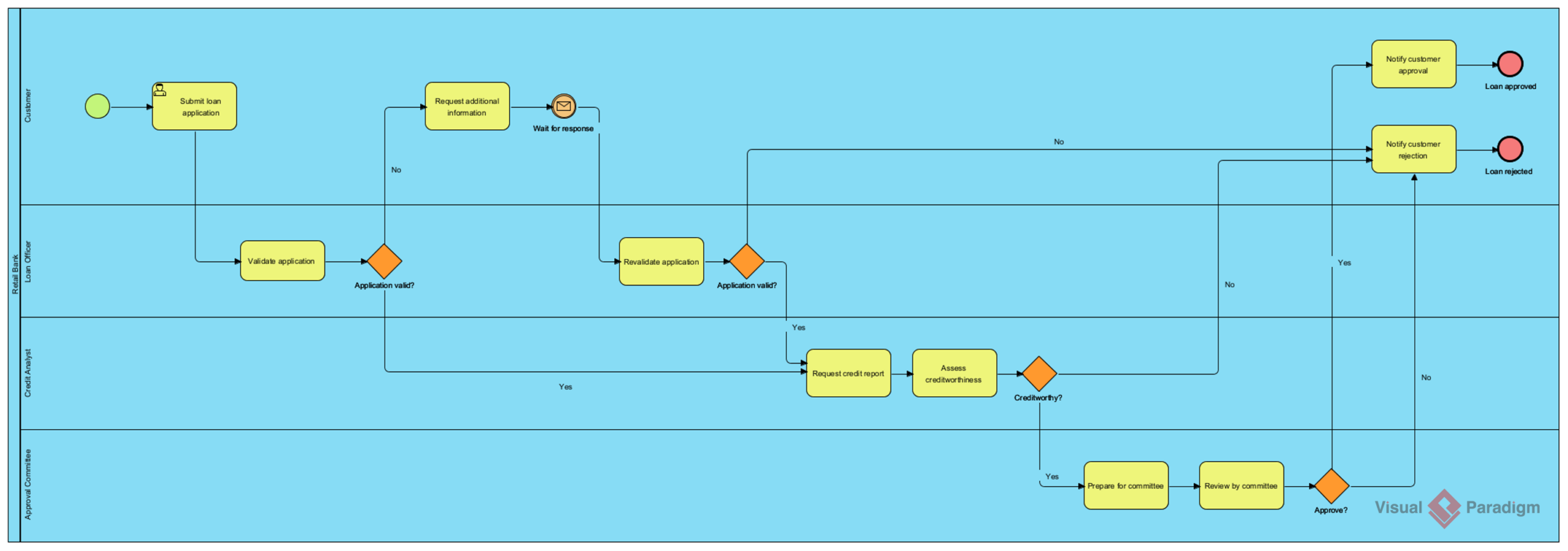
The most striking feature of this BPMN diagram is its structure. The process is divided into horizontal Swimlanes, which represent distinct organizational units or roles responsible for specific tasks. This visual separation is vital for clarity and accountability.
- Customer: The initiator of the process. This lane contains the primary actions taken by the applicant.
- Retail Bank (Loan Officer): The first line of defense. This role handles initial data validation and manages the interaction with the customer.
- Credit Analyst: A specialized role responsible for the financial risk assessment.
- Approval Committee: The final decision-making body, likely reserved for large or complex loan amounts.
The Process Flow: Step-by-Step Analysis
Let us walk through the logic of the diagram from left to right, starting with the Start Event (the green circle) and following the sequence of activities.
1. Initiation and Initial Validation
The process begins when the Customer performs the task Submit loan application. This triggers a sequence flow to the Loan Officer lane. The officer’s first responsibility is to Validate application.
Immediately following this task is a Exclusive Gateway (the orange diamond) labeled Application valid?. This is a critical decision point:
- If No: The process branches to Request additional information. This is a loop. The system waits for a response (indicated by the envelope icon), and the customer must re-engage. Once the information is received, the process moves to Revalidate application and checks the gateway again.
- If Yes: The process moves forward to the next stage.
2. Credit Assessment
Once the application passes initial validation, the baton is passed to the Credit Analyst. This phase involves two key tasks:
- Request credit report: Gathering historical financial data.
- Assess creditworthiness: Analyzing the data to determine risk.
Another Exclusive Gateway labeled Creditworthy? determines the next path. If the applicant is deemed not creditworthy, the process immediately diverts to Notify customer rejection, ending the interaction.
3. Final Approval
If the applicant is creditworthy, the process moves to the Approval Committee. This suggests a tiered approval system where high-value loans require human committee review rather than automated approval.
The committee performs two tasks: Prepare for committee and Review by committee. They face a final Exclusive Gateway labeled Approve?.
- Yes: The process moves to Notify customer approval and ends at the End Event (red circle) labeled Loan approved.
- No: The process routes to Notify customer rejection and ends at the End Event labeled Loan rejected.
Key BPMN Concepts & Tooling
To replicate or understand this diagram using Visual Paradigm Online, one must understand the specific symbols used:
1. Tasks vs. Events
Tasks (rounded rectangles) represent work that needs to be done (e.g., “Validate application”). Events (circles) represent something that happens. The green circle is a Start Event, while the red circles are Terminating End Events, signifying the conclusion of the process.
2. Gateways (Decision Points)
The orange diamonds are Gateways. They act as traffic lights. In this diagram, they are Exclusive Gateways (XOR), meaning only one path can be taken based on a condition (e.g., “Is it valid?” Yes OR No).
3. Message Flows
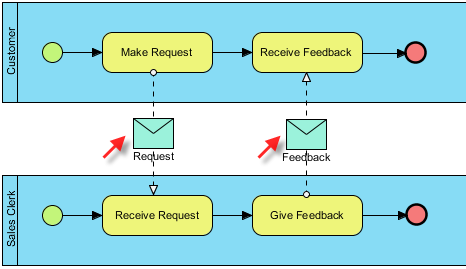
Notice the icon of the envelope in the “Customer” lane next to “Wait for response.” In BPMN, this often represents a Message Flow. It indicates that the process is waiting for an external input or a communication from the customer before the internal workflow can proceed. This highlights the asynchronous nature of human interaction within a digital process.
Conclusion
This Loan Application diagram is a perfect example of how BPMN brings clarity to complex financial workflows. By visualizing the “Happy Path” (successful approval) alongside the “Unhappy Path” (rejections and re-validations), stakeholders can identify bottlenecks, automate specific decision points, and ensure that customer service is optimized. Using tools like Visual Paradigm allows analysts to build these models quickly, ensuring that the “As-Is” process is understood before moving to the “To-Be” optimized state.