In the realm of Business Process Model and Notation (BPMN), the difference between a static flowchart and a dynamic, executable process model lies in the use of Intermediate Events. These elements act as the heartbeat of your process, introducing timing, external communication, and exception handling directly into the workflow.
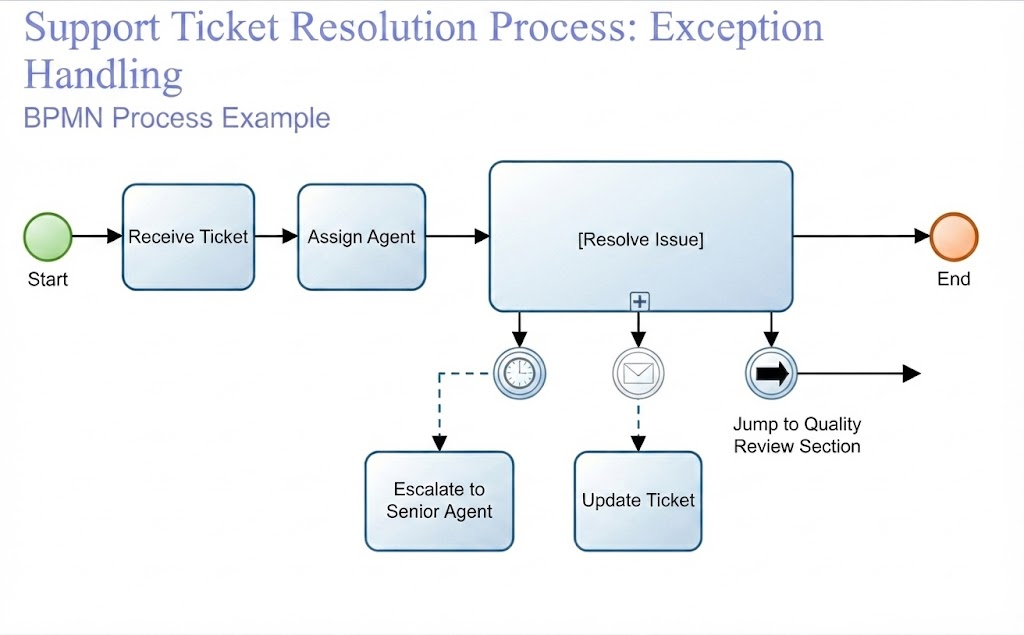
This tutorial breaks down a specific BPMN diagram: the Support Ticket Resolution Process. We will analyze how this model handles “Exceptions” using intermediate events, demonstrating how to manage SLA deadlines, external customer communication, and complex quality reviews.
Understanding the Process Flow
At a high level, the process follows a linear path, often called the “Happy Path.” It begins when a ticket is received, followed by an agent assignment, and finally, the resolution of the issue.
- Start Event: The process initiates upon the arrival of a new ticket.
- Receive Ticket: The initial intake activity.
- Assign Agent: The system routes the ticket to an available support agent.
- [Resolve Issue]: A critical task where the agent works to solve the customer’s problem.
- End Event: The process concludes once the issue is resolved.
The Power of Intermediate Events
The complexity in this diagram arises from the Intermediate Events attached to the boundary of the [Resolve Issue] activity. In BPMN, these are known as Boundary Events. They allow the process to pause and wait for a specific condition to occur while the agent is working. If that condition happens, the process diverts to a different path.
1. Timer Events: Enforcing SLA Deadlines
One of the most critical events shown is the Timer Event (represented by a clock icon). This is a classic example of an exception handler.
- Function: It monitors the duration of the task.
- Business Logic: If the agent takes too long to resolve the issue, the timer triggers.
- Action: The process diverts to “Escalate to Senior Agent.”
Technical Insight: As noted in best practices, it is crucial to define these timers correctly. You must specify whether the timer is relative (e.g., “after 2 hours”) or absolute (e.g., “on Friday at 5 PM”). In this context, a relative duration is typically used to enforce Service Level Agreements (SLAs).
2. Message Events: External Communication
The second boundary event is a Message Event (represented by an envelope icon). Unlike a timer, which relies on time, a message event relies on external input.
- Function: It waits for a specific message to arrive from an external participant (such as the customer).
- Business Logic: The customer might reply to an email or update the ticket portal while the agent is working.
- Action: The process diverts to “Update Ticket.”
Best Practice: Do not confuse Message events with Signal events. Messages are strictly for communication between external participants and the process. Signals are for internal communication between different processes within the same system.
3. Link Events: Managing Complexity
The third boundary event uses a Link Event (represented by a thick arrow). This is a unique type of intermediate event used to jump to a different part of the diagram or another diagram entirely.
- Function: It acts as a shortcut or a jump cut.
- Business Logic: If a specific trigger (defined in accompanying documentation) occurs, the process needs to move to a complex, distant section.
- Action: The process jumps to the “Quality Review Section.”
Why use this? Link events improve readability in large diagrams. Instead of drawing a massive arrow all the way to the end of the page, you place a link event and a corresponding target link event to indicate the jump.
Best Practices for Modeling Boundary Events
When designing models like the one above, keep these technical rules in mind to ensure your diagrams are maintainable and executable:
- Limit Boundary Events: While powerful, too many boundary events can clutter a diagram. Use them only for genuine exceptions or interrupts.
- Document Complex Logic: Events like the Link Event or Rule Events often require specific conditions that aren’t fully visible in the diagram. Always document these triggers in a companion document.
- Test Compensation Logic: If your process involves compensation (undoing actions), ensure that handlers are defined for activities that have completed successfully.
- Avoid Error Events in Normal Flow: Error events are reserved for exceptions (attached to boundaries) and should not be placed on standard sequence flows.
Conclusion
The Support Ticket Resolution Process demonstrates how Intermediate Events transform a simple workflow into a robust system. By integrating Timer, Message, and Link events, the model accounts for the real-world unpredictability of business operations—deadlines, customer feedback, and quality reviews.
Mastering these events allows you to create BPMN models that are not just accurate on paper, but executable in practice, ensuring your processes respond intelligently to the dynamic nature of enterprise systems.