In the world of Business Process Model and Notation (BPMN), clarity is king. When modeling intricate workflows—such as a sprawling procurement cycle—process diagrams can quickly become cluttered with spaghetti-like sequence flows that cross page boundaries or obscure the logical flow. To solve this visual complexity, BPMN introduces a powerful feature: the Link Intermediate Event. This tutorial explores how to effectively use Link events to improve diagram readability while maintaining strict process logic.
The Challenge of Complex Process Segmentation
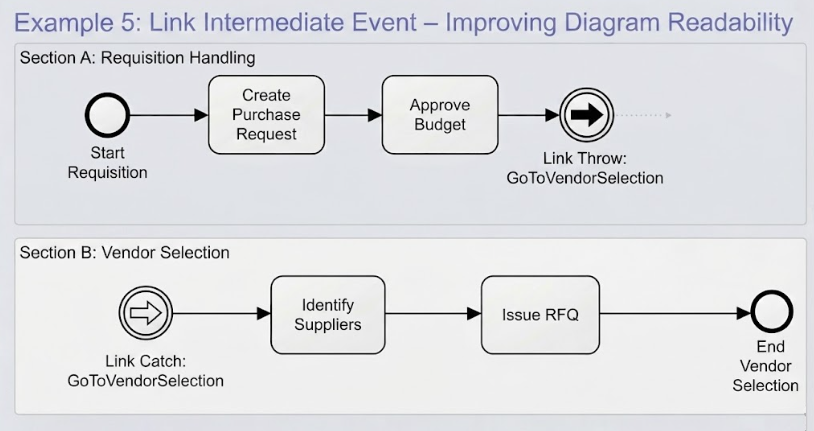
Consider a scenario where a procurement process is so extensive that it spans multiple sections of a document or distinct areas of a canvas. You might have a “Requisition Handling” phase that concludes, followed by a distinct “Vendor Selection” phase that begins elsewhere. If you were to draw a standard Sequence Flow (a solid arrow) connecting the end of the first section to the start of the second, you might end up with long lines crossing over other activities, making the diagram difficult to read.
The solution lies in decoupling the visual representation of the flow from the logical connection. This is achieved using Link Events.
Understanding the Architecture: Throw vs. Catch
At the core of this technique is a pair of specific modeling elements: the Link Throw Event and the Link Catch Event. These are both types of Intermediate Events, distinguished by their shape (a circle with a specific icon) and their function in the process flow.
1. The Link Throw Event
The Throw Event acts as the “jump” point. It is placed at the end of a logical sequence where the process intends to move to a different location, section, or page. Visually, it is represented by a circle containing a solid arrow pointing to the right.
2. The Link Catch Event
The Catch Event acts as the “landing” point. It is placed at the beginning of the target section, ready to receive the process flow. Visually, it is represented by a circle containing an arrow pointing inward (or a hollow arrow, depending on the specific BPMN version, but often depicted as a return arrow in diagrammatic examples).
Step-by-Step Implementation in Visual Paradigm
Following the scenario of a procurement process, here is how you architect this connection using Visual Paradigm to ensure the diagram remains clean and professional.
- Identify the Jump Point: Navigate to your diagram and locate the final activity in your first section (e.g., “Approve Budget”).
- Add the Link Throw Event: Insert an Intermediate Throw Event immediately after the final activity. In the properties panel, set the event type to Link.
- Name the Event (Crucial Step): To establish the connection, you must give this event a unique, meaningful name. For example, name it
GoToVendorSelection. This name acts as the “key” for the connection. - Add the Link Catch Event: Navigate to your second section (e.g., “Section B: Vendor Selection”). Insert an Intermediate Catch Event at the very start of the section. Set the event type to Link.
- Match the Name: Open the properties for this Catch Event and enter the exact same name used for the Throw Event (
GoToVendorSelection).
The Result: Logical Connection Without Visual Clutter
Once these two events are configured with matching names, Visual Paradigm (and BPMN tools in general) treats them as a single logical unit. The system understands that when the “Requisition Handling” section finishes with the Throw Event, the process logically “jumps” to the location of the Catch Event.
The Visual Payoff:
- You do not need to draw a visible Sequence Flow line between the two events.
- This eliminates the need for dashed lines or long arrows that might cross over unrelated boxes.
- The diagram remains clean, allowing stakeholders to focus on the specific activities within each section without getting lost in long-distance connectors.
By mastering the use of Link Intermediate Events, you transform a complex, messy diagram into a structured, readable document that effectively communicates the architecture of your business processes.