In the world of Business Process Model and Notation (BPMN), standard process flows are straightforward: a task happens, and the next one follows. However, real-world business scenarios often require “undo” buttons. What happens if a guest cancels a hotel reservation after it has already been confirmed? Simply stopping the process isn’t enough; the system must also roll back the previous state by issuing a refund.
This tutorial dives into a critical BPMN concept: Compensation Intermediate Events. We will explore how to model a scenario where a confirmed reservation triggers a potential future action (a refund) if a cancellation event occurs.
Understanding the Architecture of Compensation
Compensation in BPMN is not about stopping a process; it is about reversing the effects of a completed activity. When a process path deviates from its normal flow, the engine needs to know which tasks it needs to “undo.”
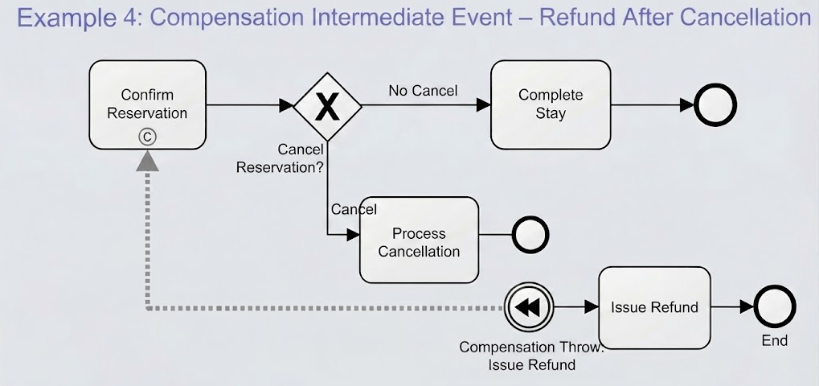
The diagram provided illustrates a classic compensation pattern involving two distinct flows:
- The Normal Flow: A reservation is confirmed, and if the guest stays, the process ends happily.
- The Cancellation Flow: If the guest cancels, a separate compensation flow is triggered to handle the refund.
Step-by-Step Modeling Guide
Based on the visual representation, here is how we construct this logic using standard modeling tools like Visual Paradigm.
1. Marking the Activity as Compensable
The foundation of this diagram is the Confirm Reservation task. For the system to issue a refund later, it must remember that this task happened and that it needs to be reversed.
In BPMN terms, you must mark this task as Compensable. This creates a “receipt” or a link to the compensation logic. In Visual Paradigm, this is achieved by selecting the task properties and checking the Compensate flag. Visually, this is often represented by a small (C) icon attached to the task, indicating that a compensation handler exists for this specific activity.
2. The Normal Flow (The Happy Path)
The process begins with the Confirm Reservation task. Following the standard sequence flow (solid arrow), the process moves to an Exclusive Gateway (the diamond shape with an X). This gateway asks the question: “Cancel Reservation?”
- If the answer is No Cancel, the process continues to the Complete Stay task and concludes at the End Event. No compensation is needed here.
3. The Cancellation Flow
If the decision at the gateway is Cancel, the process enters a sub-process or a specific path labeled Process Cancellation. This is where the business logic for rejecting the booking takes place. Once the cancellation is processed, the standard flow ends. However, because the reservation was previously confirmed, the system must now trigger the refund.
4. Implementing the Compensation Throw Event
This is the most technical part of the diagram. To trigger the refund, we use a Compensation Intermediate Throw Event.
- The Symbol: Look for the circle with a double arrow pointing left (or inward). This is the universal BPMN symbol for compensation.
- The Connection: This event is placed within the cancellation path. It does not flow from the previous task in a standard way; rather, it acts as a trigger.
- Automatic Association: When you add this event to the process, the modeling tool (like Visual Paradigm) automatically associates it with the specific task that was marked as “Compensable” (the Confirm Reservation task).
5. The Compensation Sequence Flow
Notice the dotted line connecting the Compensation Throw Event to the Issue Refund task. This is the Compensation Sequence Flow.
Unlike a standard sequence flow that happens immediately, this flow represents a logical link. When the Compensation Throw Event fires (triggered by the cancellation), the BPMN engine looks for the compensation handler for the “Confirm Reservation” task. It finds the link to the Issue Refund task and executes it.
Key Takeaways
By mastering this pattern, you can design robust systems that handle exceptions gracefully. The key elements to remember are:
- Mark Tasks as Compensable: You cannot compensate for a task unless it is explicitly marked as such.
- Use the Throw Event: The Compensation Intermediate Throw Event is the trigger that initiates the rollback.
- Follow the Dotted Line: The Compensation Sequence Flow connects the trigger to the action, ensuring the refund is issued specifically for the reservation that was confirmed.
This architecture ensures data integrity and customer satisfaction by automating the “undo” button in complex business scenarios.