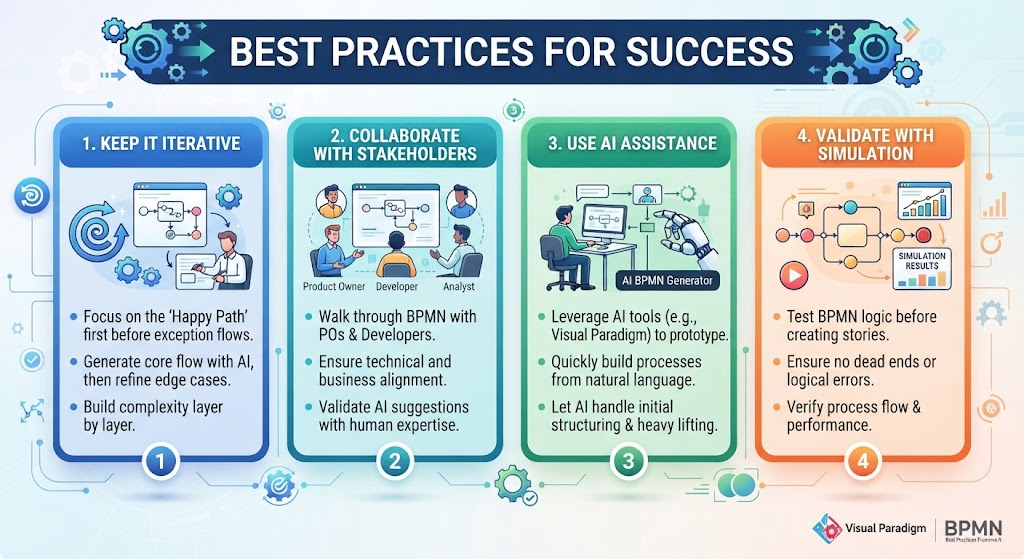
In the rapidly evolving landscape of business process management, the gap between high-level business goals and technical execution is often bridged by BPMN (Business Process Model and Notation) diagrams. These diagrams are the blueprints of an organization’s workflow, translating complex operations into visual maps that both humans and machines can understand. However, creating these diagrams effectively requires more than just drawing boxes and arrows; it demands a strategic approach to ensure accuracy, efficiency, and alignment.
This tutorial explores the four pillars of success in BPMN modeling: Iteration, Collaboration, AI Assistance, and Validation. By following these best practices, you can ensure that your process models are robust, logically sound, and ready for implementation.
1. Keep It Iterative: The Happy Path First
One of the most common pitfalls in process modeling is attempting to capture every single exception, error, and edge case simultaneously. This “boiling the ocean” approach often leads to convoluted diagrams that are difficult to read and maintain. The golden rule of modeling is to keep it iterative.
Start with the “Happy Path”
The “Happy Path” represents the ideal scenario where everything goes according to plan. When drafting your BPMN diagram, focus exclusively on this linear flow first. Ask yourself: What is the most common, successful outcome of this process?
- Focus on the Ideal Flow: Map out the sequence of events from Start to End assuming no errors occur. This provides a clear skeleton for your process.
- Generate Core Flow with AI: Leverage AI tools to generate this core flow rapidly. AI is excellent at structuring standard, logical sequences based on natural language descriptions.
- Refine Edge Cases Later: Once the Happy Path is established, layer in the complexity. Go back and add the exception flows, error events, and alternative paths.
Build Complexity Layer by Layer
By isolating the Happy Path, you ensure that the primary logic of your process is sound before you clutter the model with “what-if” scenarios. This method builds complexity in a controlled, manageable manner.
2. Collaborate with Stakeholders: Bridging Business and Tech
A BPMN diagram is not a solitary artifact; it is a communication tool. To ensure your model accurately reflects reality, you must engage in active collaboration with key stakeholders.
The Trinity of Process Modeling
Successful modeling typically involves a trio of roles, each bringing a unique perspective:
- Product Owners: They define the business value and the goals of the process.
- Developers: They understand the technical constraints and implementation details.
- Analysts: They bridge the gap, translating business needs into technical specifications.
Walk Through the Diagram
Do not wait until the diagram is “finished” to show it to the team. Instead, walk through the BPMN diagram with Product Owners and developers while drafting the stories. This ensures:
- Technical Alignment: The developers confirm that the proposed workflow is feasible within the existing architecture.
- Business Alignment: The Product Owners verify that the process captures the necessary business rules and value propositions.
Human Expertise over AI Suggestions
While AI can suggest process structures, it cannot understand the nuanced context of your specific organization. AI-generated suggestions should always be validated by human expertise. Treat AI as a drafting assistant, not the final architect.
3. Use AI Assistance: Prototyping from Natural Language
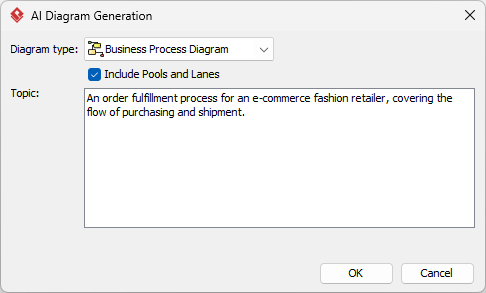
The barrier to entry for creating detailed BPMN diagrams has been lowered significantly by the advent of Generative AI. Tools like Visual Paradigm’s AI BPMN Generator allow you to prototype processes directly from natural language descriptions.
The Workflow of AI-Assisted Modeling
- Describe: Input a natural language description of your process (e.g., “When a customer places an order, verify inventory, charge the card, and ship the item”).
- Generate: Let the AI handle the heavy lifting of initial structuring, converting text into a visual flowchart.
- Refine: Use the generated model as a starting point. You can then manually refine the shapes, connectors, and labels to meet precise modeling standards.
This approach allows you to quickly visualize concepts without getting bogged down in the mechanics of drawing shapes, enabling a faster shift from idea to model.
4. Validate with Simulation: Testing Logic Before Implementation
A static diagram can hide logical flaws that only become apparent during execution. To mitigate this risk, you must validate your model with simulation before converting it into development stories or code.
Why Simulate?
Simulation allows you to run your BPMN diagram as if it were a real process. It is a stress test for your logic. Using simulation features in tools like Visual Paradigm, you can:
- Test the Logic: Run the process multiple times to see if it behaves consistently.
- Ensure No Dead Ends: Verify that every path in the diagram leads to an End Event. A dead end (a path that stops without an end) is a critical logic error.
- Verify Performance: Check if the process flow is efficient or if bottlenecks exist.
By catching these logical errors early in the modeling phase, you save significant time and resources that would otherwise be spent fixing bugs in the development phase.
Conclusion
Mastering BPMN modeling is a journey that combines technical precision with strategic thinking. By keeping your approach iterative, collaborating closely with stakeholders, leveraging AI for prototyping, and validating logic through simulation, you create process models that are not just diagrams, but actionable roadmaps for success.